Probability and Death

Inspired by a conversation with Jamie Angus following my last posting, I did some digging into the probability density functions (PDF’s) of a bunch of test tracks that I use for tuning and testing loudspeakers.

The plots below are the results of this analysis.

Some explanations, to start…

A PDF of an audio signal is a measurement of the probability that a given level (or sample value) will happen in a given period of time. In the case of the plots below, I just counted each time every sample value the 16-bit range of possibilities (from -32768 to 32767, if you think in binary – from -1 to +1-2^-15 in steps of 2^-15 if you prefer to think in floating point decimal) occurred in an entire track (usually the full tune).  That’s plotted below as the gray “curve” in a linear world.

I converted the linear levels to “instantaneous” (sample-by-sample) dB values (since they’re instantaneous, they’re not in dB FS – but let’s not get into that discussion), but kept the positive and negative polarities of the linear values separate. Those are plotted as the red (negative values, expressed in dB) and black (positive values, expressed in dB). I cheated a little here, since a linear value of “0” isn’t really -96 dB – it’s -infinity dB… but, except for that one value, everything else is plotted correctly.

When I did these analyses, I noticed lots of sample values in lots of tracks that had no probability of ever occurring. Sometimes, this is just because the track is mastered low in level – so the “upper” sample values are not used. Sometimes, there are “dead values” well inside the range. This likely points to an error in the converter and/or digital mixing and/or mastering equipment.

Finally, I made a plot of the number of “dead” sample values per 128 sample values in 512 blocks (65536/128 = 512). That’s the red line above the gray one.


Some other things are noticeable in the plots, but we’ll take those as they come, below…

Note that I will not reveal the names of the tracks I used, since it’s not my purpose here to make anyone look bad. It’s to look at the differences between different recordings, types, and even equipment… Don’t ask which recordings I used.


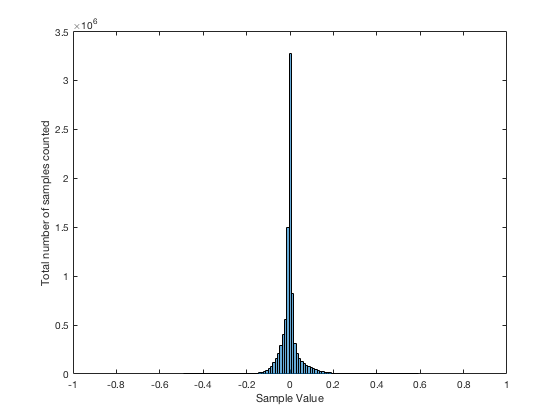
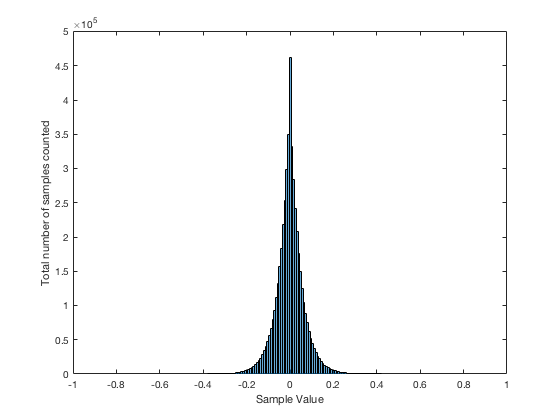
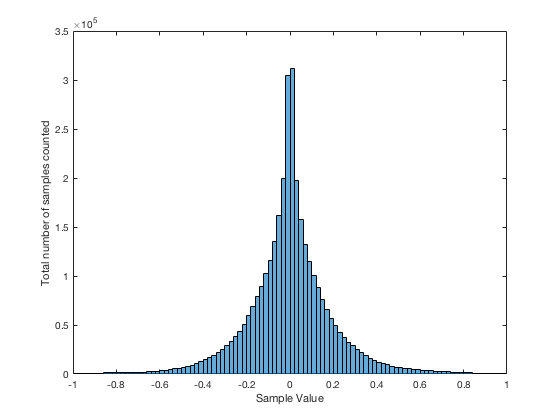
This plot of an orchestral recording (“orchestral8”) looks fairly normal. As Jamie pointed out in the last posting, the distribution looks to be Laplacian. There is a big spike at the “0” mark – due to the silence at the beginning and end of the track. As can be seen, the track peaks around a linear value of about +/- 0.2 or about -14 dB below full scale. So, the sample values above 0.2 (or below -0.2) are unused. This can be seen in the blue lines (comprised of a blue dot at each sample value) in the top plot, and the red line at 128 (the number of “dead values” per 128 possible values) in the bottom plot.


The “solo inst3” is very similar in behaviour, even though it’s a completely different recording. This one is of a solo stringed instrument in a fairly reverberant space. Notice that its basic characteristics are very similar to those shown in “orchestra8”.


The “voice3” recording is also similar. It’s a little interesting in all three of these recordings to note the transition between levels where there are no dead sample values (around the “0” line) and levels where there are nothing but dead values. In this area (in the “voice3” recording, for example, around +/- 0.3, there are sample values that are used – but others that are skipped. This is because the track has a reasonably large crest factor (the ratio between the peak and the RMS of the track) – in other words, it has noticeable peaks. When the levels peak positively or negatively, there will be some values skipped along the way…

Although these are very different recordings of different instruments in different spaces on different labels – they all appear to have some characteristics in common.

  • They very likely had little or no compression applied
  • They don’t use the entire dynamic range available. This is not necessarily a bad thing, since it could be that each of those tracks was part of a larger collection, and its level made sense in the context of the entire album.

Now let’s look at another acoustic recording that was done with four microphones, and no compression – but possibly some small processing done in the mastering.

Obviously the “orchestra6” recording has something strange going on. It almost looks as though something in the recording chain “favoured” every second sample value – hence the zig-zag pattern in the probability density function. Note that this was not a small thing – the difference in how much the sample values are “preferred” is by a factor of 10.

What could cause this? This is difficult to say by just looking at this plot, since we have to remember that these values are complied using the entire track. So, for example, three possibilities that come immediately to mind are:

  • for some strange reason, the analogue-to-digital converter, or one of the DSP blocks in the mastering console “liked” every second sample value 10 times more than the others
  • for some other strange reason, the original ADC only used every second sample value – and one 10th of the track was edited together (or “spliced”) from a different take that needed extra gain.
  • something else

To be honest, I think that the first or third of these is more likely than the second – but either way, it certainly looks weird…

This track of another solo instrument (hence “solo inst1”) is a little different – but not terribly so. There is a little flatter behaviour in the upper plot, which corresponds to a more convex “umbrella” shape in the lower one – but generally, this is nothing serious to raise any eyebrows in my opinion… It probably indicates some minor compression.

Let’s look at some other tracks with compression…


“testtracks4” and “pop21” both have indications of compression in the flat response of the top plots and the convex  shape of the lower ones. The “pop21” track has the added indication of clipping – the spikes on the sides of the plots. This indicates that we have an unusual number of samples with values of either -1 or +1. Note, however, that we do not move smoothly into that clipping – it was what we call “hard clipping”, since the values just before the +/- 1 values show no indication of a smooth transition to the spike.

The “bass20” track is interesting, not only because of the compression, but the apparent lack of silence (notice there is no spike around the “0” line). This is because this track is from a live album that is intended for gapless playback – and I just grabbed the track. So, it starts and stops with a hard transition to and from audience sound – there is no fade in or fade out.


The “bass2” track also has the spikes on the ends, showing the clipping – but, as you can see, the plots (particularly the linear plot on the bottom) starts to slope upwards just before the spike – indicating some kind of soft clipping or a peak limiting function was used to shape the envelope.

The “bass15” track is interesting, since it has the characteristic spikes on the sides that look a little like clipping (especially if you only look at the upper plot) but, as can be seen in the bottom plot, these are not at values of -1 or +1. So, this would indicate either that something else in the recording chain clipped – and then was smoothed out and reduced in level a little later in the process – or we’re looking at some kind of interesting soft-clipping processor that keeps a little “bump” in the envelope of the signal above the “clipping” area.


Now let’s look at some really strange ones…

I have no explanation for the plot in “testtracks6”. I can’t understand what would cause that bump only in the negative portion of the signal around -70 dB FS. My guess is that this is some sort of weird watermark that is inserted – but this is really stretching my imagination…  Of course, if could just be that something in the processing chain is just broken… Anyone reading this have any good ideas? Seems to me that I should do a little more digging into this track to see what’s going on around those sample values…

The “pop11” track is an example of a recording that was probably done on early digital recording gear – or an early digital mastering console. As can be seen in both plots, there are missing sample values across the entire range of possible values.

One possible explanation of this is that this is a digital recording that had gain applied to it using a processor that did not use dither. This would cause the signal to not use every second sample value (or every third or fourth – depending on the gain applied). It’s also possible that it was processed or recorded using a device that had a “stuck bit”. I’ll do some simulations to show what that would look like and publish the plots in a future posting.

Note that the small “spikes” of peak limiting (looking a little like clipping on a small scale) are visible in the bottom plot – but they’re very small…

Some more recordings with strangely dead sample values are shown below. Note that some of these are very recent recordings – so the “early digital gear” excuse doesn’t hold up for all of them…

So, something is obviously broken in all four of these examples… Please don’t ask me how to explain them. The only thing I can do is to suspect that at least one piece of gear and/or software that was used in the late stages of the process was really broken… I just hope that, whatever gear/software it was, it didn’t cost a lot of money….

An interesting pair of examples are shown below…

The “jazz1” and “jazz2” recordings both come from the same album released by a small jazz ensemble. Notice that, although they are different tracks, they have similar PDF’s, seen in the “spikes” through the upper plots. It seems that there is something weird going on in the mastering console (or software) in this case – or perhaps the final mixing console…


The “speech4” track has obvious “favouring” of alternate sample values – but this was a track that was recorded on a very early DAT machine about 35 years ago… To be honest, knowing what I know about using an identical model DAT recorded, I’m surprised this looks as good as it does…


I’ll just put in a bunch more plots without comment – just to let you see some of the variety that shows up with this kind of analysis.


Post-script

This posting has a Part 2 that you’ll find here, and a Part 3 that you’ll find here.
Noise, Averages, and Incorrect Assumptions, Part 1

Let’s talk about the subject of noise. To begin with, we have to agree on a definition, which might become the biggest part of the problem. For normal people, going about their daily lives, “noise” is a word that usually means “unwanted sound”, as the Grinch explained, just before hitching up his dog to a sleigh:


However, “noise” means something else to an audio professional, who is consequently not “normal” and does not have a life – daily or otherwise.

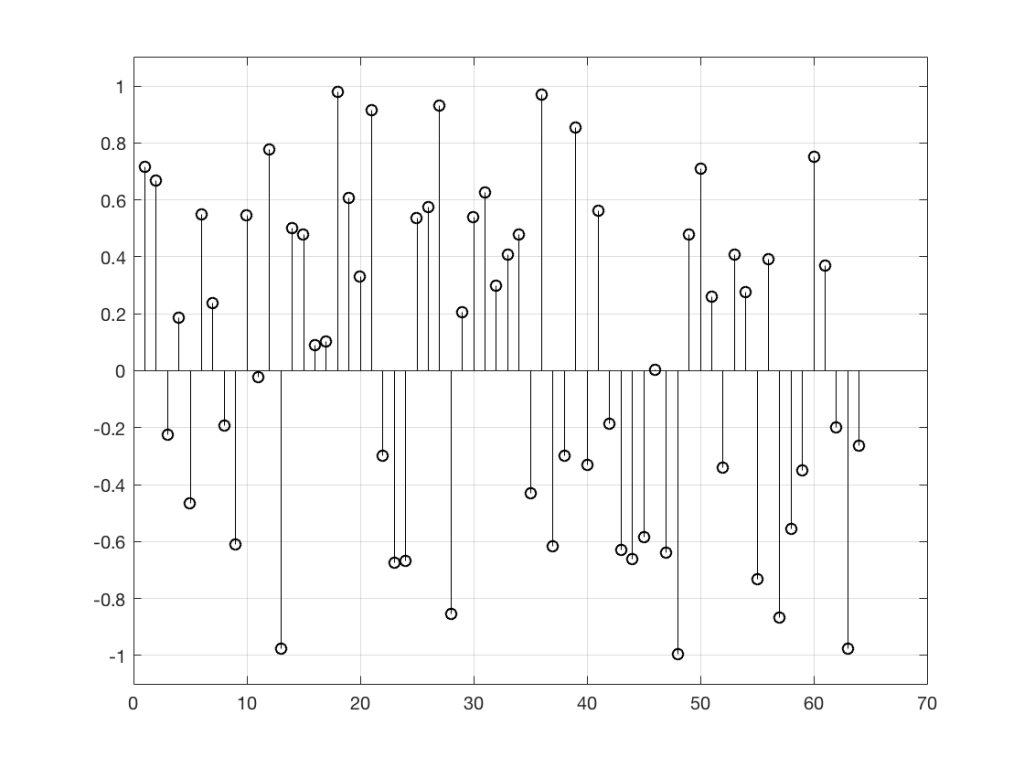
When an audio professional says “noise”, they mean something very specific – “noise” is an audio signal that is random. For example, if the noise signal is digital, there would be no way to predict the value of the next sample – even if you know everything about all previous samples.

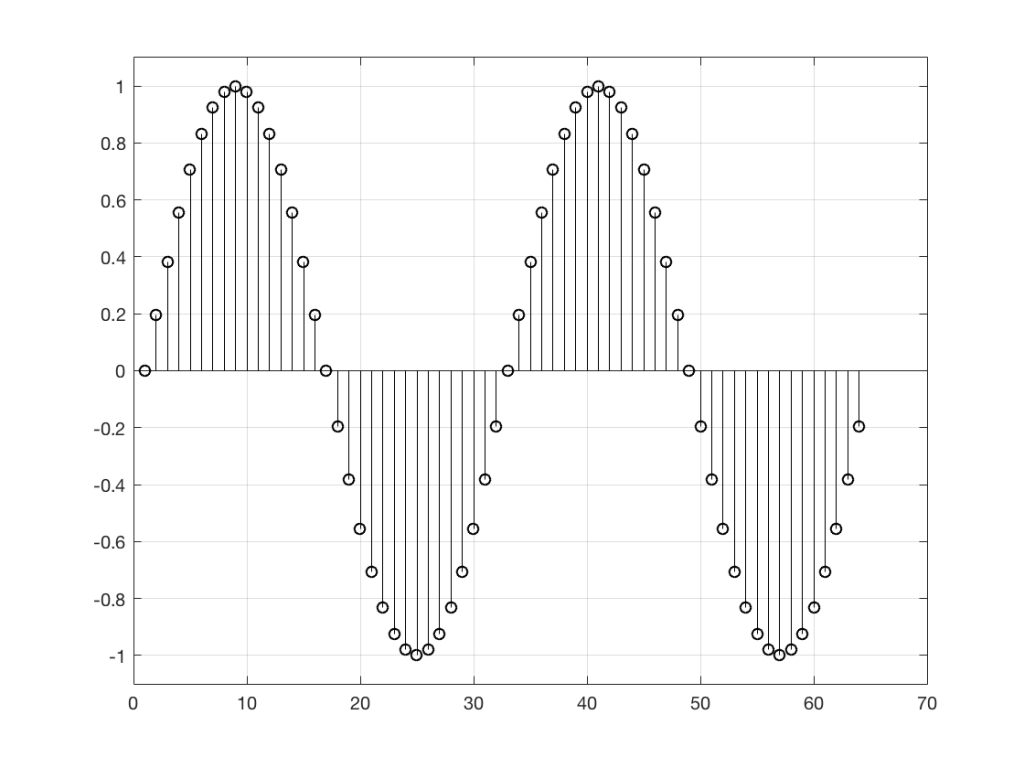
Figure 1:
Figure 1: It would be fairly easy to guess the value of the next sample in the signal (#65), based on looking at what has happened before. This is because the signal is, as far as we can see here, periodic – meaning that it repeats itself – meaning that it repeats itself…


Figure 2:
Figure 2: It’s impossible to predict the next value in the sequence, because there is no pattern in the previous samples. Each value is a random number between -1 and 1, and the next random number is, in no way, related to the ones before it.


So, “noise”, according to the professionals, is a signal made of a random sequence. However, we can be a little more specific than this. For example, in order to make the noise plotted in Figure 2, above, I asked Matlab to generate 64 random numbers between -1 and 1 using the code

rand(1,64)*2-1

So, although this will generate random numbers for me (we’ll assume for the purposes of this discussion that Matlab is able to generate truly random numbers… actually they’re “pseudorandom” – but let’s pretend for today…), there are some restrictions on those values. No matter how many random values I ask for using this code, I will never get a value greater than 1 or less than -1.

However, if I used a slightly different Matlab function – “randn” instead of “rand”, using the following code

randn(1,64)

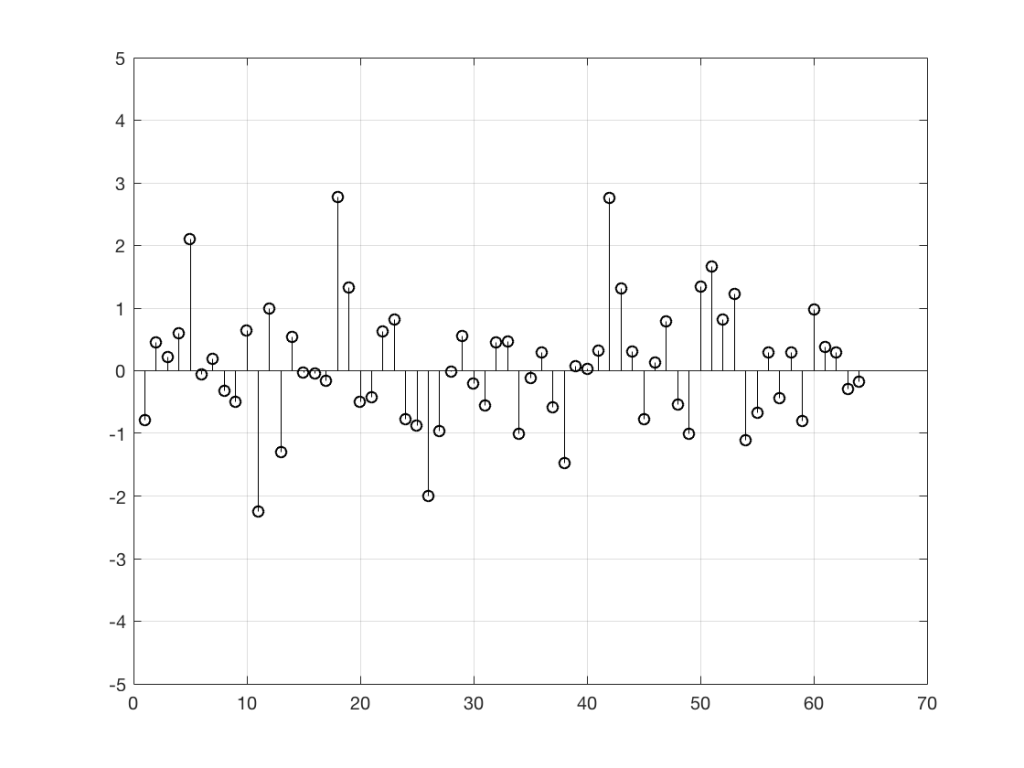
I would get 64 random numbers, but they are not restricted as my previous bunch were, as you can seen in Figure 2a, below.

Figure 2a:
Figure 2a: Another sequence of random numbers, this time with a different distribution.

Again, it’s impossible to guess what the next value will be, but now you can see that it might be greater than 1 or less than -1 – but it will more likely to be closer to 0 than to be a “big” number.

So, Figures 2 and 2a show two different types of noise. Both are random numbers, but the distribution of the numbers in those two sequences are different.

To be more specific:

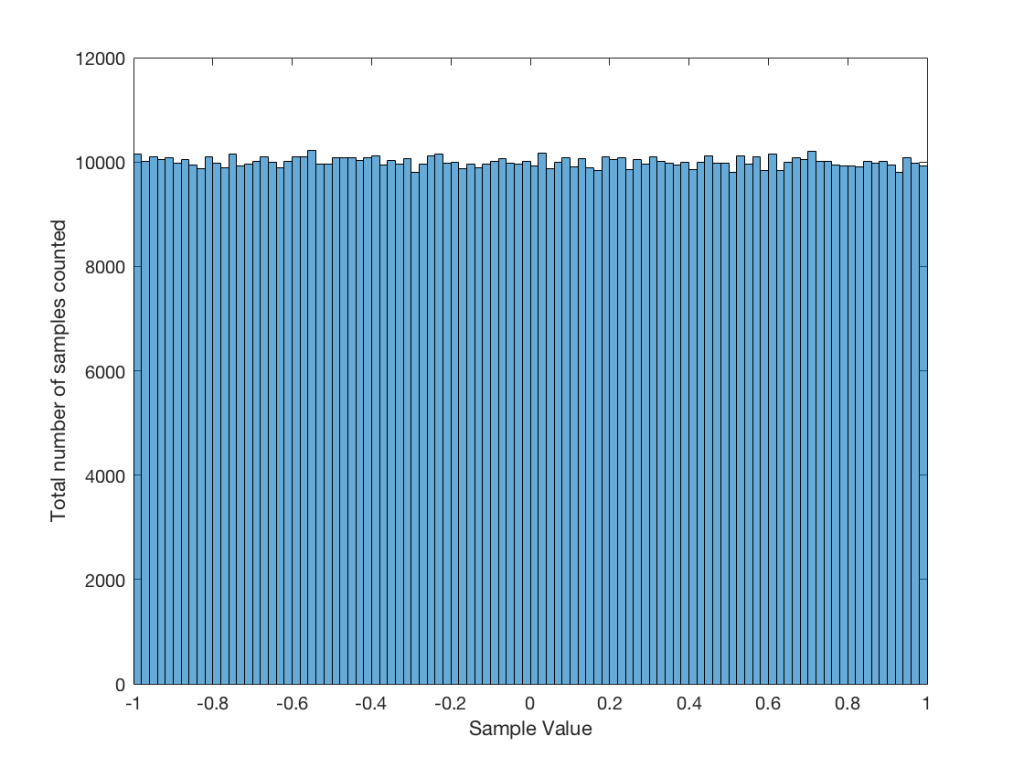
Let’s use the “rand(1,1000000)*2-1” function to make a sequence of 1,000,000 samples. We know that this will produce values ranging from -1 to 1. So, we’ll divide this range into 100 steps (-1.00 to -0.98, -0.98 to -0.96, -0.96 to -0.94, … and so on up to 0.98 to 1.00 – I know, I know, there’s some overlap here, but I didn’t want to use a bunch of less than or equal to symbols… The concept is the important point here… Back off!). For each of those divisions, we’ll count how many of the 1,000,000 samples fall inside that smaller range, and we’ll plot it. This is shown in Figure 3a.

Figure 3a:
Figure 3a: A plot showing the distribution of the values of 1,000,000 samples generated by the Matlab code “rand(1, 1000000) * 2 – 1”

As you can see in Figure 3a, there are about 10,000 samples in each “bin”. This means that about 10,000 samples have a value that fall within each of the smaller slices of the total range. Also, if I added up the values of all 100 of those numbers plotted in 3a, I would get 1,000,000, since that’s the total number of values that we analysed.

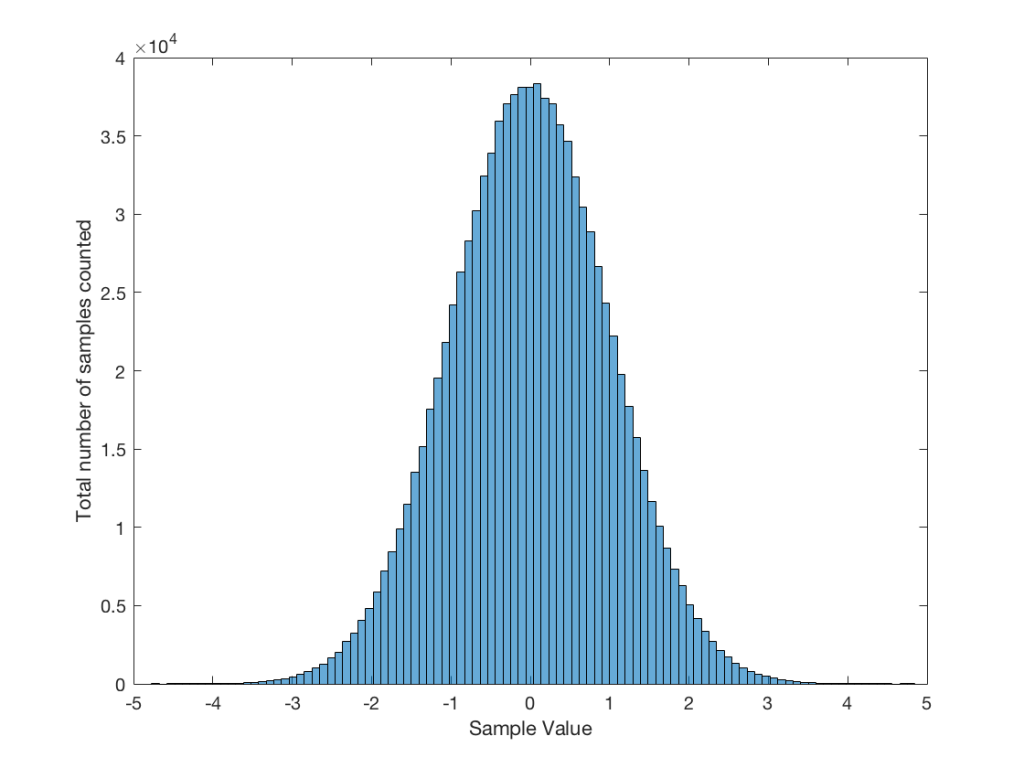
If I do the same thing to the numbers coming out of the other function: “randn(1,1000000)” it would look very different. As we already saw, the numbers can be outside the range of -1 to 1, and they’re more likely to be around 0 than to be far away from it. This can be seen in Figure 3b.

Figure 3b:
Figure 3b: A plot showing the distribution of the values of 1,000,000 samples generated by the Matlab code “randn(1,1000000)”.


Just to clean up a loose end – there are official terms to describe these differences. The noise plotted in Figure 2 has what is called a “rectangular distribution” because a plot of the distribution of the values in it (if we measure enough sample values) eventually looks like a rectangle (a blue rectangle, in the case of Figure 3a). The noise plotted in Figure 2a has a “normal distribution”, as can be seen in the bell-like shape of the plot in Figure 3b. There are many other types of distributions (for example, rolling 2 dice will give you random numbers with a “triangular distribution”), but we’ll leave it at 2 for now.

So, we’ve seen that we can have at least two different “types” of random number sets – but let’s do a little more digging.

Frequency content

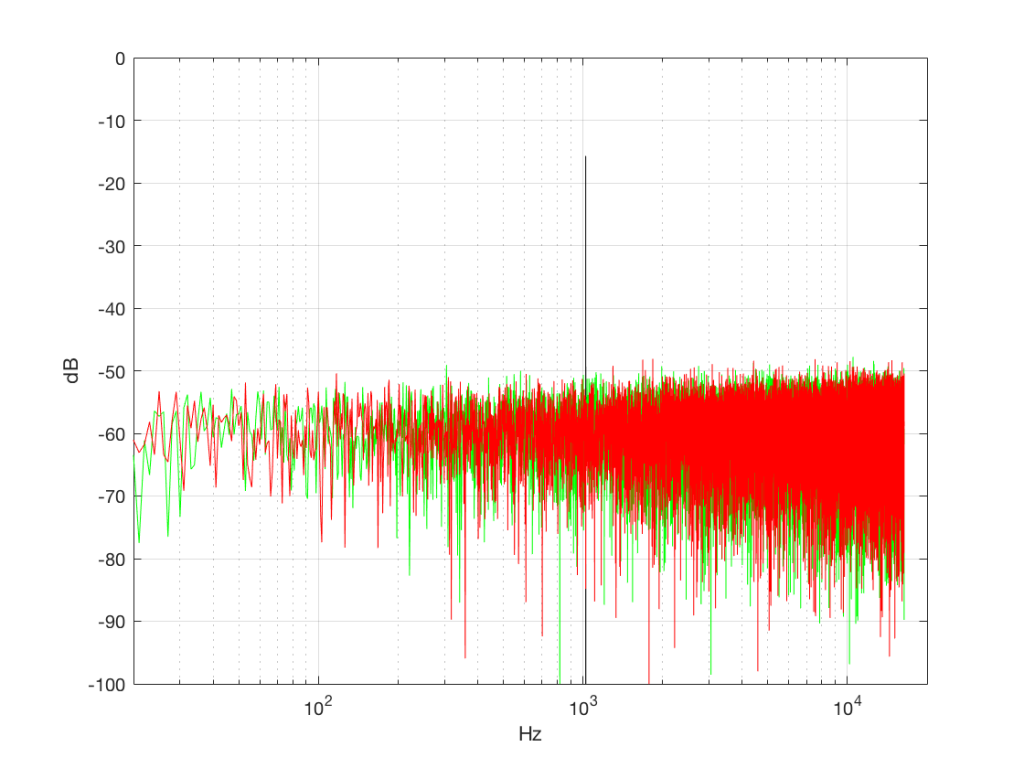
Here’s where things get a little interesting. If I take the 1,000,000 samples that I used to make the plot in Figure 3a and I pretend it’s an audio signal, and then calculate the frequency content (or spectrum) of the signal, it would look like the green plot in Figure 4a, below. If I did a frequency analysis of the signal used to make the plot in Figure 3b, it would look like the red plot.

Figure 4
Figure 4a: The frequency content of three different signals, as is described in the surrounding text.


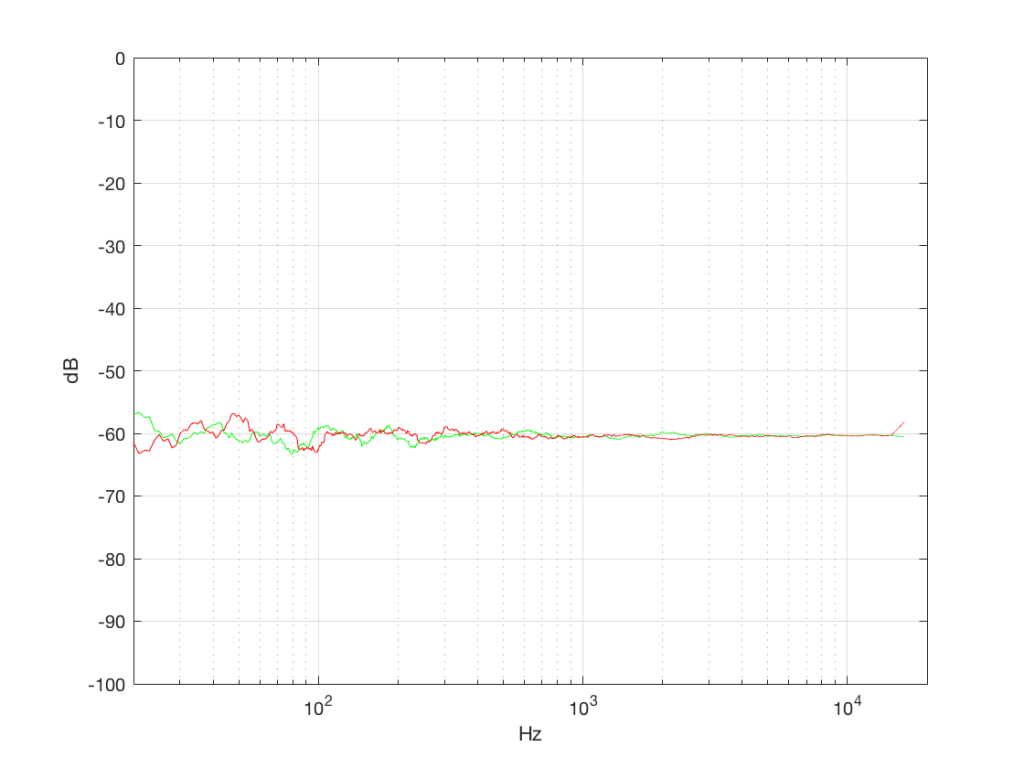
What’s interesting about this is that, basically speaking, the two signals, although they’re very different, have basically the same spectra – meaning they have the same frequency content, and therefore they’ll sound the same. This is really evident if I smooth these two plots using, for example, a 1/3 octave smoothing function, as is shown below in Figure 4b.

Figure 4a:
Figure 4b: The same data as is shown in Figure 4a, with a 1/3 octave smoothing applied.


As you can see there, the very fine peaks and dips in the response shown in Figure 4a, when averaged, smooth to the flat response shown in Figure 4b.


Now we have to clear up a couple of issues…

The first is that, as you can see in the plot above, the spectrum of both random signals (both noise generators) is flat. However, due to the way that I did the math to calculate this, this means that we have an equal amount of energy in equal-sized frequency ranges throughout the entire frequency range of the signal. So, for example, we have as much energy from 20-30 Hz as we do from 1000-1010 Hz as we do from 10,000 – 10,010 Hz. In other words, we have equal energy per Hz. This might be a little counter-intuitive, since we’re looking at a semilogarithmic plot (notice the scale of the x-axis) but trust me, it’s true. This means that, in both cases, we have what is known as a “white noise” signal – which is a colourful way of saying “noise with an equal amount of energy per Hz”.

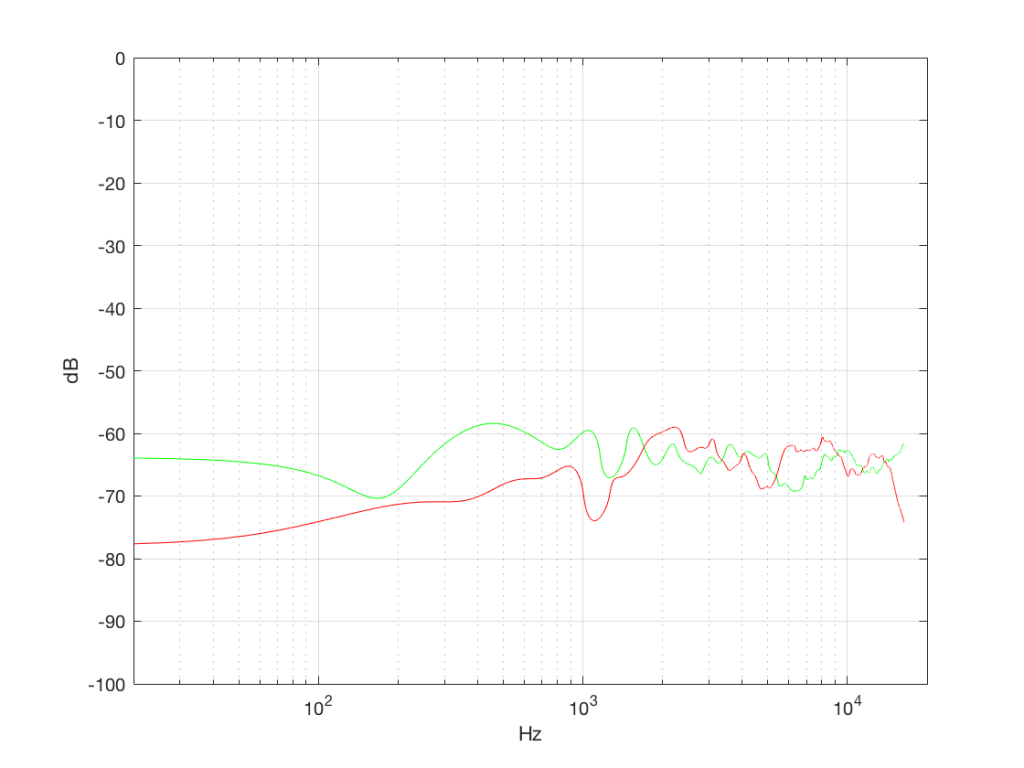
The second thing is that I just lied to you. In order to get the pretty plots in Figures 4a and 4b, I had to take long signals and analyse how much energy we got, over a long period of time. If I had taken a shorter slice of time (say, 100 samples long) then the spectra plots would not have looked as pretty – or as flat. For example, if I just take the first 100 samples of both of those noise generator outputs, and calculate the spectra in those, I get the plots in Figure 4c, below.

Figure 4c:
Figure 4c: The spectra in the first 100 samples of the signals analysed in Figures 4a and 4b.

Notice that these plots do not look nearly as flat – even though I’ve smoothed them with a 1/3 octave smoothing filter again. Why is this?

Well, the problem is probability. Since the two signals are random, there is no guarantee that all frequencies will be contained in them for any one little slice of time. However, there is an equal probability of getting energy at all frequencies over time. So, in a really strange universe, you might get all frequencies below 1000 Hz for one second, and then all frequencies above 1000 Hz for the next second – over two seconds, you get all frequencies, but at any one moment, you don’t.

What this means is that “white noise” doesn’t necessarily contain energy at all frequencies equally – unless you wait for a long time. If you listen for long enough, all frequencies will be represented, but the shorter the measurement, the less “flat” your response.


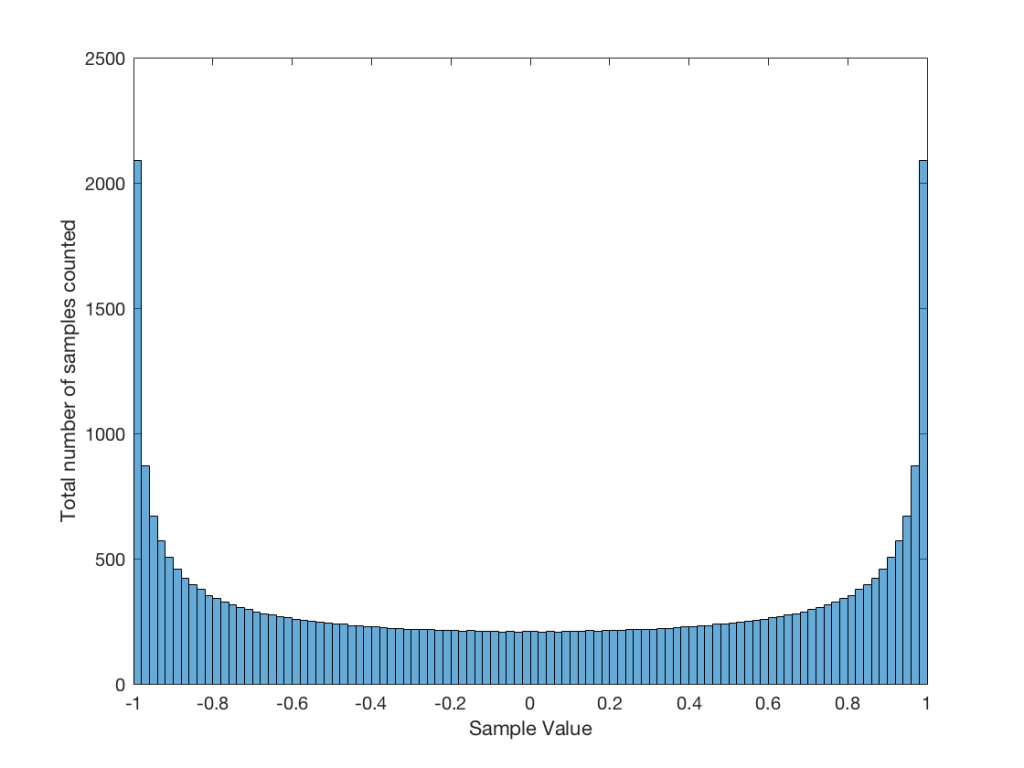
Just for the purposes of comparison, let’s also find out what the distribution of values is for a sine wave – since this might be interesting later… This is shown in Figure 5, below.


Fig 5: The distribution of values in a sine wave that has a peak value of 1. Basically, what this plot means is that, on average, a sine wave doesn’t spend much time around “0” – and it spends a lot of time out at the extremes.

It may be interesting to note that “normal” sounds like music and speech have distributions that look much more like Figure 3b than like Figure 5, as is shown in the examples in Figures 6, 7, and 8. This is why you shouldn’t necessarily use a sine wave to measure a piece of audio equipment and draw a conclusion about how music will sound…

Fig 6. The distribution of values for an anechoic recording of female voice, made without any processing. A non-anechoic recording of any voice would have a similar shape…


Fig 7. The distribution of values in a recording of a Brandenburg Concerto that I happen to like.


Fig 8. The distribution of values in the samples in the first 60 seconds of “Smells Like Teen Spirit” by Nirvana.


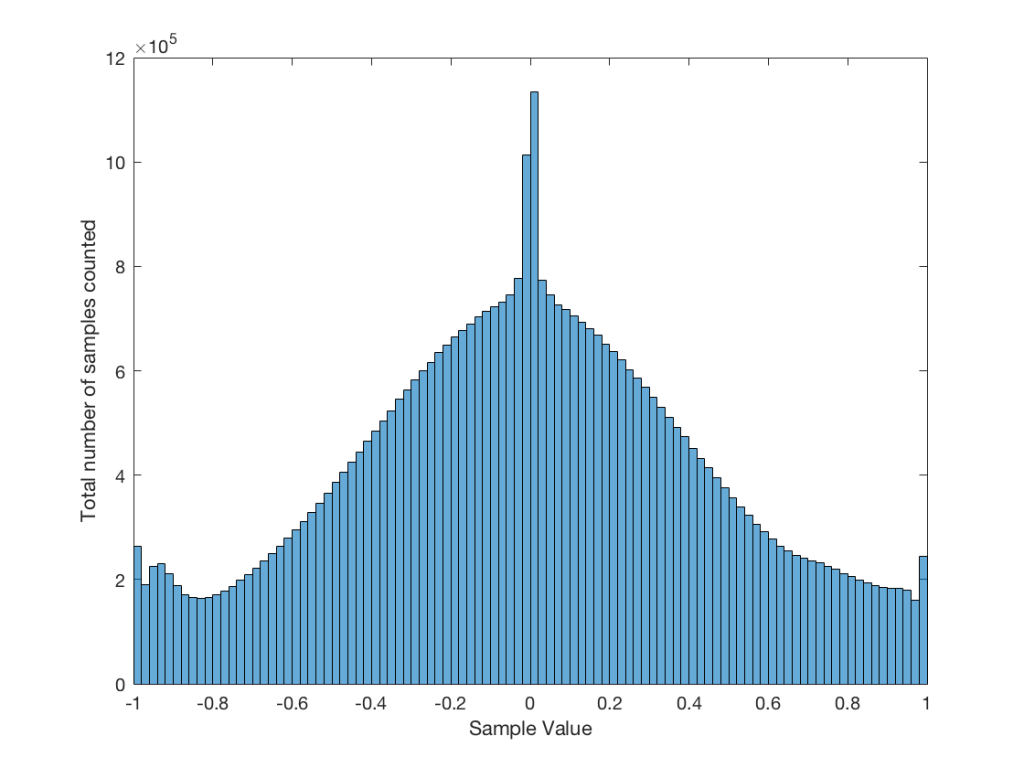
Fig 9: The distribution of all of the samples in Metallica’s “The Day that Never Comes”. This one is admittedly pretty strange – but that won’t come as a surprise to many people.


Averaging

If I play the first kind of white noise (the one shown in Figure 2) and measure how loud it is with a  sound pressure level meter, I’ll get a number – probably higher than 0 dB SPL (or else I can’t hear it) and hopefully lower than 120 dB SPL (or else I’ll probably be in pain…). Let’s say that we turn up the volume until the meter says 70 dB SPL – which is loud enough to be useful, but not loud enough to be uncomfortable.

Then, I switch to playing the other kind of white noise (the one shown in Figure 2a) and turn up the volume until it also measures 70 dB SPL on the same meter.

Then, I switch to playing a sine wave at 1 kHz and turn up the volume until it also reads 70 dB SPL.

If I were to compare what is coming into the loudspeaker for each of those three signals, after they have been calibrated to have the same output level, they would look like the three signals in Figure 9.

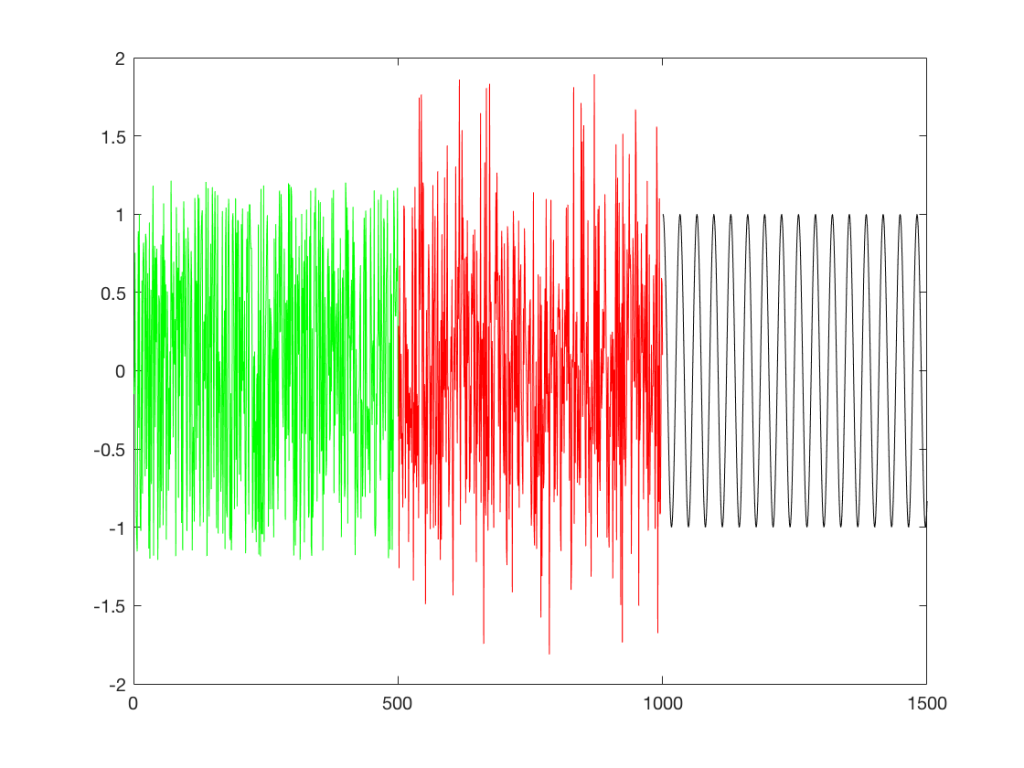
Fig 9: Three different signals, all calibrated to have the same output level when measured with a meter that doesn’t know anything about frequency content. The green signal is white noise as shown in Figure 2. The red plot is white noise as shown in Figure 2a. The black plot is a sine wave.

These will all sound roughly the same level, but as you can see in the plot in Figure 9, they do not have the same PEAK level – they have the same average level – averaged over time…

However, if we were to do a frequency-dependent analysis of these three signals, one of these things would not look like the others… Check out Figure 4a, which I’ve copied below…

Figure 4a: The frequency content of three different signals, as is described in the surrounding text.

Notice that, in a frequency-dependent analysis, the sine wave (the black line sticking up around 1000 Hz) looks much louder (35 dB louder is a lot!) than the green plot and the red plot (our two types of white noise). So, even though all three of these signals sound and measure to have roughly the same level, the distribution of energy in frequency is very different.

Another way to think about this is to say that each of the three signals has the same energy – but the sine wave has all of it at only one frequency all the time – so there’re more energy right there. The noise signals have the energy at that frequency only some of the time (as was explained above…).

ANOTHER way to think about this is to put a glass of water in the bottom of an empty bathtub. If the depth of the water in the glass is 10 cm – and you pour it out into the tub, the depth of the water will be less, since it’s distributed over a larger area.


As you can see in the title of this posting, this is “Part 1″… All of this was to set up for Part 2, which will (hopefully) come next week. As a preview: the topic will be the use (and mis-use) of weighting functions (like “A-weighting”) when doing measurements…


BeoLab 90 Review in Scandinavia

screen-shot-2016-11-18-at-06-38-27


“Lyden av BeoLab 90 er vanskelig å forklare, den må egentlig bare oppleves. Personlig har jeg aldri hørt en mer livaktig musikkgjengivelse, og flere som har vært på besøk reagerte med å klype seg i armen eller felle en tåre når de hørte et opptak de kjente, eller rettere sagt trodde de kjente!”

“The sound of the BeoLab 90 is hard to explain, it must really be experienced. Personally I have never heard a more lifelike music reproduction, and several who have been visiting reacted by pinching their own arm or shedding a tear when they heard a recording they knew, or rather thought they knew!”


The Danish version can be read here.
B&O Tech: A quick primer on distortion

#55 in a series of articles about the technology behind Bang & Olufsen loudspeakers


In a previous posting, I talked about the relationship between its “Bl” or “force factor” curve and the stiffness characteristics of its suspension and the fact that this relationship has an effect on the distortion characteristics of the driver. What was missing in that article was the details in the punchline – the “so what?” That’s what this posting is about – the effect of a particular kind of distortion in a system, and its resulting output.


WARNING: There is an intentional, fundamental error in many of the plots in this article. If you want to know about this, please jump to the “appendix” at the end. If you aren’t interested in the pedantic details, but are only curious about an intuitive understanding of the topic, then don’t worry about this, and read on. As an exciting third option, you could just read the article, and then read the appendix to find out how I’ve been protecting you from the truth…


Examples of Non-linear Distortion

Let’s start by looking at something called a “transfer function” – this is a plot of the difference between what you want and what you get.

For example, if we look at the excursion of a loudspeaker driver: we have some intended excursion (for example, we want to push the woofer out by 5 mm) and we have some actual excursion (hopefully, it’s also 5 mm…)

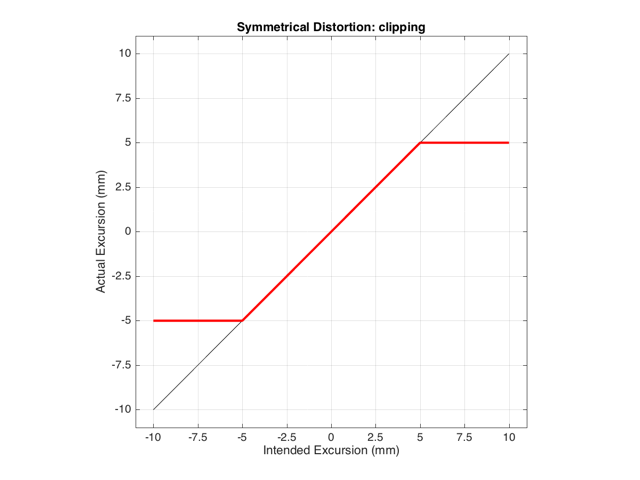
If we have a system that behaves exactly as we want it to within some limit, and then at that limit it can’t move farther, we have a system that clips the signal. For example, let’s say that we have a loudspeaker driver that can move perfectly (in other words, it goes exactly where we want it to) until it hits 5 mm from the rest position (either inwards or outwards). In this case, its transfer function would look like Figure 1.


Figure 1:
Figure 1: The transfer function of a loudspeaker driver that behaves perfectly, as long as you don’t try to go father than 5 mm from the rest position. If you try to exceed this limit, then the system will just stay at its maximum of 5 mm, or its minimum of -5 mm.


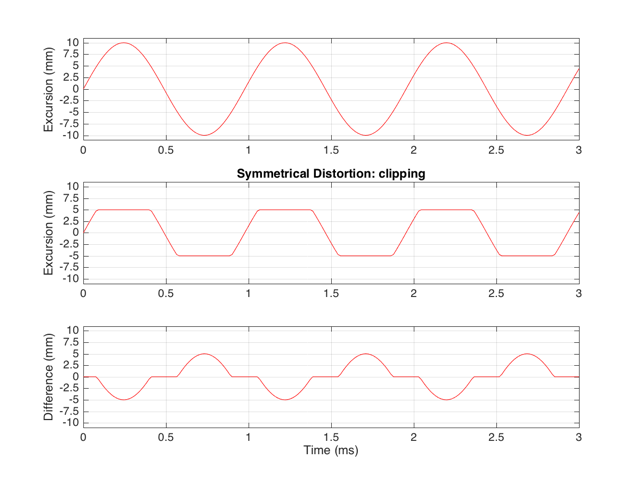
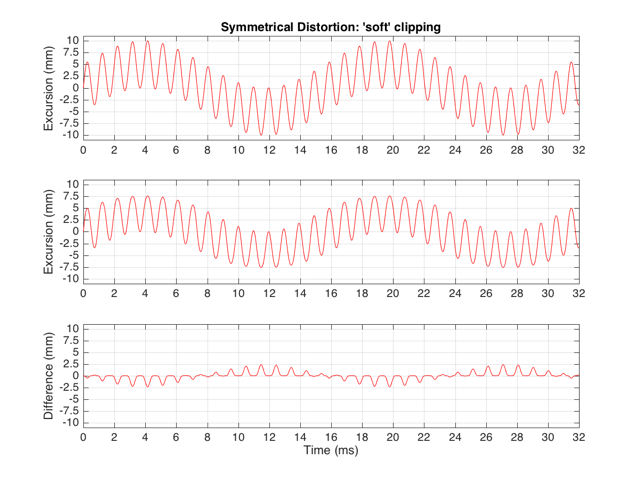
This means that if we try to move the driver with a sinusoidal wave that should peak at 10 mm and -10 mm, the tops and bottoms of the wave will be “chopped off” at ±5 mm. This is shown in Figure 2, below.

Figure X:
Figure 2: The top plot shows the desired excursion of the driver over time. Note that it should move out to 10 mm and -10 mm. The middle plot shows the actual behaviour of the (theoretical) driver that behaves perfectly out to a maximum excursion of 5 mm from the rest position. The bottom plot shows the difference between the top two plots – the error in the actual signal. In other words, it’s what should be played (but is not) by the driver.


Let’s think carefully about the bottom plot in Figure 2. This is the difference between the actual excursion of the driver and the desired excursion (I calculated it by actually subtracting the top plot from the middle plot) – in other words, it’s the error in the signal. Another way to think of this is that the signal produced by the driver is what you want (the top plot) PLUS the error (the bottom plot). (Looking at the plots, if middle-top = bottom, then top+bottom = middle)

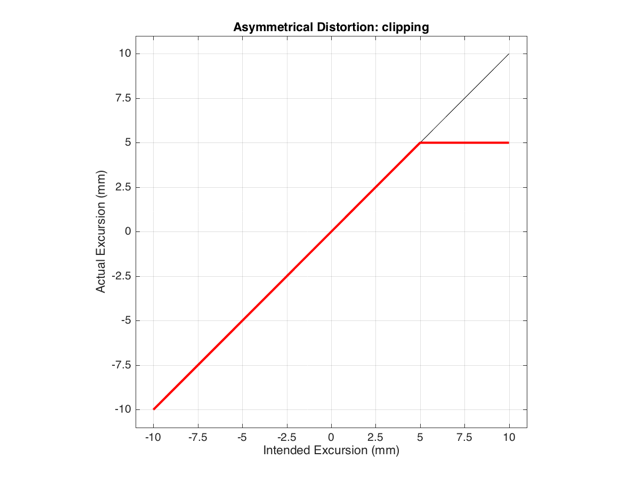
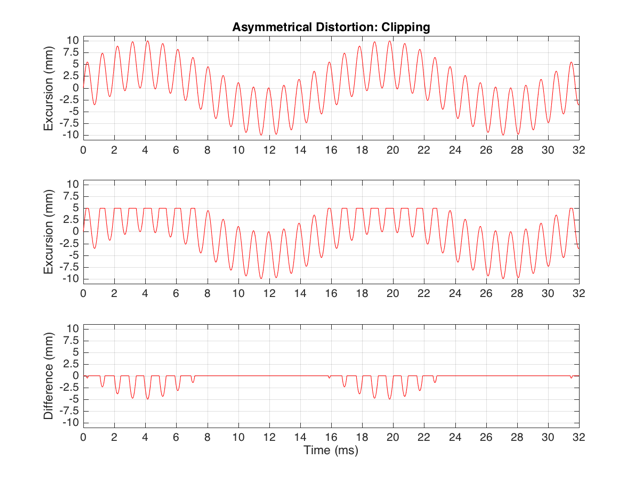
These plots show a rather simple case where the clipping of the signal is symmetrical. That is to say that the error on the positive part of the waveform is identical to that on the negative part of the waveform. As we saw in this posting, however, perfectly symmetrical distortion is not guaranteed… So, what happens if you have asymmetrical distortion? Let’s say, for example, that you have a system that behaves perfectly, except that it cannot move more than 5 mm outwards (moving inwards is not limited). The transfer function for this driver would look like Figure 3.


Figure 2:
Figure 3: The transfer function of a loudspeaker driver that behaves at any excursion less than +5 mm. If you try to push it beyond 5 mm from the rest position outwards, then it will stay at 5 mm.


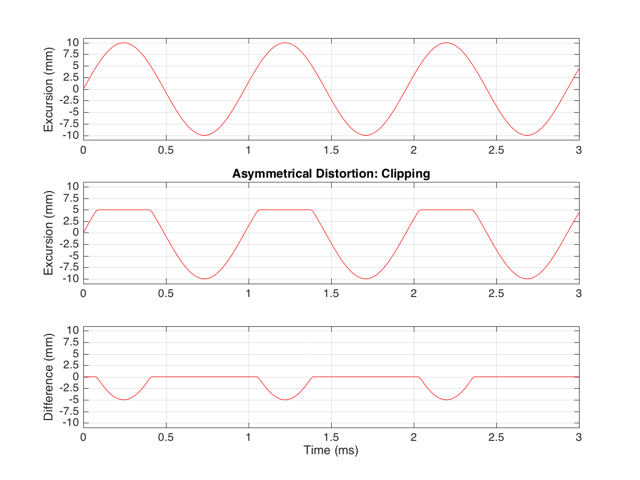
How would a sinusoidal waveform look if it were passed through that driver? This is shown in Figure 4, below.

Figure X:
Figure 4: The top plot shows the desired excursion of the driver over time. The middle plot shows the actual excursion of the driver. Note that it behaves unless it is pushed to +5 mm. The bottom plot shows the error in the driver’s movement.


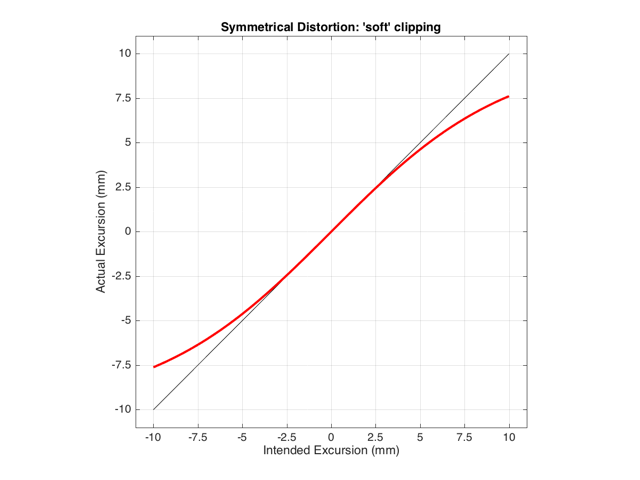
As we also saw before, it is unlikely that the abrupt clipping of a signal is how a real driver will behave. This is because, usually, a driver has an increasing stiffness and a decreasing force to push against it, as the excursion increases. So, instead of the driver behaving perfectly to some limit, and then clipping, it is more likely that the error is gradually increasing with excursion. An example of this is shown below in Figure 5. Note that this plot is just a tanh (a hyperbolic tangent) function for illustrative purposes – it is not a measurement of a real loudspeaker driver’s behaviour.


Figure X:
Figure 5: An example of a system that has an error that increases with excursion.


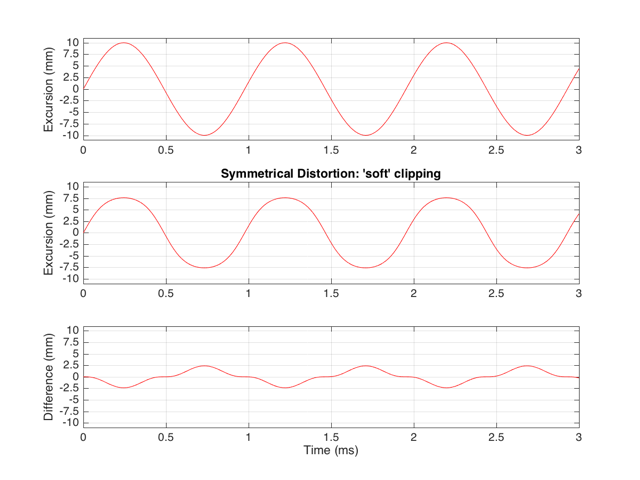
If we were to pass a sinusoidal waveform through this system, the result would be as is shown in Figure 6.


Figure X:
Figure 6: The desired (top) and actual (middle) output of a system with the behaviour shown in Figure 5. The bottom plot shows the error imposed by the system. Note that it is smoother (in time) than the error shown in Figure 4, but it is not sinusoidal.


Harmonic Distortion

The reason engineers love sinusoidal waveforms is that they only contain one frequency each. A 1000 Hz sine tone only has energy at 1000 Hz and no where else. This means that if you have a box that does something to audio, and you put a 1000 Hz sine tone into it, and a signal with frequencies other than 1000 Hz comes out, then the box is distorting your sine wave in some way.

This was a very general statement and should be taken with a grain of salt. A gain applied perfectly to a signal is also a distortion (since the output is different from the input), but will not necessarily add new frequency components (and therefore it is linear distortion, not non-linear distortion). A box that adds noise to the signal is, generally speaking, distorting the input – but the output’s extra components are unrelated to the input – which would classify the problem as noise instead of distortion.) To be more accurate, I would have said that “if you have a box that does something to audio, and you put a 1000 Hz sine tone into it, and a signal with frequencies other than 1000 Hz comes out, then the box is applying a non-linear distortion to your sine wave in some way.”

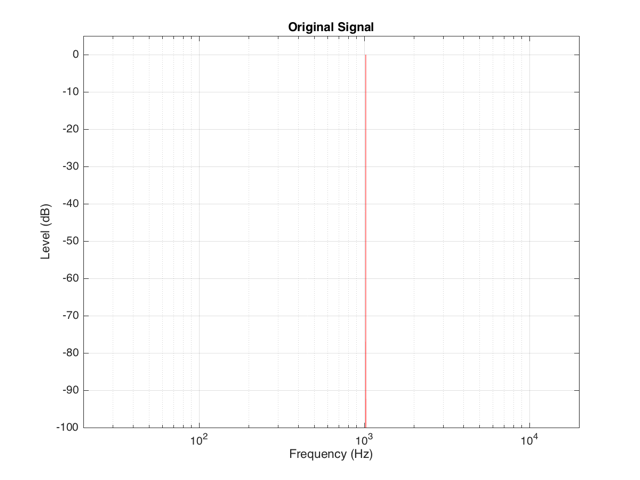
Back to the engineers… If you take a sinusoidal waveform and plot its frequency content, you’ll see something like Figure 7. This shows the frequency content of a signal consisting of a 1024 Hz sine wave.


Figure X:
Figure 7: The frequency content of a signal consisting of a 1024 Hz sine wave.


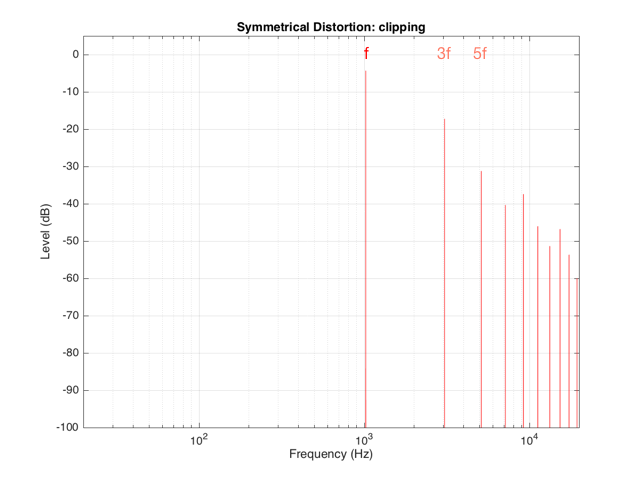
If we clip this signal symmetrically, using the transfer function shown in Figure 1, resulting in the signal shown in the middle plot in Figure 2, and them measure the frequency content of the result, it will look like Figure 8.


Figure X:
Figure 8: The frequency content of a signal that is comprised of a 1024 Hz sine wave that has been symmetrically clipped at a level of one-half of its peak value. See the middle plot in Figure 2 for a plot of the signal in the time domain.


There are at least two interesting things to note about the frequency content shown in Figure 8.

The first is that the level of the signal at the fundamental frequency “f” (1024 Hz, in this case) is lower than the input. This might be obvious, since the output cannot “go as loud” as the input of the system – so some level is lost. (Since we’re clipping at -6 dB, the fundamental has dropped by 6 dB.)

The second thing to notice is that the new frequencies that have appeared are at odd multiples of the frequency of the original signal. So, we have content at 3072 Hz (3*1024), 5120 Hz (5*1024), 7168 Hz (7*1024) and so on. This is a characteristic of a symmetrically distorted signal (meaning not only that we have distorted the top and the bottom of the signal in the same way, but also that the signal itself was symmetrical to begin with). In other words, whenever you see a distortion product that only produces odd-order harmonics of the fundamental, you have a system that is distorting a symmetrical signal symmetrically.

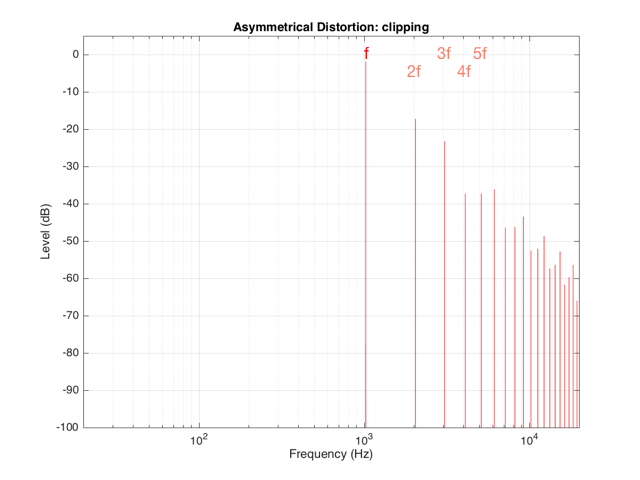
If we were to look at the frequency content of the asymmetrically-distorted signal (shown in Figures 3 and 4), the result would be as is shown in Figure 9.


Figure X:
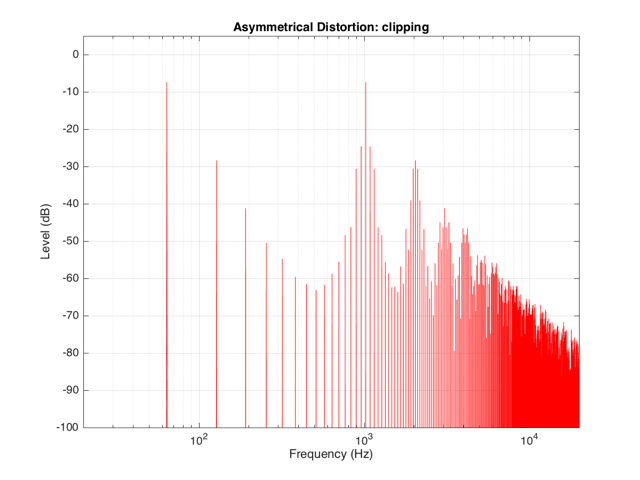
Figure 9: The frequency content of a signal that is comprised of a 1024 Hz sine wave that has been clipped at a level of one-half of its peak value on the positive portion of the signal only. See the middle plot in Figure 4 for a plot of the signal in the time domain.

In Figure 9, you can see at least two interesting things:

The first is that the level of the fundamental frequency of “f” (1024 Hz) is higher than it was in Figure 8. This is because we’re letting more of the energy of the original waveform through the distortion (because the negative portion is untouched).

The second thing that you can see in Figure 9 is that both the odd-order and the even-order harmonics are showing up. So, we get energy at 2048 Hz (2*1024), 3072 Hz (3*1024), 4096 Hz (4*1024), 5120 Hz (5*1024), and so on. The presence of the even-order harmonics tells us that either the input signal was asymmetrical (which it wasn’t) or that the distortion applied to it was asymmetrical (which is was) or both.

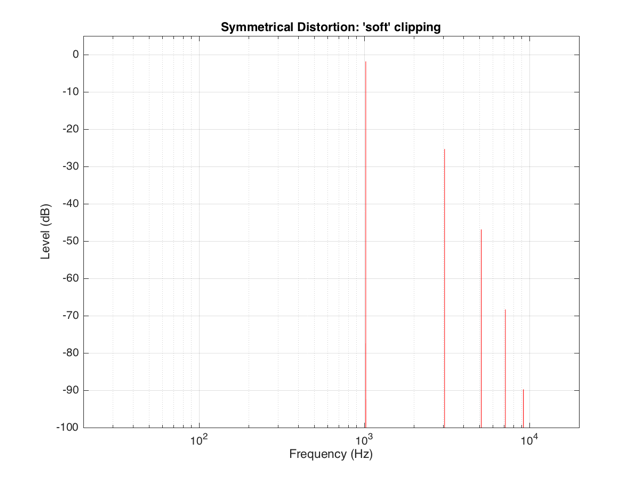
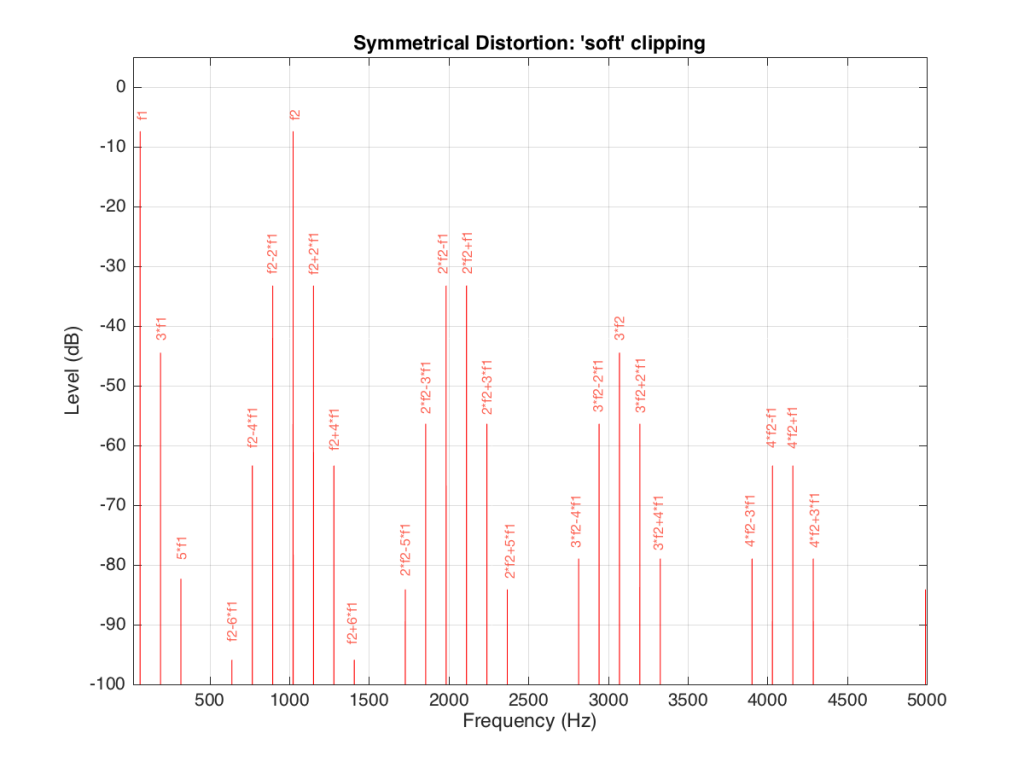
If the distortion we apply to the signal was less abrupt – using the “soft-clipping” function shown in Figure 5 and 6, the result would be different, as is shown in Figure 10.


Figure X:
Figure 10: The frequency content of a signal that is comprised of a 1024 Hz sine wave that has been symmetrically “soft clipped” using a tanh function. See the middle plot in Figure 6 for a plot of the signal in the time domain.


Again, in Figure 10, you can see that only the odd-order harmonics appear as the distortion products, since the distortion we’re applying to the symmetrical signal is symmetrical.


Intermodulation Distortion

So far, we’ve only been looking at the simple case of an input signal with a single frequency. Typically, however, research has shown that most persons listen to more than one frequency simultaneously (acoustical engineers and Stockhausen enthusiasts excepted…). So, let’s look at what happens when we have more than one frequency – say, two frequencies – in our input signal.

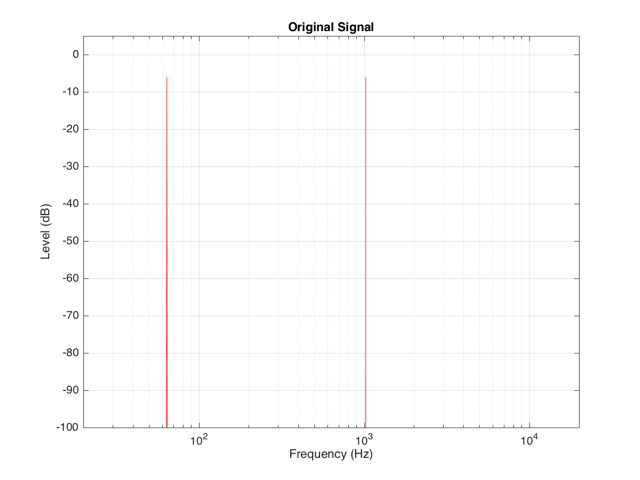
For example, let’s say that we have an input signal, the frequency content of which is shown in Figure 11, consisting of sinusoidal tones at 64 Hz and 1024 Hz. Both sine tones, individually, have a peak level of one-half of the maximum peak of the system. Therefore, they are shown in Figure 11 as having a level of approximately -6 dB each.

Figure X:
Figure 11: The frequency content of a signal consisting of two sine tones at 64 Hz and 1024 Hz, each with a level of approximately -6 dB.


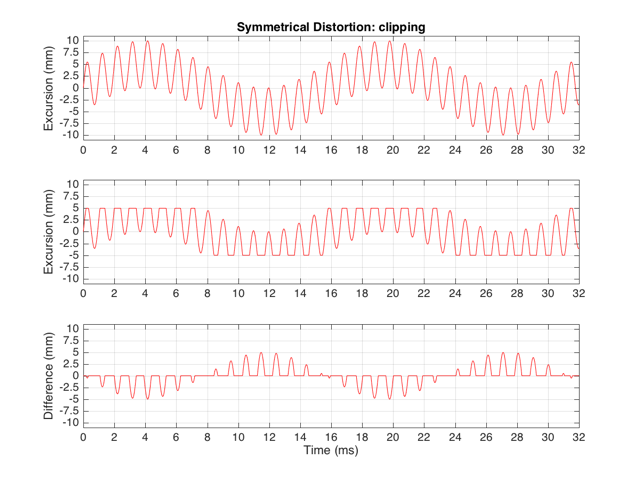
The sum of these two sinusoids will look like the top plot in Figure 12. As you can see there, the signal with the higher frequency is “riding on top of” the signal with the lower frequency. Each frequency, on its own, is pushing and pulling the excursion by ±5 mm. The total result therefore can move from -10 mm to +10 mm, but its instantaneous value is dependent on the overlap of the two signals at any one moment.

If we apply the symmetrical clipping shown in Figure 1 to this signal, the result is as is shown in the middle plot of Figure 12 (with the error shown in the bottom plot). This results in an interesting effect since, although the distortion we’re applying should be symmetrical, the result at any given moment is asymmetrical. This is because the signal itself is asymmetrical with respect to the clipping – the high frequency component alternates between getting clipped on the top and the bottom, depending on where the low frequency component has put it…


Figure X:
Figure 12: A signal composed of a 64 Hz and a 1024 Hz sine tone, each with a peak excursion of 5 mm individually. This signal is distorted using the transfer function shown in Figure 1, resulting in the middle plot. The bottom plot shows the error.


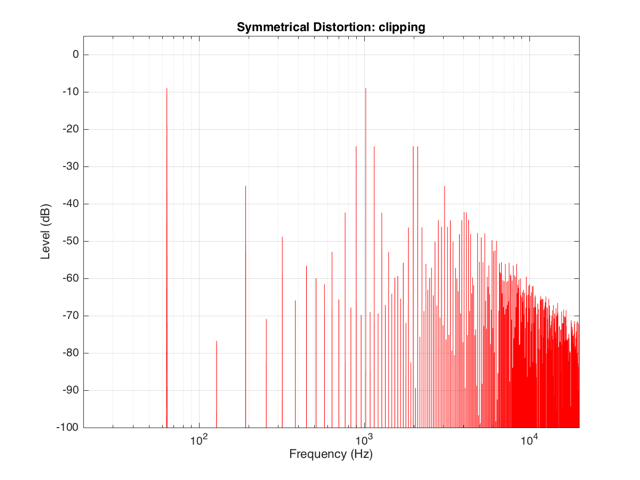
We can look at the frequency content of the resulting clipped signal. This is shown in Figure 13.


Figure X:
Figure 13: The frequency content of the signal shown in the middle plot in Figure 12


It’s obvious from the plot in Figure 13 that we have a mess. However, although the mess is rather systematic, it’s difficult to see in that plot. If we plot the same information on a different scale, things get easier to understand. Take a look at Figure 14.


Figure X:
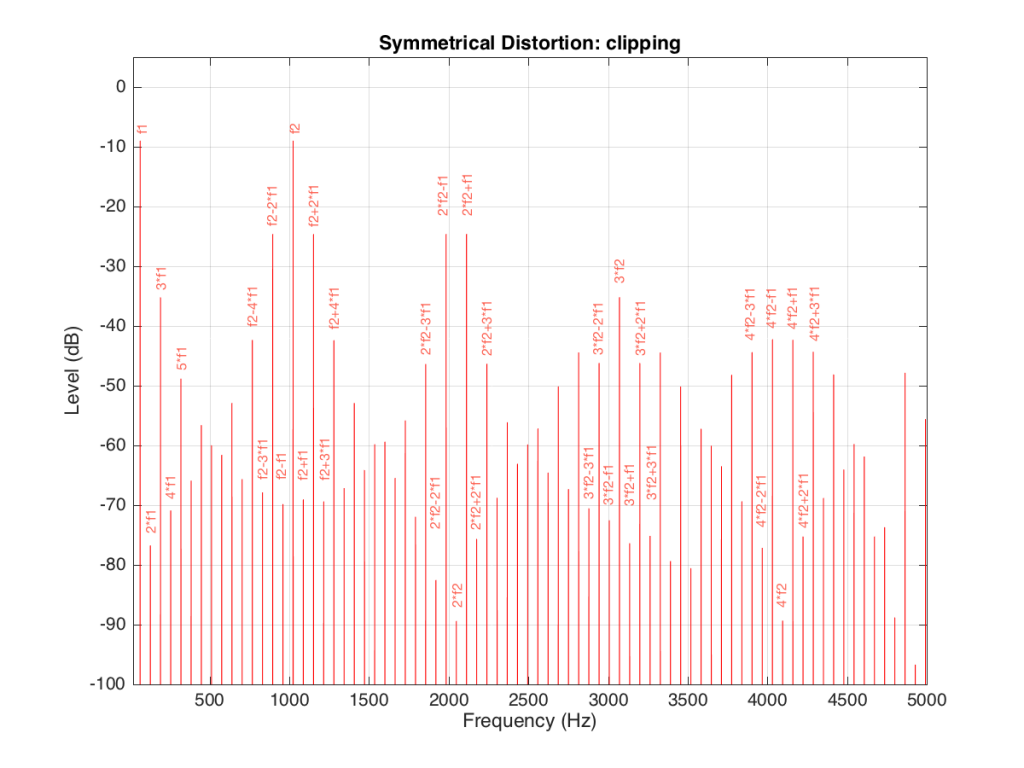
Figure 14: The same information as is shown in Figure 13, plotted on a linear frequency scale and zoomed in to show only up to 5 kHz.


Figure 14 and Figure 13 show exactly the same information with only two differences. The first is that Figure 14 only shows frequencies up to 5 kHz instead of 20 kHz. The second is that the scale of the x-axis of Figure 13 is logarithmic whereas the scale of Figure 14 is linear. This is only a chance in spacing, but it makes things easier to understand.

As you can see in Figure 14, the extra frequencies added to the original signal by the clipping are regularly spaced. This is because the distortion that we have generated (called an intermodulation distortion, since it results from two two signals modulating each other), in the frequency domain, follows a pretty simple mathematical pattern.

Our original two frequencies of 64 Hz (called “f1” on the plot) and 1024 Hz  (“f2”) are still present.

In addition, the sum and difference of these two frequencies are also present (f2+f1 = 1088 Hz and f2-f1 = 1018 Hz).

The sum and difference of the harmonic distortion products of the frequencies are also present. For example, 2*f2+f1 = 2*1024+64=2112 Hz, 3*fs-2*f1 = 3*1024-2*64 = 2944 Hz…  There are many, many more of these. Take one frequency, multiply it by an integer and then add (or subtract) that from the other frequency multiplied by an integer – whatever the result, that frequency will be there. Don’t worry if your result is negative – that’s also in there (although we’re not going to talk about negative frequencies today – but trust me, they exist…)
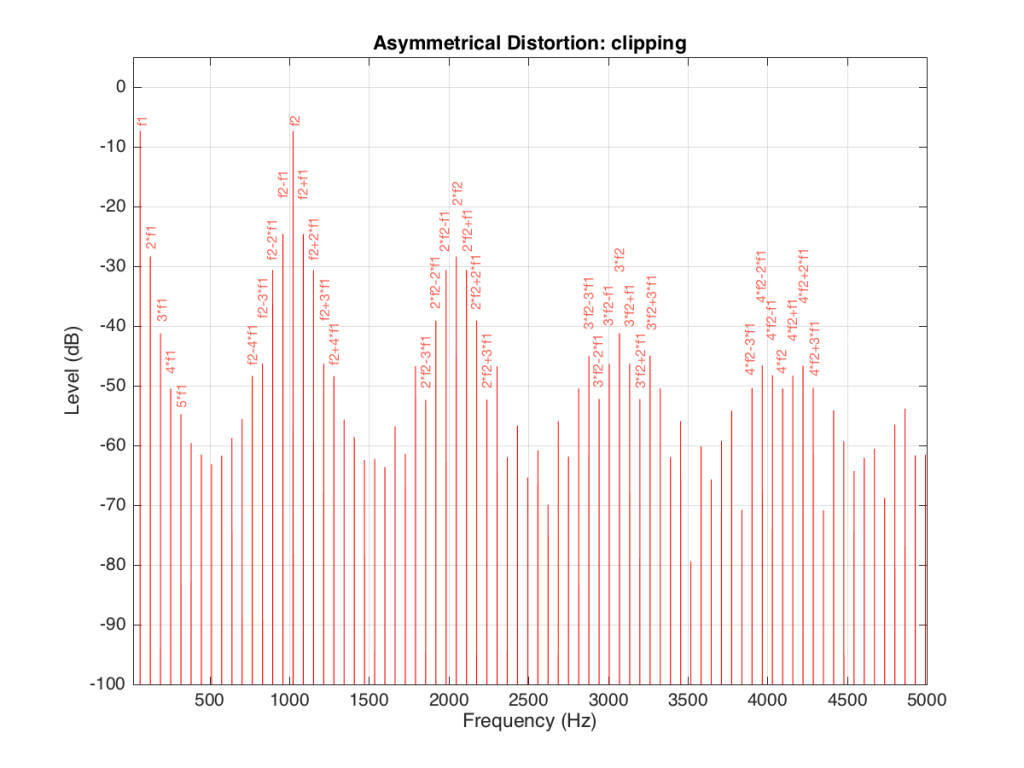
 

If we apply the asymmetrical clipping to the same signal, we (of course) get a different result, but it  exhibits the same characteristics, just with different values, as can be seen in Figures 15 and 16.


Figure X:
Figure 15: The same 64 Hz + 1024 Hz signal, distorted using the symmetrical clipping shown in Figure 2.


Figure X:
Figure 16: The frequency content of the signal shown in the middle plot of Figure 15, plotted on a logarithmic frequency scale.


Figure X:
Figure 17: The sample information as is shown in Figure 16, plotted on a linear frequency scale and zoomed in to show only up to 5 kHz.


Figure X:
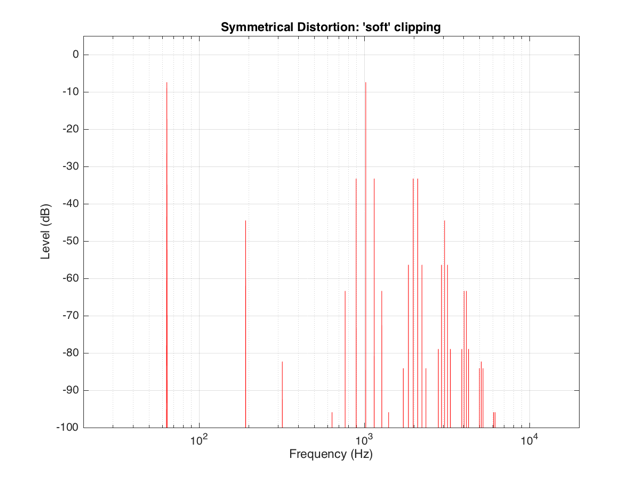
Figure 18: The same 64 Hz + 1024 Hz signal, distorted using the “soft clipper” shown in Figure 3.


Figure X:
Figure 19: The frequency content of the middle plot in Figure 18, plotted on a logarithmic frequency scale.


Figure X:
Figure 20: The same information as is shown in Figure 19, plotted on a linear frequency scale and zoomed in to show only up to 5 kHz.


Wrapping up

It’s important to state once more that none of the plots I’ve shown here are based on any real loudspeaker driver. I’m using simple examples of non-linear distortion just to illustrate the effects on an audio signal. The actual behaviour of an actual loudspeaker driver will be much more complicated than this, but also much more subtle (hopefully – if not, something it probably broken…).


Appendix

As I mentioned at the very beginning of this posting, many of the plots in this article have an intentional error. The reason I wrote this article is to try to give you an intuitive understanding of the results of a problem with the stiffness and Bl curves of a loudspeaker driver with respect to its excursion. This means that my plots of the time domain (such as those in Figure 2) show the excursion of the driver in millimetres with respect to time. I then skip over to a magnitude response plot, pretending that the signal that comes from a driver (a measurement of the air pressure) is identical to the pattern of the driver’s excursion. This is not true. The modulation in air pressure caused by a moving loudspeaker driver are actually in phase with the acceleration of the loudspeaker driver – not its excursion. So, I skipped a step or two. However, since I wasn’t actually showing real responses from real drivers, I didn’t feel too guilty about this. Just be warned that, if you’re really digging into this, you should not directly jump from loudspeaker driver excursion to a plot of the sound pressure.
B&O Tech: Headphone signal flows

#54 in a series of articles about the technology behind Bang & Olufsen products

Someone recently asked a question on this posting regarding headphone loudness. Specifically, the question was:

“There is still a big volume difference between H8 on Bluetooth and cable. Why is that?”
I thought that this would make a good topic for a whole posting, rather than just a quick answer to a comment – so here goes…

Introduction – the building blocks

To begin, let’s take a quick look at all the blocks that we’re going to assemble in a chain later. It’s relatively important to understand one or two small details about each block.

Two start:

  • I’ve used red lines for digital signals and blue lines for analogue signals. I’ve assumed that the digital signal contains 2 audio channels, and that the analogue connections are one channel each.
  • My signal flow goes from left to right
  • I use the word “telephone” not because I’m old-fashioned (although I am that…) but because if I say “phone”, I could be mistaken for someone talking about headphones. However, the source does not have to be a telephone, it could be anything that fits the descriptions below.
  • The blocks in my signal flows should be taken as basic examples. I have not reverse-engineered a particular telephone or computer or pair of headphones. I’m just describing basic concepts here…
Fig 1: A Digital to Analogue converter.

Figure 1, above, shows a 2-channel audio DAC – a Digital to Analogue Converter. This is a device (these days, it’s usually just a chip) that receives a 2-channel digital audio signal as a stream of bits at its input and outputs an analogue signal that is essentially a voltage that varies appropriately over time.

One important thing to remember here is that different DAC’s have different output levels. So, if you send a Full Scale sine wave (say, a 997 Hz, 0 dB FS) into the input of one DAC, you might get 1 V RMS out. If you sent exactly the same input into another DAC (meaning another brand or model) you might get 2 V RMS out.

You’ll find a DAC, for example, inside your telephone, since the data inside it (your MP3 and .wav files) have to be converted to an analogue signal at some point in the chain in order to move the drivers in a pair of headphones connected to the minijack output.

Fig 2: An Analogue to Digital converter.

Figure 2, above, shows a 2-channel ADC – and Analogue to Digital Converter. This does the opposite of a DAC – it receives two analogue audio channels, each one a voltage that varies in time, and converts that to a 2-channel digital representation at its output.

One important thing to remember here is the sensitivity of the input of the ADC. When you make (or use) an ADC, one way to help maximise your signal-to-noise ratio (how much louder the music is than the background noise of the device itself) is to make the highest analogue signal level produce a full-scale representation at the digital output. However, different ADC’s have different sensitivities. One ADC might be designed so that 2.0 V RMS signal at its input results in a 0 dB FS (full scale) output. Another ADC might be designed so that a 0.5 V RMS signal at its input results in a 0 dB FS output. If you send 0.5 V RMS to the first ADC (expecting a max of 2 V RMS) then you’ll get an output of approximately -12 dB FS. If you send 2 V RMS to the second ADC (which expects a maximum of only 0.5 V RMS) then you’ll clip the signal.

Fig 3: A Digital Signal Processor.

Figure 3, above, shows a Digital Signal Processor or DSP. This is just the component that does the calculations on the audio signals. The word “calculations” here can mean a lot of different things: it might be a simple volume control, it could be the filtering for a bass or treble control, or, in an extreme case, it might be doing fancy things like compression, upmixing, bass management, processing of headphone signals to make things sound like they’re outside your head, dynamic control of signals to make sure you don’t melt your woofers – anything…

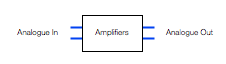
Fig 4: A two-channel analogue amplifier block.

Figure 4, above, shows a two-channel analogue amplifier block. This is typically somewhere in the audio chain because the output of the DAC that is used to drive the headphones either can’t provide a high-enough voltage or current (or both) to drive the headphones. So, the amplifier is there to make the voltage higher, or to be able to provide enough current to the headphones to make them loud enough so that the kids don’t complain.

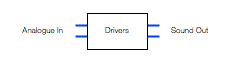
Fig 5: The headphone drivers - the "business end" of the headphones.
Fig 5: The headphone drivers – the “business end” of the headphones.

The final building block in the chain is the headphone driver itself. In most pairs of headphones, this is comprised of a circular-shaped magnet with a coil of wire inside it. The coil is glued to a diaphragm that can move like the skin of a drum. Sending electrical current back and forth through the coil causes it to move back and forth which pushes and pulls the diaphragm. That, in turn, pushes and pulls the air molecules next to it, generating high and low pressure waves that move outwards from the front of the diaphragm and towards your eardrum. If you’d like to know more about this basic concept – this posting will help.

One important thing to note about a headphone driver is its sensitivity. This is a measure of how loud the output sound is for a given input voltage. The persons who designed the headphone driver’s components determine this sensitivity by changing things like the strength of the magnet, the length of the coil of wire, the weight of the moving parts, resonant chambers around it, and other things. However, the basic point here is that different drivers will have different loudnesses at different frequencies for the same input voltage.

Now that we have all of those building blocks, let’s see how they’re put together so that you can listen to Foo Fighters on your phone.

Version 1: The good-old days

In the olden days, you had a pair of headphones with a wire hanging out of one or both sides and you plugged that wire into the headphone jack of a telephone or computer or something else. We’ll stick with the example of a telephone to keep things consistent.

Figure 6, below, shows an example of the path the audio signal takes from being a MP3 or .wav (or something else) file on your phone to the sound getting into your ears.

The file is read and then decoded into something called a “PCM” signal (Pulse Code Modulation – it doesn’t matter what this is for the purposes of this posting). So, we get to point “A” in the chain and we have audio. In some cases, the decoder doesn’t have to do anything (for example, if you use uncompressed PCM audio like a .wav file) – in other cases (like MP3) the decoder has to convert a stream of data into something that can be understood as an audio signal by the DSP. In essence, the decoder is just a kind of universal translator, because the DSP only speaks one language.

The signal then goes through the DSP, which, in a very simple case is just the volume control. For example, if you want the signal to have half the level, then the DSP just multiplies the incoming numbers (the audio signal) by 0.5 and spits them out again. (No, I’m not going to talk about dither today.) So, that gets us to point “B” in the chain. Note that, if your volume is set to maximum and you aren’t doing anything like changing the bass or treble or anything else – it could be that the DSP just spits out what it’s fed (by multiplying all incoming values by 1.0).

Now, the signal has to be converted to analogue using the DAC. Remember (from above) that the actual voltage at its output (at point “C”) is dependent on the brand and model of DAC we’re talking about. However, that will probably change anyway, since the signal is fed through the amplifiers which output to the minijack connector at point “D”.

Assuming that they’ve set the DSP so that output=input for now, then the voltage level at the output (at “D”) is determined by the telephone’s manufacturer by looking at the DAC’s output voltage and setting the gain of the amplifiers to produce a desired output.

Fig 6: An example of a basic signal flow that occurs when you plus a pair of passive headphones into your phone to listen to music.
Fig 6: An example of a basic signal flow that occurs when you plug a pair of passive headphones into your telephone’s headphone output to listen to music.

Then, you plug a pair of headphones into the minijack. The headphone drivers have a sensitivity (a measure of the amount of sound output for a given voltage/current input) that will have an influence on the output level at your eardrum. The more sensitive the drivers to the electrical input, the louder the output. However, since, in this case, we’re talking about an electromechanical system, it will not change its behaviour (much) for different sources. So, if you plug a pair of headphones into a minijack that is supplying 2.0 V RMS, you’ll get 4 times as much sound output as when you plug them into a minijack that is supplying 0.5 V RMS.

This is important, since different devices have VERY different output levels – and therefore the headphones will behave accordingly. I regularly measure the maximum output level of phones, computers, CD players, preamps and so on – just to get an idea of what’s on the market. I’ve seen maximum output levels on a headphone jack as low as 0.28 V RMS (on an Apple iPod Nano Gen4) and as high as 8.11 V RMS (on a Behringer Powerplay Pro-8 headphone distribution amp). This is a very big difference (29 dB, which also happens to be 29  times…).

Version 2: The more-recent past

So, you’ve recently gone out and bought yourself a newfangled pair of noise-cancelling headphones, but you’re a fan of wires, so you keep them plugged into the minijack output of your telephone. Ignoring the noise-cancelling portion, the signal flow that the audio follows, going from a file in the memory to some sound in your ears is probably something like that shown in Figure 7.

Fig 7: An example of a basic signal flow that occurs when you plug a pair of active headphones into your phone's headphone output to listen to music.
Fig 7: An example of a basic signal flow that occurs when you plug a pair of active headphones into your telephone’s headphone output to listen to music.

As you can see by comparing Figures 7 and 6, the two systems are probably identical until you hit the input of the headphones. So, everything that I said in the previous section up to the output of the telephone’s amplifiers is the same. However, things change when we hit the input of the headphones.

The input of the headphones is an analogue to digital converter. As we saw above, the designer of the ADC (and its analogue input stages) had to make a decision about its sensitivity – the relationship between the voltage of the analogue signal at its input and the level of the  digital signal at its output. In this case, the designer of the headphones had to make an assumption/decision about the maximum voltage output of the source device.

Now we’re at point “E” in the signal chain. Let’s say that there is no DSP in the headphones – no tuning, no volume – nothing. So, the signal that comes out of the ADC is sent, bit for bit, to its DAC. Just like the DAC in the source, the headphone’s DAC has some analogue output level for its digital input level. Note that there is no reason for the analogue signal level of the headphones’ input to be identical to the analogue output level of the DAC or the analogue output level of the amplifiers. The only reason a manufacturer might want to try to match the level between the analogue input and the amplifier output is if the headphones work when they’re turned off – thus connecting the source’s amplifier directly to the headphone drivers (just like in Figure 6). This was one of the goals with the BeoPlay H8 – to ensure that if your batteries die, the overall level of the headphones didn’t change considerably.

However, some headphones don’t bother with this alignment because when the batteries die, or you turn them off, they don’t work – there’s no bypass…

Version 3: Look ma! No wires!

These days, many people use Bluetooth to connect wirelessly from the source to the headphones. This means that some components in the chain are omitted (like the DAC’s in the source and the ADC in the headphones) and others are inserted (in Figures 8 and 9, the Bluetooth Transmitter and Receiver).

Note that, to keep things simple, I have not included the encoder and the decoder for the Bluetooth transmission in the chain. Depending mainly on your source’s capabilities, the audio signal will probably be encoded into one of the varieties of an SBC, an AAC, or an aptX codec before transmitting. It’s then decoded back to PCM after receiving. In theory, the output of the decoder has the same level as the input of the encoder, so I’ve left it out of this discussion. I won’t discuss either CODEC’s implications on audio quality in this posting.

Taking a look at Figure 8 or 9 and you’ll see that, in theory, the level of the digital audio signal inside the source is identical to that inside the headphones – or, at least, it can be.

Fig 6: An example of a basic signal flow that occurs when you plus a pair of passive headphones into your phone to listen to music.
Fig 8: One example of a basic signal flow that occurs when you connect a pair of active headphones to your telephone using Bluetooth to listen to music. Note that the volume control, in this example, is shown in the telephone.
Fig 9: One example of a basic signal flow that occurs when you connect a pair of active headphones to your telephone using Bluetooth to listen to music. Note that the volume control, in this example, is shown in the headphones.

This means that the potentially incorrect assumptions made by the headphone manufacturer about the analogue output levels of the source can be avoided. However, it also means that, if you have a pair of headphones like the BeoPlay H7 or H8 that can be used either via an analogue or a Bluetooth connection then there will, in many cases, be a difference in level when switching between the two signal paths.

For example…

Let’s take a simple case. We’ll build a pair of headphones that can be used in two ways. The first is using an analogue input that is processed through the headphone’s internal DSP (just as is shown in Figure 6). We’ll build the headphones so that they can be used with a 2.0 V RMS output – therefore we’ll set the input sensitivity so that a 2.0 V RMS signal will result in a 0 dB FS signal internally.

We then connect the headphones to an Apple MacBook Pro’s headphone output, we play a signal with a level of 0 dB FS, and we turn up the volume to maximum. This will result in an analogue violate level of 2.085 V RMS coming from the computer’s headphone output.

Now we’ll use the same headphones and connect them to an Apple iPhone 4s which has a maximum analogue output level of 0.92 V RMS. This is less than half the level of the MacBook Pro’s output. So, if we set the volume to maximum on the iPhone and play exactly the same file as on the MacBook Pro, the headphones will have half the output level.

A second way to connect the headphones is via Bluetooth using the signal flow shown in Figure 8. Now, if we use Bluetooth to connect the headphones to the MacBook Pro with its volume set to maximum, a 0 dB FS signal inside the computer results in a 0 dB FS signal inside the headphones.

If we connect the headphones to the iPhone 4s via Bluetooth and play the same file at maximum volume, we’ll get the same output as we did with the MacBook Pro. This is because the 0 dB FS signal inside the phone is also producing a 0 dB FS signal in the headphones.

So, if you’re on the computer, switching from a Bluetooth connection to an analogue wired connection using the same volume settings will result in the same output level from the headphones (because the headphones are designed for a max 2 V RMS analogue signal). However, if you’re using the telephone, switching from a Bluetooth connection to an analogue wired connection will results in a drop in the output level by more than 6 dB (because the telephone’s maximum output level is less than 1 V RMS).

Wrapping up

So, the answer to the initial question is that there’s a difference between the output of the H8 headphones when switching between Bluetooth and the cable because the output level of the source that you’re using is different from what was anticipated by the engineers who designed the input stage of the headphones. This is likely because the input stage of the headphones was designed to be compatible with a device with a higher maximum output level than the one you’re using.