Signal levels and Dynamic Range

If you have a bunch of audio devices in a chain (say, a CD player connected to a preamplifier connected to a power amplifier connected to a loudspeaker) then one of the simplest things that you can do to improve or optimise your audio quality is to look after the gain of the signal through the system. It’s also free – and getting a lot for free is always a good thing…

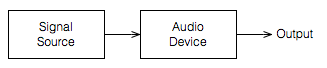
Let’s start by taking a simple view of one device – a piece of audio gear. It doesn’t matter what the gear is – it could be an MP3 player, it could be a giant mixing console. What we’ll do is just look at the output of this device as it tries to play an audio signal with a varying level.

Fig 1: An audio device with an audio signal at its output. The Signal Source might be external (say, a different device) or internal (like a CD or an MP3 file)

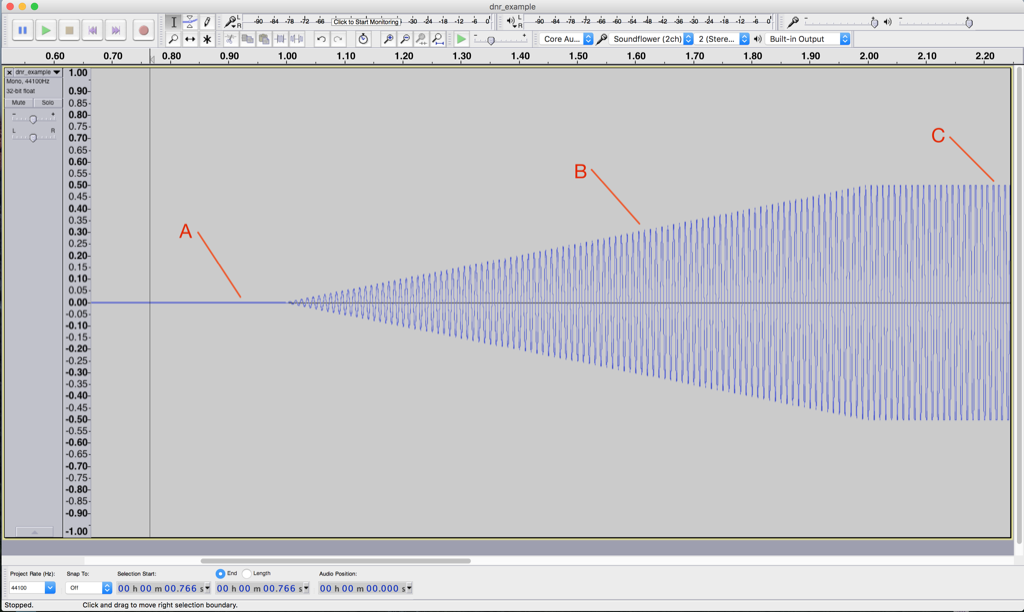
Let’s use a very simple example of a sine wave as our audio signal; we’ll look at the output of the Audio Device as we increase the level of our sine wave from very quiet to very loud.

Fig 2: A recording of the output of our Audio Device as we play a sine tone going from very, very quiet to very loud.

This screen shot shown in Figure 2, by itself, is not that interesting. Let’s zoom in to the three points on the plot to see what’s going on.


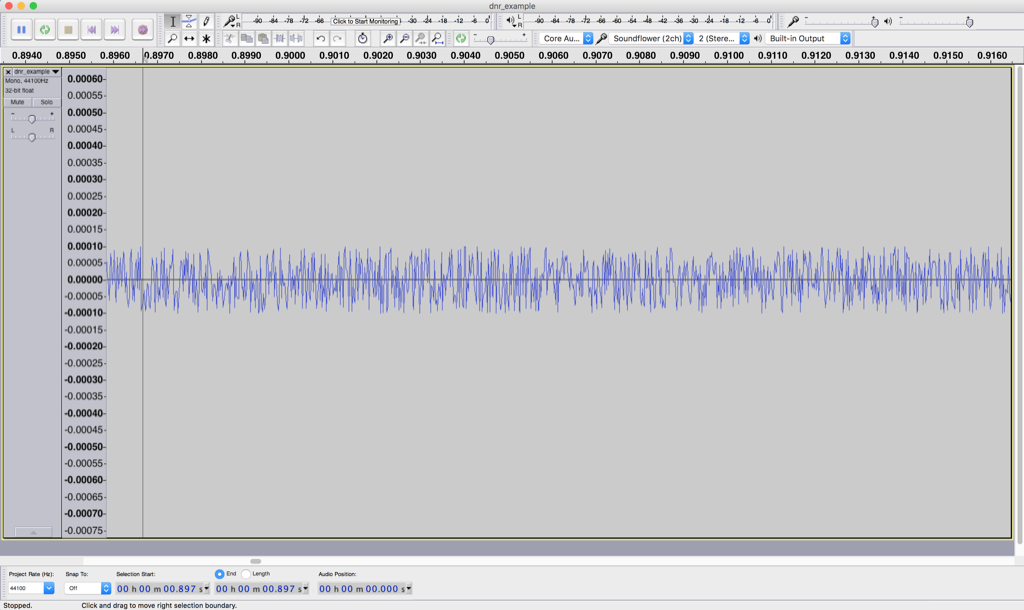
Fig 3: A zoomed-in view of point “A” in Figure 2. Notice that this is not a sine tone – it’s noise generated by the device that we’re testing. The sine tone is quieter than this “noise floor”, so we can’t see (or hear) it.

Figure 3 shows a zoomed-in view of point “A” in Figure 2. Notice that you cannot see a sine wave in that signal – it’s just noise. This is the noise that is naturally generated by the device for some reason. This may be natural noise in the analogue chain – caused by thermal movement of electrons in resistors, amplified by the device itself. It may be intentional noise like dither which is added to the signal to randomise errors in a digital audio chain. Or, it may be something else entirely…

But be careful not to jump to conclusions… Just because you can’t see a sine wave there doesn’t mean that you won’t be able to hear it. As the level of the sine wave is increased, we’ll be able to hear it along with the noise before we’ll be able to see it on the screen.

In this case, we have a very low “signal-to-noise ratio”. In other words, the level of the signal (the sine wave) divided by (because it’s a ratio) the level of the noise gives us a low number. Or, in normal English – the sine wave  is “drowned out” by the noise.


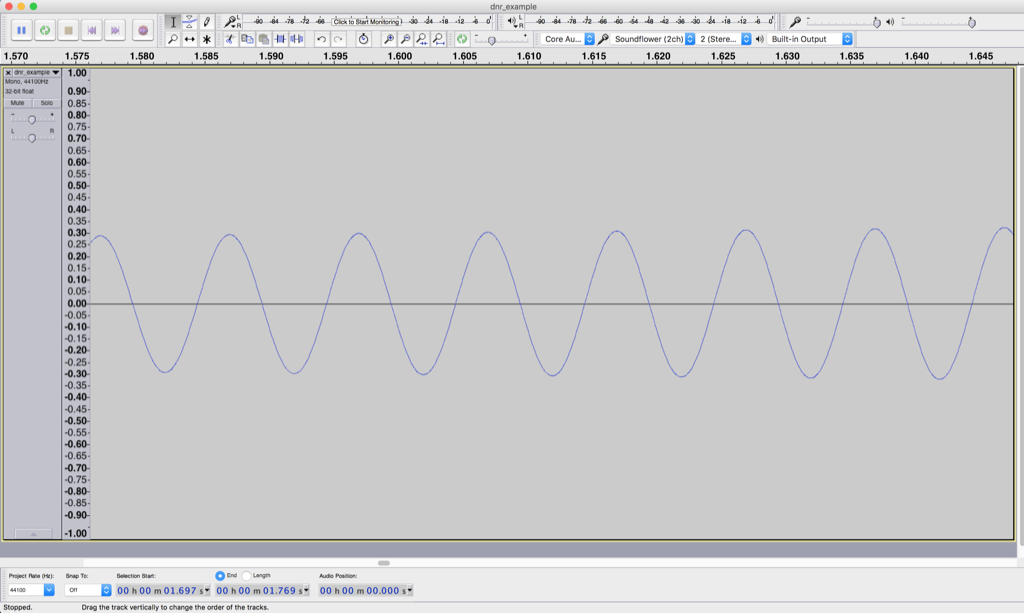
Fig 4: A zoomed-in view of point “B” in Figure 2.

Figure 4 shows a nice, clean-looking sine wave coming out of our audio device. It’s what’s going on at point “B” in Figure 2. We’ve zoomed in so much that you can’t see the increase in level over time – but trust me, it’s happening there.

The noise is still there, “riding the wave” of the sine tone. In fact, if we were to zoom in on the sine wave in that figure, we’d see the same kind of noise that we saw in Figure 3 – like little ripples on big ocean waves. Now, however, the sine wave is much louder than the noise – so we have a reasonably high “signal-to-noise ratio”. In other words, the level of the signal (the sine wave) divided by (because it’s a ratio) the level of the noise gives us a high number. Or, in normal English – the sine wave “drowns out” the noise.


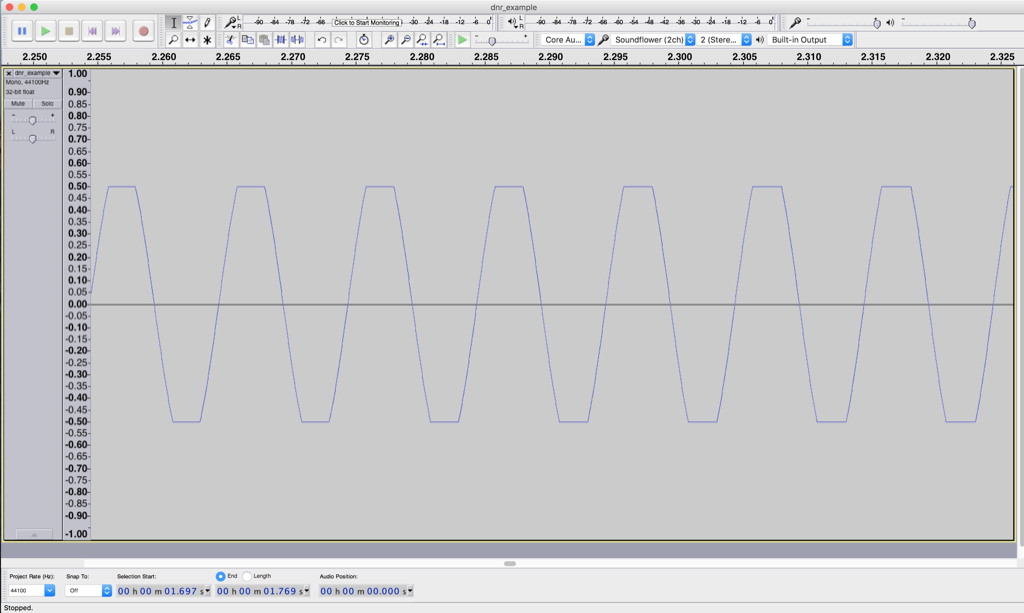
Fig 5: We have pushed our audio device too far by making the sine wave louder than it can go..


Figure 5 shows what’s happening at point “C” in Figure 2. Notice that this doesn’t really look like a sine wave any more – the top and bottom has been chopped off or “clipped”. This has happened because we are trying to make our audio device have an output level that is beyond its abilities. As the sine wave increases, the audio device follows along, until its output can go no higher, so it stops and holds that output level until the sine wave comes back down.

At the point, the noise is still very much lower in level than the signal – but we have caused a problem – the input is a sine wave, but the output is not. In other words, we have distorted the shape of the audio signal.

Note that distortion of an audio signal can take an infinite number of forms. The example here is symmetrical clipping of the signal – which is what many people mean when they say “distorted” – but don’t be fooled… “Distortion” means a whole lot more than this.

So, there’s a moral to the story-thus-far: every audio device has an upper and lower limit for audio level. (Yes, even a wire has a lower limit set by thermal noise in the electrons it contains and an upper limit set by the amount of current it will pass through before melting.) That range of dynamics or dynamic range is (hopefully) big – in other words, the noise floor (the quietest sound) should be MUCH MUCH quieter than a just-clipped signal (the loudest sound). Because this difference is so big, we’ll measure it in decibels (for kind of the same reason it doesn’t make sense to measure the speed of a car in millimetres per year, or the area of Canada in square micrometres.)

We can also represent these two numbers (the level of the noise floor and the level of a just-clipped signal) as two values relative to each other. Let’s say, for the purposes of keeping the numbers pretty, that we have an audio device that just so happens to have a level of noise floor that it 100 dB below the level of a signal that just starts to clip at its output.

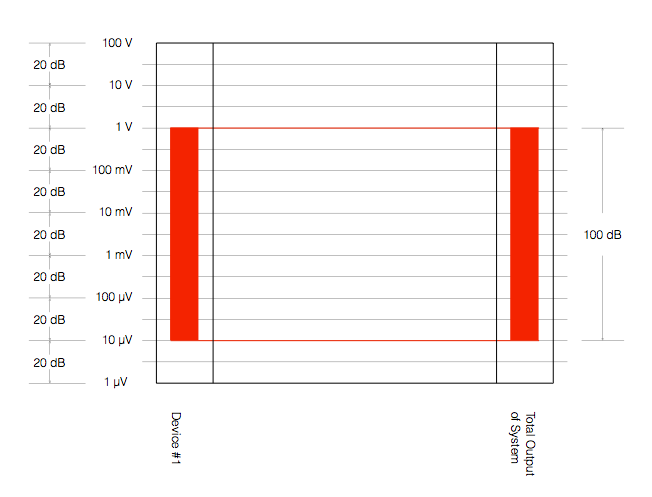
Fig 6: Another way to represent the dynamic range of an audio device or system.

Figure 6 shows one way to represent this. The red vertical rectangle on the left shows the range of audio levels that is possible to achieve with “Device #1”. It has a noise floor of 10 µV and will clip at 1 V  – therefore it has a total dynamic range of 100 dB. Since, in this example, Device #1 is the only device in our audio system, the dynamic range of the entire system is also 100 dB (shown as the ride rectangle on the right) – since the entire system consists of just one device.

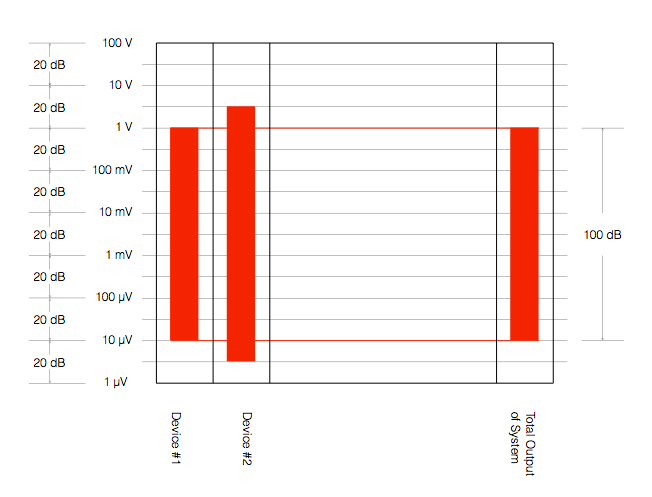
What happens if we add another device in our chain? Let’s say, for example, that we put a second device in the system after Device #1. Let’s also say that Device #2 can play louder signals than Device #1 – and it has a lower noise floor, as is shown in Figure 7.

Fig 7: An audio system with two devices in a chain. The second device has a wider dynamic range than the first.

There are three things to notice in Figure 7:

  1. Device #2 can play louder than Device #1
  2. Device #2 has a lower noise floor than Device #1
  3. Therefore Device #2 has a wider dynamic range than Device #1
  4. The dynamic range of the total system is set by Device #1, since it is not limited by Device #2.

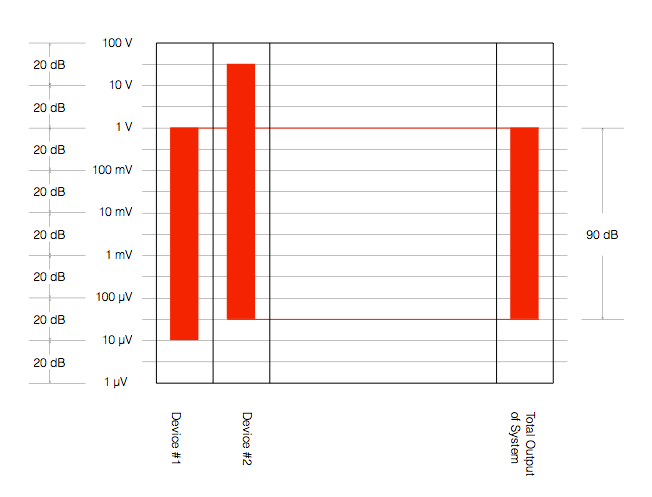
However, we should be careful here. The fact that Device #2 has a wider dynamic range than Device #1 does not automatically mean that the total system has a dynamic range that is defined by the “weakest link” (Device #1). Look at Figure 8, for example.

Fig 8: A system with the same devices as are shown in Figure 7, but the total maximum dynamic range has dropped by 10 dB.

In Figure 8, we have not changed the devices – Device #2 still has a 120 dB dynamic range – but the Total System has a dynamic range that is reduced to 90 dB because of the alignment of levels in the system. Now, the noise floor of the system comes from Device #2 because we have not been careful about setting up the alignment of the levels of the devices.

Another way to think of this is that Device #2 is set up with the expectation that it will go much louder – but it doesn’t because of the limitations of Device #1. Because of that incorrect setup, the noise that you hear at the output of the system comes from Device #2.

An example of a system like the one shown in Figure 8 is when you connect a low-end audio device’s output (say, the headphone jack of your computer or phone) to a better device that is built to handle a much higher input level. The possible result is that the “headroom” (the amount by which the better device can handle higher level signals) is wasted (since the lower-quality device doesn’t deliver those high levels) and the total system has a degraded dynamic range.


So, the moral of the story here so far is that you should always try to ensure that your system’s dynamic range is not limited by the way it’s connected.

For example, if you have a system that has an adjustable input sensitivity, you should set it so that the input is not expecting more level than the device that’s feeding it can deliver. If your output device can only deliver 2 V RMS maximum, it my not be helpful for the thing it’s connected to to be “expecting” to see 4 V coming from it. If this is the way things are setup, then you might be “throwing away” 6 dB of dynamic range (because 4 V is 6 dB louder than 2 V).

Generally, there are two good “rules of thumb” that can help you here.

The first one is to try to align all your maximum levels as much as possible. So, as in the last example above, if your source device has a maximum output of 2.0 V RMS, set the input sensitivity of your next device to “expect” 2.0 V RMS maximum. This will make the tops of the red rectangles all align, and the dynamic range will be defined by the worst link in the chain instead of the way the devices are connected.

The second rule of thumb is to put as much gain as possible at the beginning of the chain. This is particularly true if you’re working in a recording studio. This is because every piece of gear contributes noise to the audio signal. If you put all the gain at the end of the chain, then you are making the signal louder, but you’re also making all of the noise from all of the gear “upstream” louder as well. If you put all the gain at the beginning of the chain, then you might wind up in a situation where you have to turn DOWN the signal through the chain, those reducing your signal to the correct level, and bringing the noise floor down with it. (Two obvious examples of this are using lots of gain at your mic preamp in a recording studio, or getting a RIAA preamp with a healthy output level for your turntable…) Another good example of this is the case where you have a headphone output from your phone connected to the aux input of a small stereo system. You want to turn up the phone as much as possible, and turn down the stereo volume. If you do the opposite, you’ll be using the stereo system to turn up the noise output of your phone.

One last thing: connecting devices digitally will probably help with your dynamic range, however, this is not necessarily always true. You certainly cannot make an automatic conclusion that a digital connection is better in all respects than an analogue one – or vice versa. For example, in some cases, the errors in a sampling rate converter at a digital input stage may result in a higher level of “noise” floor than the analogue noise caused by an analogue-to-digital converter on the same device. Or, it might be that these two inputs have the same measurable noise floor, but those two noises have very different characteristics. Typically analogue noise is program independent – meaning it’s unrelated to the signal – whereas poorly-implemented digital transmission and processing typically results in program-dependent errors. These can be interpreted by the listener as being part of the signal (more like distortion artefacts than noise) and therefore will be different for different signals. To make things even more confusing, different digital inputs on the same device (e.g. Optical, S/P-DIF, and HDMI) may (or may not) behave differently – so any decisions you make about one of them may (or may not) be applicable to the others…


BeoPlay H9 Headphone Reviews

I was part of the development team, and one of the two persons who decided on the final sound design (aka tonal balance) of the B&O Play H9 headphones. So, I’m happy to share some of the blame for some of the comments (at least on the sound quality) from the reviews.

Because they were sound designed primarily for portable use, the H9’s have a intentional emphasis on the lower frequency band in their tuning – although a little less than would be done on a passive pair of headphones due to the noise cancelling.


WhistleOut

“As you’d expect with a pair of $799 headphones, the Beoplay H9s sound amazing. In short, they offer a balanced, warm, detailed sound that isn’t quite as bass driven as what you might get from a pair of Bose or Beats. That’s not to say bass is missing, just more of a healthy medium between a more sterile studio pair of headphones and big bass alternatives. As a result, you end up with a nuanced profile that helps bring your music to life without compromising a song’s mix.”


headphonereview.com

“Of course, a great design and high comfort level don’t really matter if they’re let down by a bad sound quality. Thankfully, on the closed-back B&O Beoplay H9’s, the sound quality is pretty damn great.

Now, let’s make something clear before we talk about the sound — these headphones are not built for the studio. They’re consumer headphones, and as such they aren’t aimed at providing the flattes (sic.) frequency response possible, but rather at coloring the music in a way that fits most of today’s music. And that’s something they do very well.”


Lyd & Billede

“Særligt musik optaget i flere lag demonstrerer præcis hvor godt H9 spiller. I billigere hovedtelefoner vil denne type musik ofte resultere i et mudret lydbillede. Med et sæt af høj kvalitet som H9, kan du hele vejen igennem adskille instrumenter og stemmer fra hinanden.”

(Music recorded in multiple layers demonstrates exactly how well the H9’s play. In cheaper headphones, this type of music often result in a muddy sound. With a set with high quality like the H9’s, you can easily separate instruments and voices from each other.)


Probability and Death

Inspired by a conversation with Jamie Angus following my last posting, I did some digging into the probability density functions (PDF’s) of a bunch of test tracks that I use for tuning and testing loudspeakers.

The plots below are the results of this analysis.

Some explanations, to start…

A PDF of an audio signal is a measurement of the probability that a given level (or sample value) will happen in a given period of time. In the case of the plots below, I just counted each time every sample value the 16-bit range of possibilities (from -32768 to 32767, if you think in binary – from -1 to +1-2^-15 in steps of 2^-15 if you prefer to think in floating point decimal) occurred in an entire track (usually the full tune).  That’s plotted below as the gray “curve” in a linear world.

I converted the linear levels to “instantaneous” (sample-by-sample) dB values (since they’re instantaneous, they’re not in dB FS – but let’s not get into that discussion), but kept the positive and negative polarities of the linear values separate. Those are plotted as the red (negative values, expressed in dB) and black (positive values, expressed in dB). I cheated a little here, since a linear value of “0” isn’t really -96 dB – it’s -infinity dB… but, except for that one value, everything else is plotted correctly.

When I did these analyses, I noticed lots of sample values in lots of tracks that had no probability of ever occurring. Sometimes, this is just because the track is mastered low in level – so the “upper” sample values are not used. Sometimes, there are “dead values” well inside the range. This likely points to an error in the converter and/or digital mixing and/or mastering equipment.

Finally, I made a plot of the number of “dead” sample values per 128 sample values in 512 blocks (65536/128 = 512). That’s the red line above the gray one.


Some other things are noticeable in the plots, but we’ll take those as they come, below…

Note that I will not reveal the names of the tracks I used, since it’s not my purpose here to make anyone look bad. It’s to look at the differences between different recordings, types, and even equipment… Don’t ask which recordings I used.


This plot of an orchestral recording (“orchestral8”) looks fairly normal. As Jamie pointed out in the last posting, the distribution looks to be Laplacian. There is a big spike at the “0” mark – due to the silence at the beginning and end of the track. As can be seen, the track peaks around a linear value of about +/- 0.2 or about -14 dB below full scale. So, the sample values above 0.2 (or below -0.2) are unused. This can be seen in the blue lines (comprised of a blue dot at each sample value) in the top plot, and the red line at 128 (the number of “dead values” per 128 possible values) in the bottom plot.


The “solo inst3” is very similar in behaviour, even though it’s a completely different recording. This one is of a solo stringed instrument in a fairly reverberant space. Notice that its basic characteristics are very similar to those shown in “orchestra8”.


The “voice3” recording is also similar. It’s a little interesting in all three of these recordings to note the transition between levels where there are no dead sample values (around the “0” line) and levels where there are nothing but dead values. In this area (in the “voice3” recording, for example, around +/- 0.3, there are sample values that are used – but others that are skipped. This is because the track has a reasonably large crest factor (the ratio between the peak and the RMS of the track) – in other words, it has noticeable peaks. When the levels peak positively or negatively, there will be some values skipped along the way…

Although these are very different recordings of different instruments in different spaces on different labels – they all appear to have some characteristics in common.

  • They very likely had little or no compression applied
  • They don’t use the entire dynamic range available. This is not necessarily a bad thing, since it could be that each of those tracks was part of a larger collection, and its level made sense in the context of the entire album.

Now let’s look at another acoustic recording that was done with four microphones, and no compression – but possibly some small processing done in the mastering.

Obviously the “orchestra6” recording has something strange going on. It almost looks as though something in the recording chain “favoured” every second sample value – hence the zig-zag pattern in the probability density function. Note that this was not a small thing – the difference in how much the sample values are “preferred” is by a factor of 10.

What could cause this? This is difficult to say by just looking at this plot, since we have to remember that these values are complied using the entire track. So, for example, three possibilities that come immediately to mind are:

  • for some strange reason, the analogue-to-digital converter, or one of the DSP blocks in the mastering console “liked” every second sample value 10 times more than the others
  • for some other strange reason, the original ADC only used every second sample value – and one 10th of the track was edited together (or “spliced”) from a different take that needed extra gain.
  • something else

To be honest, I think that the first or third of these is more likely than the second – but either way, it certainly looks weird…

This track of another solo instrument (hence “solo inst1”) is a little different – but not terribly so. There is a little flatter behaviour in the upper plot, which corresponds to a more convex “umbrella” shape in the lower one – but generally, this is nothing serious to raise any eyebrows in my opinion… It probably indicates some minor compression.

Let’s look at some other tracks with compression…


“testtracks4” and “pop21” both have indications of compression in the flat response of the top plots and the convex  shape of the lower ones. The “pop21” track has the added indication of clipping – the spikes on the sides of the plots. This indicates that we have an unusual number of samples with values of either -1 or +1. Note, however, that we do not move smoothly into that clipping – it was what we call “hard clipping”, since the values just before the +/- 1 values show no indication of a smooth transition to the spike.

The “bass20” track is interesting, not only because of the compression, but the apparent lack of silence (notice there is no spike around the “0” line). This is because this track is from a live album that is intended for gapless playback – and I just grabbed the track. So, it starts and stops with a hard transition to and from audience sound – there is no fade in or fade out.


The “bass2” track also has the spikes on the ends, showing the clipping – but, as you can see, the plots (particularly the linear plot on the bottom) starts to slope upwards just before the spike – indicating some kind of soft clipping or a peak limiting function was used to shape the envelope.

The “bass15” track is interesting, since it has the characteristic spikes on the sides that look a little like clipping (especially if you only look at the upper plot) but, as can be seen in the bottom plot, these are not at values of -1 or +1. So, this would indicate either that something else in the recording chain clipped – and then was smoothed out and reduced in level a little later in the process – or we’re looking at some kind of interesting soft-clipping processor that keeps a little “bump” in the envelope of the signal above the “clipping” area.


Now let’s look at some really strange ones…

I have no explanation for the plot in “testtracks6”. I can’t understand what would cause that bump only in the negative portion of the signal around -70 dB FS. My guess is that this is some sort of weird watermark that is inserted – but this is really stretching my imagination…  Of course, if could just be that something in the processing chain is just broken… Anyone reading this have any good ideas? Seems to me that I should do a little more digging into this track to see what’s going on around those sample values…

The “pop11” track is an example of a recording that was probably done on early digital recording gear – or an early digital mastering console. As can be seen in both plots, there are missing sample values across the entire range of possible values.

One possible explanation of this is that this is a digital recording that had gain applied to it using a processor that did not use dither. This would cause the signal to not use every second sample value (or every third or fourth – depending on the gain applied). It’s also possible that it was processed or recorded using a device that had a “stuck bit”. I’ll do some simulations to show what that would look like and publish the plots in a future posting.

Note that the small “spikes” of peak limiting (looking a little like clipping on a small scale) are visible in the bottom plot – but they’re very small…

Some more recordings with strangely dead sample values are shown below. Note that some of these are very recent recordings – so the “early digital gear” excuse doesn’t hold up for all of them…

So, something is obviously broken in all four of these examples… Please don’t ask me how to explain them. The only thing I can do is to suspect that at least one piece of gear and/or software that was used in the late stages of the process was really broken… I just hope that, whatever gear/software it was, it didn’t cost a lot of money….

An interesting pair of examples are shown below…

The “jazz1” and “jazz2” recordings both come from the same album released by a small jazz ensemble. Notice that, although they are different tracks, they have similar PDF’s, seen in the “spikes” through the upper plots. It seems that there is something weird going on in the mastering console (or software) in this case – or perhaps the final mixing console…


The “speech4” track has obvious “favouring” of alternate sample values – but this was a track that was recorded on a very early DAT machine about 35 years ago… To be honest, knowing what I know about using an identical model DAT recorded, I’m surprised this looks as good as it does…


I’ll just put in a bunch more plots without comment – just to let you see some of the variety that shows up with this kind of analysis.


Post-script

This posting has a Part 2 that you’ll find here, and a Part 3 that you’ll find here.