
Year: 2014
Have a listen to this!
I just accidentally stumbled on this recording by the michael wollny trio. You might not like their music, but you have to like the recording! (I like ’em both…)
We are not amused
If you don’t own a 2011-model Apple MacBook Pro with a problem with it’s discrete GPU, then you should probably stop reading right now and go look at a video on wimp.com instead. This one is pretty funny.
The backstory
I confess. I’m a Macintosh person. In fact, I’m one of those annoying Mac people who makes fun of people who own Windows machines. I’ve been a Mac person since about 1990 when I bought my first computer – a Mac Classic. In those days, if you used a computer for MIDI, you had to get a Mac because Windows machines never really knew what time it was. Not precisely or accurately enough to be used to play a MIDI file. And, once audio editing came along (not ProTools – the GOOD stuff, like Sonic Solutions) it was Macintosh or nothing because Windows people would look at you funnily when you talked about SCSI drives.
Last week, though, my evangelism came to a crashing halt when my trusty 2-year old MacBook Pro suddenly went bezerk. It started with my son booting up Minecraft, which tried to change the screen resolution. The result was a large black vertical stripe down the middle of the screen with the left side of the desktop on the right side of the screen, wrapping around to the left side. “Dad, there’s something wrong with the computer…” he said. “No problem” I said, “let’s just reboot it.”
Rebooted the computer, got the pretty grey Apple logo, then just a blank grey screen. Tried again, same result, Tried again, same result… Uh oh… It’s only been a couple of weeks since the last backup, so I haven’t lost too much data – but the time it’s going to take to get up and running again… Guh.
So, I started Googling for some solutions about what to do with a stuck grey screen. Apple has a friendly page about this – try this, try that… If that doesn’t work, try something else. If that doesn’t work, you probably have to reformat your drive. Guh.
Then I Googled some more and found out that my symptoms were not unusual. In fact, it wasn’t long before I came across a news article and another one and a very long discussion thread on the Apple Users Forum with over 1,000,000 views and an online petition (currently standing at over 13,000 signatures) – where everybody was talking about me – or at least my problem with my Mac.
Turns out that my hard drive is fine. My data is all intact. What is NOT fine is my discrete Graphic Processor Unit or GPU. Apparently, MacBook Pro’s made in 2011 (mine is a late-2011 model) are dropping like flies. And, interestingly, the whole mess was sort of predicted by this site when they did a tear-down of the computer back when it first came out. As they said back then, in talking about the GPU: “Holy thermal paste! Time will tell if the gobs of thermal paste applied to the CPU and GPU will cause overheating issues down the road.” and “Absurd amounts of pre-applied thermal paste may cause problems down the road.”
Okay, so the MBP’s from 2011 have a problem. This is forgivable – even engineers make mistakes sometimes. Manufacturing or design defects are not surprising in this day and age. However, what astounds me is that Apple is completely denying that this issue exists.The stories being told tell tales of people forking out over $300 to get a logic board replacement, only to have it fail within a couple of months. Another $300 logic board, also fails… Apparently, Apple is replacing faulty logic boards with “refurbished” boards that have exactly the same problem as the one getting taken out of the machine. So it seems that there is a large circulation of faulty circuit boards getting put into machines at $300 a pop. This means that I won’t be sending my computer off to get a “new” logic board any time soon.
Solution #1
Other people tell epic tales of a great little utility called gfxCardStatus which allows you to force the computer into using either the discrete GPU or the integrated GPU.
So, following some interactions on the Interweb, I tried rebooting my computer over and over and over and over (say, about 50 times, but it felt like a million…) until it worked! installed gfxCardStatus and locked it into the integrated GPU. Life was great. A little slow, but great. At least my computer was up and running again. Long enough to do a backup of EVERYTHING – just in case.
Sadly, the party didn’t last long. 4 days later, the machine crashed. 50 reboots later, it was running again – this time for only 3 days. And when it crashed that time, things got worse. The machine did a complete shutdown, and restarting resulted in another complete shutdown immediately after seeing a stripy grey Apple sign.
Solution #2
So, I went to plan #2 – trying to disable the discrete GPU permanently by moving the .kext, .plugin and .bundle files for the GPU. I did this following the instructions at this page – which I’ve repeated below. If you’re reading this because you have the same problem as I do, and you try this, don’t hold me responsible if you break your Mac using this technique. It was a last-ditch attempt for me to revive my machine – and so far so good…
- Start up in Single User Mode (hold down CMD-S immediately after startup)
- Get ready to move System files by typing the text mount -uw /
- Create a directory to move the Extension files into by typing mkdir /System/Library/DisabledExtensions
- Move the files by typing mv /System/Library/Extensions/ATI* /System/Library/DisabledExtensions
- Type exit
- You might need to type exit again to reboot.
This still required that I do a hard shutdown (holding the power button for 5 seconds) and restart 4 or 5 times – but here I am, once again, typing on my computer that, yesterday, was a brick. Let’s hope that this solution sticks.
However, what would be REALLY nice is if Apple were to own up to this one, and call up all those people like me who own a defective machine, and tell us that they’re going to fix it for free. Or at least fix it for a reasonable cost with a solution that actually works. Either way, I might regain a little faith in a company that I used to trust.
A little more information, in case you’re reading this because you have a similar problem: I have a 15″ late-2011 MacBook Pro with an AMD Radeon HD 6750M discrete GPU. I haven’t done anything to it (like replace the HD or add extra RAM).
For more information about this, see http://action.mbp2011.com.
I’m so confused…

Three decades of Music Distribution

Check this link for an interesting way to visualise how CD swallowed up cassettes, and how, in 2008, music distribution reached its pinnacle when 11.1% of the market was comprised of ringtone sales… Sigh…
Bang & Olufsen BeoVision Avant Reviews

I was responsible for the final sound design (aka tonal balance) of the loudspeakers built into the BeoVision Avant. So, I’m happy to share some of the blame for some of the comments (at least on the sound quality) from the reviews.
from Home Cinema Choice magazine
“Where the Avant really gets space-age, though, is with … its ability to drive 21 audio channels ”
“This effort by the integrated speakers , together with its unprecedented audio flexibility,makes the Avant the finest sounding TV I’ve ever heard.”
from TrustedReviews.com
“Even a high-end sound bar would struggle to match the gorgeous finesse the Avant combines with its raw power. The speakers reproduce soundtrack subtleties more precisely and elegantly than any other TV we’ve heard. And they do so no matter how dense the soundstage becomes, and without so much as a hint of treble harshness.”
“Then there’s that rear-mounted subwoofer. We had worried that the way this angled subwoofer fires up and out through an actually quite narrow vent could cause boominess or distortion, but not a bit of it. Instead very impressive and well-rounded amounts of bass meld immaculately into the bottom end of the wide mid-range delivered by those terrific left, right and centre speakers.”
from flatpanelshd.com
“Compared to all other TVs on the market (non-B&O) there is no competition. Sound is so much better. However, we also have to point out that the TV did not receive the best conditions for a proper audio demonstration.“
The best thing I learned today

Bang & Olufsen BeoLab 18 Reviews

I was part of the development team, and one of the two persons who decided on the final sound design (aka tonal balance) of the B&O BeoLab 18 loudspeakers. So, I’m happy to share some of the blame for some of the comments (at least on the sound quality) from the reviews.
Bernard Dickinson at Live Magazines said:
“The sound reproduction is flawless”
Lyd & Billede’s August 2014 review said
“Lydkvaliteten er rigtig god med en åben, distinkt og fyldig gengivelse, som ikke gør højopløste lydformater til skamme.” (The sound quality is very good with an open, clear and detailed reproduction, which do not put high-resolution audio formats to shame.)
and ”Stemmerne er lige klare og tydelige, hvad enten vi sidder lige i smørhullet eller befinder os langt ude i siden. Det er faktisk ret usædvanligt og gør, at BeoLab 18 egner sig lige godt til både baggrundsmusik og aktiv lytning” (The voices are crisp and clear, whether we are sitting right in the sweet spot or far off to the side. It’s actually quite unusual and makes the BeoLab 18 equally suited for both background music and active listening)
B&O Tech: Combinatorics
#26 in a series of articles about the technology behind Bang & Olufsen loudspeakers
I occasionally drop in to read and comment on the fora at www.beoworld.org. This is a group of Bang & Olufsen enthusiasts who, for the most part, are a great bunch of people, are very supportive of the brand (and yet, like any good family member, are not afraid to offer constructive criticism when it’s warranted…) Anyways, during one discussion about Speaker Groups in the BeoVision Avant, BeoVision 11, BeoPLay V1 and BeoSystem 4, the following question came up:
Speaker Groups
Would be interesting to know how many different ‘Speaker Group constellations’ you actually could make with the new engine. Of course you are limited to 10, if you want to save them. But I guess that should be enough for most of us.
This got me thinking about exactly how many possible combinations of parameters there are in a single Speaker Group in our video products. As a result, I answered with the response copied-and-pasted below:
Multiply the number of audio channels you have (internal + external) by 17 (the total number of possible speaker roles not including subwoofers, but including NONE as an option in in case you want to use a subset of your loudspeakers) or 22 (the total number of possible speaker roles including subwoofers) to get the total number of Loudspeaker Constellations.
If you want to include Speaker Level and Speaker Distance, then you will have to multiply the previous result by 301 (possible distances for each loudspeaker) and multiply again by 61 (the total number of Speaker Levels) to get the total number of possible Configurations.
This means:
If you have a BeoPlay V1 (with 2 internal + 6 external outputs) the answers are
- 136 constellations without a subwoofer, or
- 176 constellations with subwoofers, and
- a maximum of 3,231,536 possible Speaker Groups Configurations (including Levels and Distances)
If you have a BeoVision 11 without Wireless (2+10 channels), then the totals are
- 204 constellations without a subwoofer, or
- 264 constellations with subwoofers, and
- 4,847,304 possible Speaker Groups Configurations (including Levels and Distances)
If you have a BeoVision 11 with Wireless (2+10+8 channels), then the totals are
- 340 constellations without a subwoofer, or
- 440 constellations with subwoofers, and
- 8,078,840 possible Speaker Groups Configurations (including Levels and Distances)
If you have a BeoVision Avant (3+10+8 channels), then the totals are
- 357 constellations without a subwoofer, or
- 462 constellations with subwoofers, and
- 8,482,782 possible Speaker Groups Configurations (including Levels and Distances)
Note that these numbers are FOR EACH SPEAKER GROUP. So you can multiply each of those by 10 (for the number of Speaker Groups you have available in your TV). The reader is left to do this math on his/her own.
Note as well that I have not included the Speaker Roles MIX LEFT, MIX RIGHT – for those of you who are using your Speaker Groups to make headphone outputs – you know who you are… ;-)
Note as well that I have not included the possibilities for the Bass Management control.
Sound Modes
This also got me thinking about the total number of possible combinations of settings there are for the Sound Modes in the same products. In order to calculate this, you start with the list of the parameters and their possible values which is listed below:
- Frequency Tilt: 21
- Sound Enhance: 21
- Speech Enhance: 11
- Loudness On/Off: 2
- Bass Mgt On/Off: 2
- Balance: 21
- Fader: 21
- Dynamics (off, med, max): 3
- Listening Style: 2
- LFE Input on/off: 2
- Loudness Bass: 13
- Loudness Treble: 13
- Spatial Processing: 3
- Spatial Surround: 11
- Spatial Height: 11
- Spatial Stage Width: 11
- Spatial Envelopment: 11
- Clip Protection On/Off: 2
Multiply all those together and you get 1,524,473,211,092,832 different possible combinations for the parameters in a Sound Mode.
Note that this does not include the global Bass and Treble controls which are not part of the Sound Mode parameters.
However, it’s slightly misleading, since some parameters don’t work in some settings of other parameters. For example:
All four Spatial Controls are disabled when the Spatial Processing is set to either “1:1” or “downmix” – so that takes away 29282 combinations.
If Loudness is set to Off, then the Loudness Bass and Loudness Treble are irrelevant – so that takes away 169 combinations.
So, that reduces the total to only 1,524,473,211,063,381 total possible parameter configurations for a single Sound Mode.
Finally, this calculation assumes that you have all output Speaker Roles in use. For example, if you don’t have any height loudspeakers, then the Spatial Height control won’t do anything useful.
If you’d like more information on what these mean, please check out the Technical Sound Guide for Bang & Olufsen video products downloadable from this page.
B&O Tech: Where great sound starts
#25 in a series of articles about the technology behind Bang & Olufsen loudspeakers
You’ve bought your loudspeakers, you’ve connected your player, your listening chair is in exactly the right place. You sit down, put on a new recording, and you don’t like how it sounds. So, the first question is “who can I blame!?”
Of course, you can blame your loudspeakers (or at least, the people that made them). You could blame the acoustical behaviour of your listening room (that could be expensive). You could blame the format that you chose when you bought the recording (was it 128 kbps MP3 or a CD?). Or, if you’re one of those kinds of people, you could blame the quality of the AC mains cable that provides the last meter of electrical current supply to your amplifier from the hydroelectric dam 3000 km away Or you could blame the people who made the recording.
In fact, if the recording quality is poor (whatever that might mean) then you can stop worrying about your loudspeakers and your room and everything else – they are not the weakest link in the chain.
So, this week, we’ll talk about who those people are that made your recording, how they did it, and what each of them was supposed to look after before someone put a CD on a shelf (or, if you’re a little more current, put a file on a website).
Recording Engineer
The recording engineer is the person you picture of when you think about a recording session. You have the musicians in the studio or the concert hall, singing and playing music. That sound travels to microphones that were set up by a Recording Engineer who then sits behind a mixing console (if you’re American – a “mixing desk” if you’re British) and fiddles with knobs obsessively.

There’s a small detail here that we should not overlook. Generally speaking, a “recording engineer” has to do two things that happen at different times in the process of making a recording. The first is called “tracking” and the second is called “mixing”.
Tracking
Normally, bands don’t like playing together – sometimes because they don’t even like to be in the same room as each other. Sometimes schedules just don’t work out. Sometimes the orchestra and the soloist can’t be in the same city at the same time.
In order to circumvent this problem, the musicians are recorded separately in a process called “tracking”. During tracking, each musician plays their part, with or without other members of the band or ensemble. For example, if you’re a rock band, the bass and the drummer usually arrive first, and they play their parts. In the old days, they would have been recorded to seaport tracks on a very wide (2″!) magnetic tape (hence the term “tracking”) where each instrument is recorded on a separate track. That way, the engineer has a separate recording of the kick drum and the snare drum and each tom-tom and each cymbal, and so on and so on. Nowadays, most people don’t record to magnetic tape because it’s too expensive. Instead, the tracks are recorded on a hard disc on a computer. However, the process is basically the same.
Once the bass player and the drummer are done, then the guitarist comes into the studio to record his or her parts while listening to the previously-recorded bass and drum parts over a pair of headphones. Then the singer comes in and listens to the bass, drums and guitar and sings along. Then the backup vocalists come in, and so on and so on, until everyone has recorded their part.
During the tracking, the recording engineer sets up and positions the microphones to get the optimal sound for each instrument. He or she will make sure that the gain that is applied to each of those microphones is correct – meaning that it’s recorded at a level that is high enough be mask the noise floor of the electronics and the recording medium, but not so high that it distorts. In the old days, this was difficult because the dynamic range of the recording system was quite small – so they had to stay quite close to the ceiling all the time – sometimes hitting it. Nowadays, it’s much easier, since the signal paths have much wider dynamic ranges so there’s more room for error.
In the case of a classical recording, it might be a little different for the musicians, but the technical side is essentially the same. For example, an orchestra will play (so you don’t bring in the trombone section first – everyone plays together) with a lot of microphones in the room. Each microphone will be recorded on its own individual track, just like with the rock band. The only difference is that everyone is playing at the same time.
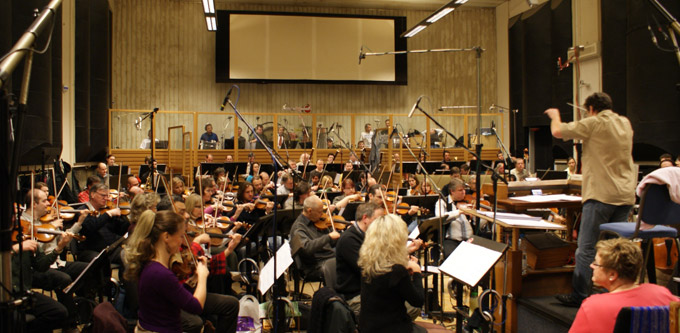
Once all the tracking is done the musicians are finished. They’ve all been captured, each on their own track that can be played back later in isolation (for example, you can listen to just the snare drum, or just the microphone above the woodwind section). Sometimes, they will even have played or sung their part more than once – so we have different versions or “takes” to choose from later. This means that there may be hundreds of tracks that all need to be mixed together (or perhaps just left out…) in order to make something that normal people can play on their stereo.
Mixing
Now that all the individual tracks are recorded, they have to be combined into a pretty package that can be easily delivered to the customers. This means that all of those individual tracks that have been recorded have to be assembled or “mixed” together into a version that has, say, only two channels – one for the left loudspeaker and one for the right loudspeaker. This is done by feeding each individual track to its own input on a mixing console and listening to them individually to see how they best fit together. This is called the “mixing” process. During this stage, basic decisions are made like “how loud should the vocals be relative to the guitars (and everything else)”. However, it’s a little more detailed than that. Each track will need its own processing or correction (maybe changing the equalisation on the snare drum – or altering the attack and decay of the bass guitar using a dynamic range compressor – or the level of the vocal recording is changed throughout the tune to compensate for the fact that the singer couldn’t stay the same distance from the microphone whilst singing…) that helps it to better fit into the final mix.

If you walk into the control room of a recording studio during a mixing session, you’d see that it looks almost exactly like a recording session – except that there are no musicians playing in the studio. This is because what you usually see on videos like this one is a tracking session – but the recording engineer usually does a “rough mix” during tracking – just to get a preliminary idea of how the puzzle will fit together during mixing.
Once the mixing session for the tune is finished, then you have a nearly-finished product. You at least have something that the musicians can take home to have a listen to see if they’re satisfied with the overall product so far.
Editing
In classical music there is an extra step that happens here. As I said above, with classical recordings, it’s not unusual for all the musicians to play in the same room at the same time when the tracking is happening. However, it is unusual that they are able to play all the way through the piece without making any mistakes or having some small issues that they want to fix. So, usually, in a classical recording, the musicians will play through the piece (or the movement) all the way through 2 or 3 times. While that happens, a Recording Producer is sitting in the control room, listening and making notes on a copy of the score. Each time there is a mistake, the producer makes a note of it – usually with a red make indicating the Take Number in which the mistake was made. If, after 2 or 3 full takes of the piece, there are points in the piece that have not been played correctly, then they go back and fix small bits. The ensemble will be asked to play, say 5 bars leading up to the point that needs fixing – and to continue playing for another 5 bars or so.
Later, those different takes (either full recordings, or bits and pieces) will be cut and spliced together in a process called editing. In the old days, this was done using a razor blade to cut the magnetic tape and stick it back together. For example, if you listen to some of Glen Gould’s recordings, you can hear the piano playing along, but the tape hiss changes suddenly in the background noise. This is the result of a splice between two different recordings – probably made on different days or with different brands of tape. Nowadays, the “splicing” is done on a computer where you fade out of one take and fade into another gradually over 10 ms or so.

If the editing was perfect, then you’ll never hear that it happened. Sometimes, however, it’s possible to hear the splice. For example, listen to this recording and listen to the overall level and general timbre of the piano. It changes to a quieter, duller sound from about 0′ 27″ to about 0´ 31″. This is a rather obvious tape splice to a different recording than the rest of the track.
Mastering Engineer
The final stage of creating a recording is performed by a Mastering Engineer in a mastering studio. This person gets the (theoretically…) “finished” product and makes it better. He or she will sit in a room that has very little gear in it, listening to the mixed song to hear if there are any small things that need fixing. For example, perhaps the overall timbre of the tune needs a little brightening or some control of the dynamic range.
Another basic role of the mastering engineer is to make sure that all of the tracks on a single album sound about the same level – since you don’t want people sitting at home fiddling with the volume knob from tune to tune.
When the mastering engineer is done, and the various other people have approved the final product, then the recording is finished. All that is left to do is to send the master to a plant to be pressed as a CD – or uploaded to the iTunes server – or whatever.

In other words the Mastering Engineer is the last person to make decisions about how a recording should sound before you get it.
This is why, when I’m talking to visitors, I say that our goal at Bang & Olufsen is to build loudspeakers that perform so that you, in your listening room, hear what the mastering engineer heard – because the ultimate reference of how the recording should sound is what it sounded like in the mastering studio.
Appendicies
What’s a producer?
The title of Recording Producer means different things for different projects. Sometimes, it’s the person with the money who hires everyone for the recording.
Sometimes (usually in a pop recording) it’s the person sitting in the control room next to the recording engineer who helps the band with the arrangement – suggesting where to put a guitar solo or where to add backup vocals. Some pop producers will even do good ol’ fashioned music arrangements.
A producer for a classical recording usually acts as an extra set of ears for the musicians through the recording process. This person will also sit with the recording engineer in the control room, following the score to ensure that all sections of the piece have been captured to the satisfaction of the performers. He or she may also make suggestions about overall musical issues like tempi, phrasing, interpretation and so on.
But what about film?
The basic procedure for film mixing is the same – however, the “mixing engineer” in a film world is called a “re-recording engineer”. The work is similar, but the name is changed.
So that’s a “Tonmeister”?
A tonmeister is a person who can act simultaneously as a Recording Engineer and a Recording Producer. It’s a person who has been trained to be equally competent in issues about music (typically, tonmeisters are also musicians), acoustics, electronics, as well as recording and studio techniques.