Category: Analysis
Phase vs Polarity
I know that language evolves. I know that a dictionary is a record of how we use words; not an arbiter of how words should be used. However, I also believe very firmly that if you don’t use words correctly, then you won’t be saying what you mean, and therefore you can be misconstrued.
One of the more common phrases that you’ll hear audio people use is “out of phase” when they mean “180º out of phase” or possibly even “opposite polarity”. I recently heard someone I work with say “out of phase” and I corrected them and said “you mean ‘opposite polarity'” and so a discussion began around the question of whether “180º out of phase” and “opposite polarity” can possibly result in two different things, or whether they’re interchangeable.
Let’s start by talking about what “phase” is. When you look at a sine wave, you’re essentially looking at a two-dimensional view of a three-dimensional shape. I’ve talked about this a lot in two other postings: this one and this one. However, the short form goes something like “Look at a coil spring from the side and it will look like a sine wave.” A coil is a two-dimensional circle that has been stretched in the third dimension so that when you rotate 360º, you wind up back where you started in the first two dimensions, but not the third. When you look at that coil from the side, the circular rotation (say, in degrees) looks like a change in height.
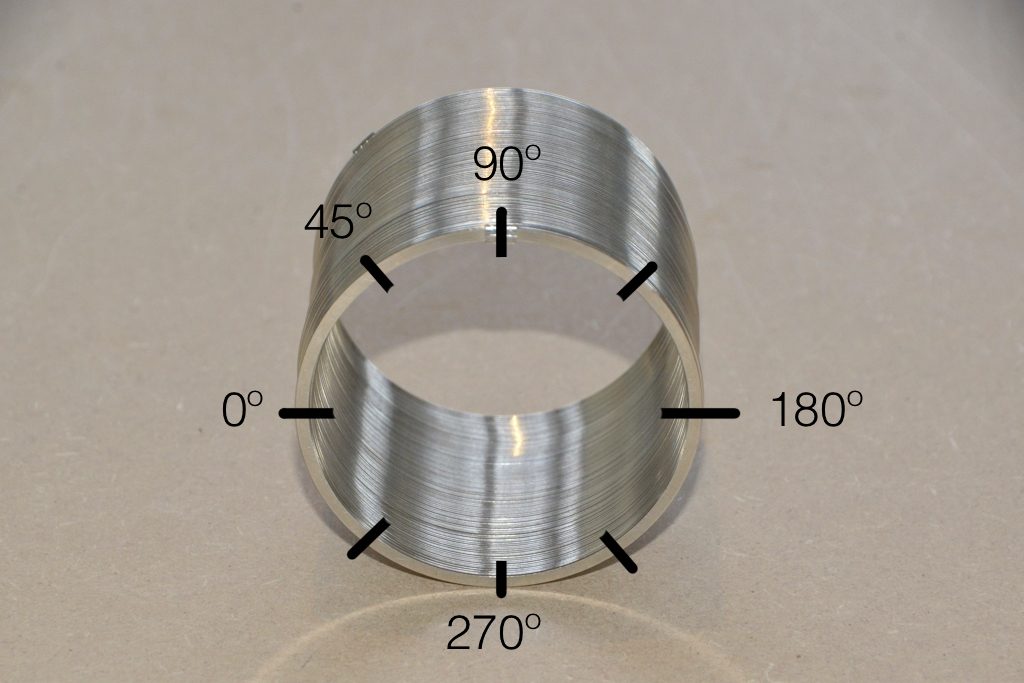
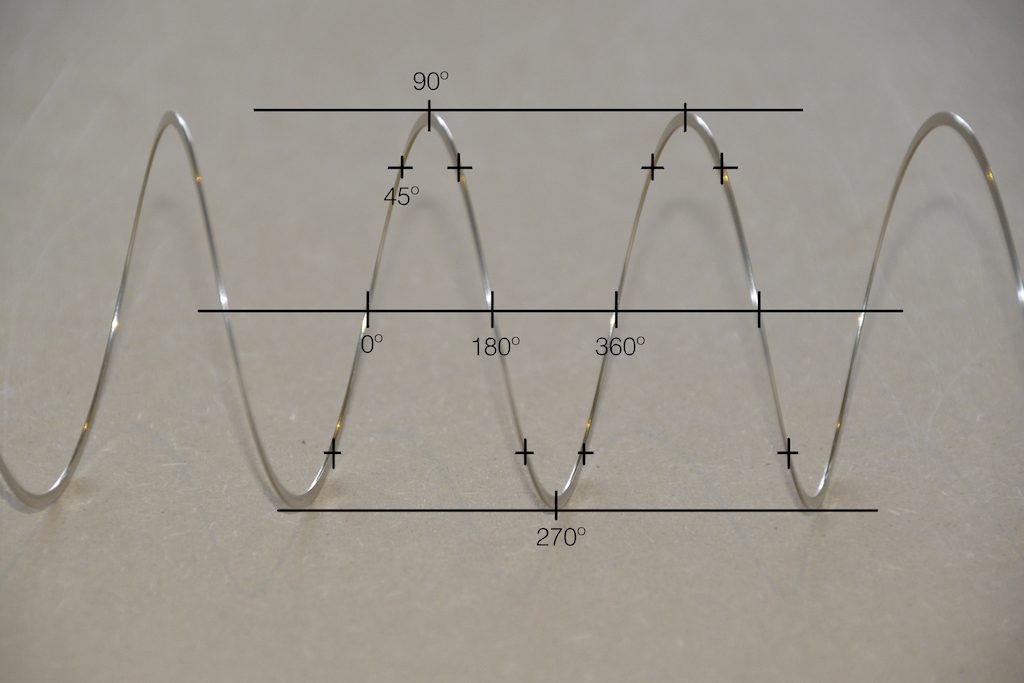
Notice in the two photos above how the rotation of the circle, when viewed from the side, looks only like a change in height related to the rotation in degrees.
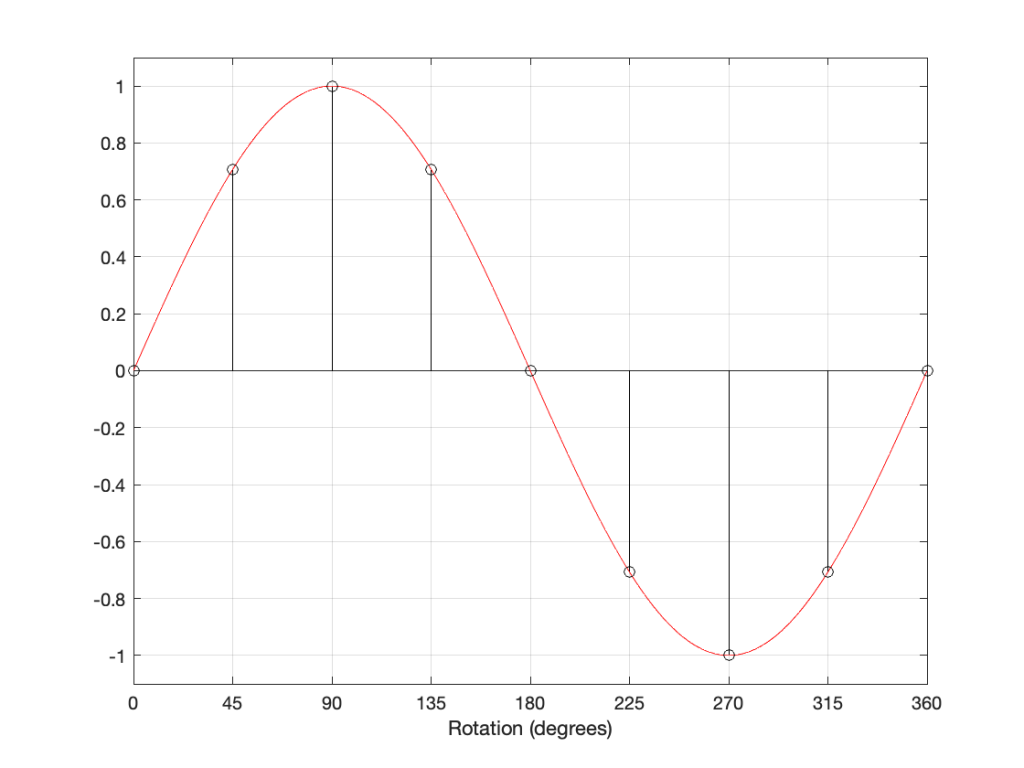
The figure above is a classic representation of a sine wave with a peak amplitude of 1, and as you can see there, it’s essentially the same as the photo of the Slinky. In fact, you get used to seeing sine waves as springs-viewed-from-the-side if you force yourself to think of it that way.
Now let’s look at the same sine wave, but we’ll start at a different place in the rotation.
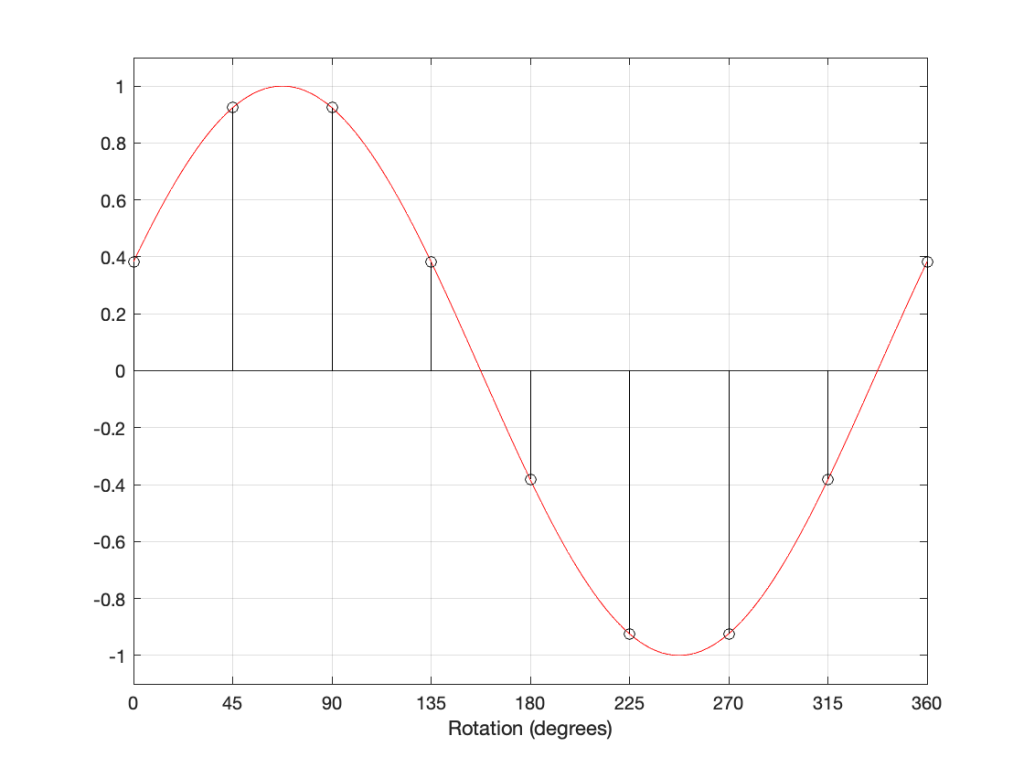
The figure above shows a sine wave whose rotation has been delayed by some number of degrees (22.5º, to be precisely accurate).
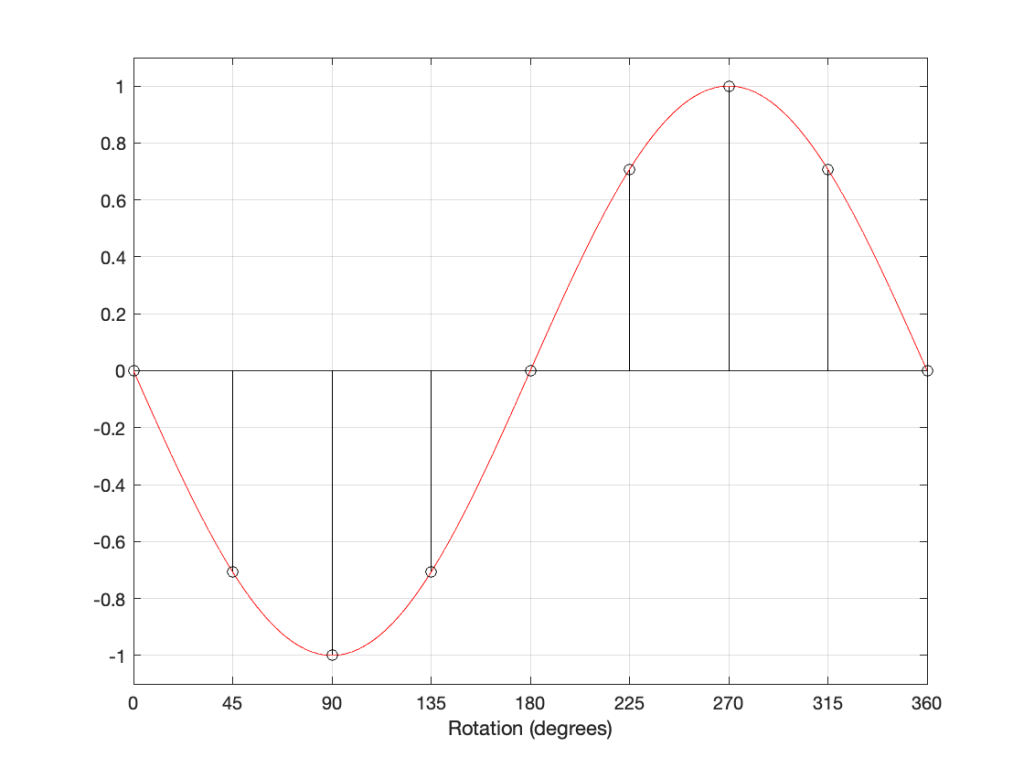
If I delay the start of the sine wave by 180 degrees instead, it looks like Figure 5..
However, if I take the sine wave and multiply each value by -1 (inverting the polarity) then it looks like this:
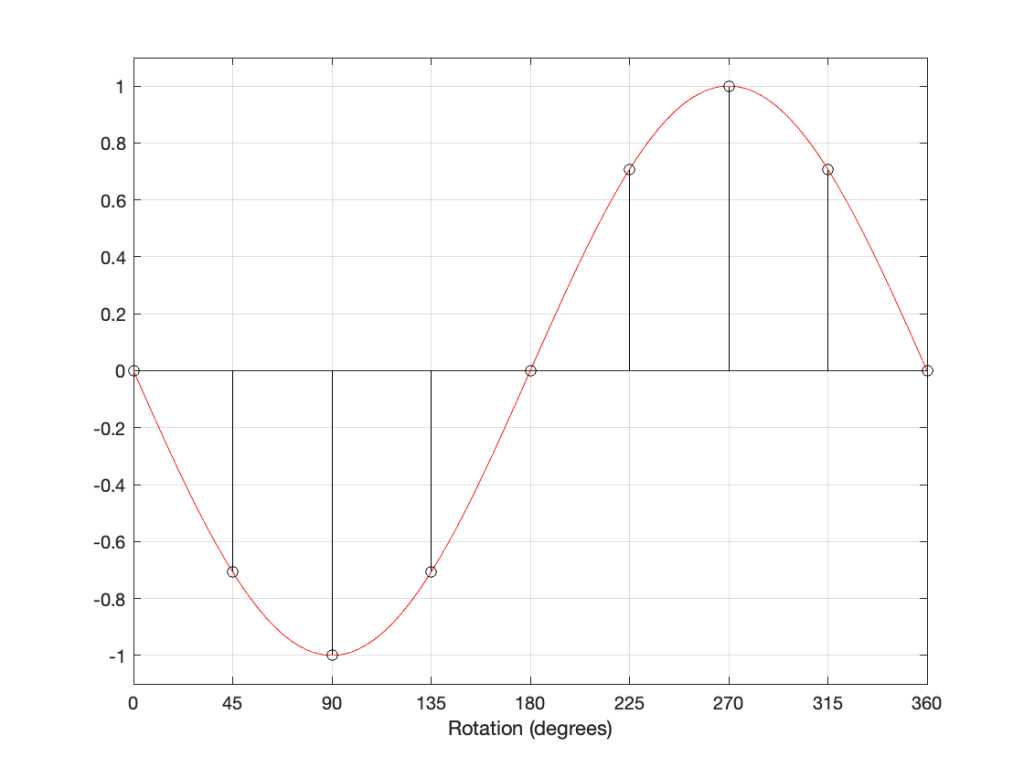
As you can probably see, the plots in Figure 5 and 6 are identical. Therefore, in the case of a sine wave, shifting the phase of the signal by 180 degrees has the same result at inverting the polarity.
What happens when you have a signal that is the sum of multiple sine waves? Let’s look at a simple example below.
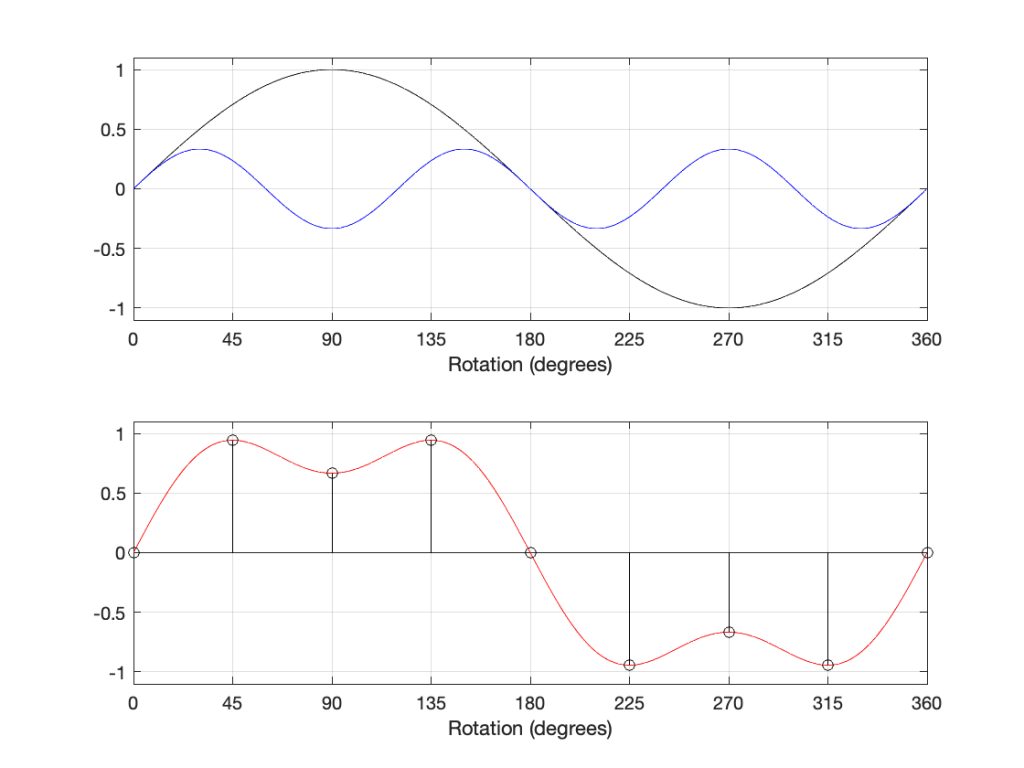
The top plot above shows two sine waves, one with a frequency of three times the other, and with 1/3 the amplitude. If I add these two together, the result is the red curve in the lower plot. There are two ways to think of this addition: You can add each amplitude, degree by degree to get the red curve. You can also think of the slopes adding. At the 180º mark, the two downward-going slopes of the two sine waves cause the steeper slope in the red curve.
If we shift the phase of each of the two sine wave components, then the result looks like the plots below.
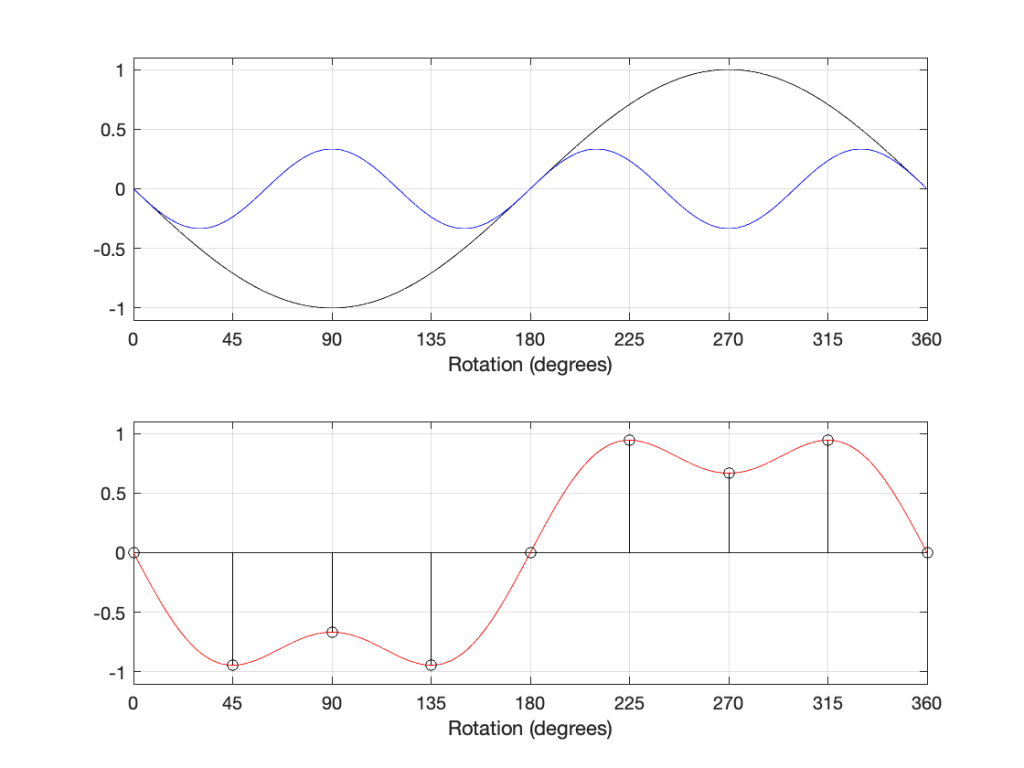
As you can see in the plots above, shifting the phases of the sine waves is the same as inverting their polarities, and so the resulting total sum (the red curve) is the same as if we had inverted the polarity of the previous total sum.
So, so far, we can conclude that shifting the phase by 180º gives the same result as inverting the polarity.
In the April, 1946 edition of Wireless World magazine, C.E. Cooper wrote an article called “Phase Relationships: ‘180 Degrees Out of Phase’ or ‘Reversed Polarity’?” (I’m not the first one to have this debate…) In this article, it’s states that there is a difference between “phase” and “polarity” with the example shown below.
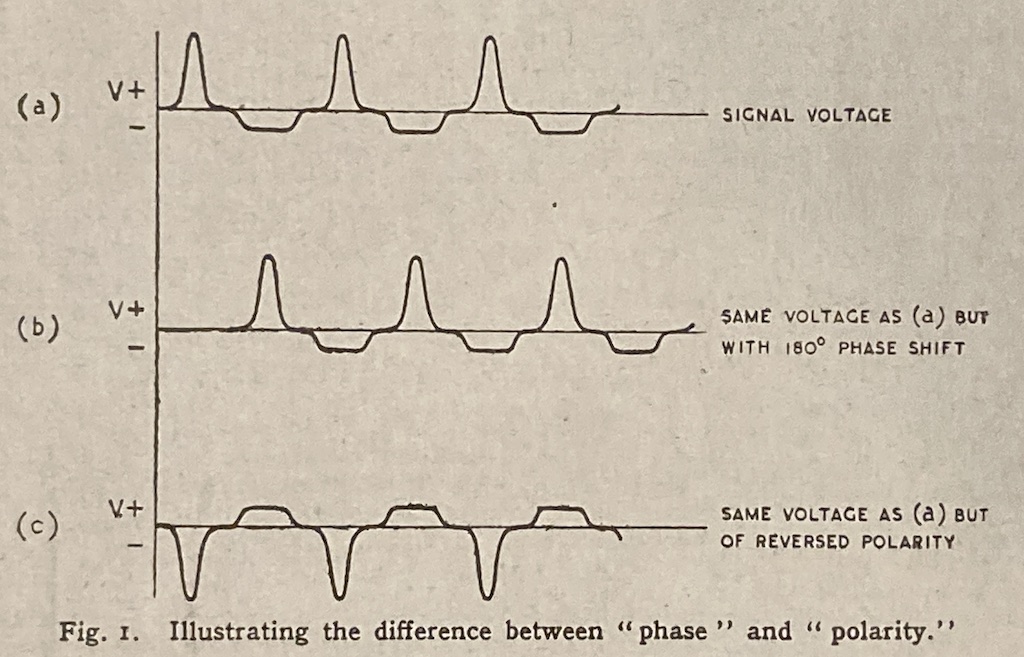
There is a problem with the illustration in Figure 9, which is the fact that you cannot say that the middle plot has been shifted in phase by 180 degrees because that waveform doesn’t have a “phase”. If you decomposed it to its constituent sines/cosines and shifted each of those by 180º, then the result would look like (c) instead of (b). Instead, this signal has had a delay of 1/2 of a period applied to it – which is a different thing, since it’s delaying in time instead of shifting in phase.
However, there is a hint here of a correct answer… If we think of the black and blue sine waves in the 2-part plots above as sine waves with frequencies 1 Hz and 3 Hz, we can add another “sine wave” with a frequency of 0 Hz, or DC, as shown in Figure 10, below.
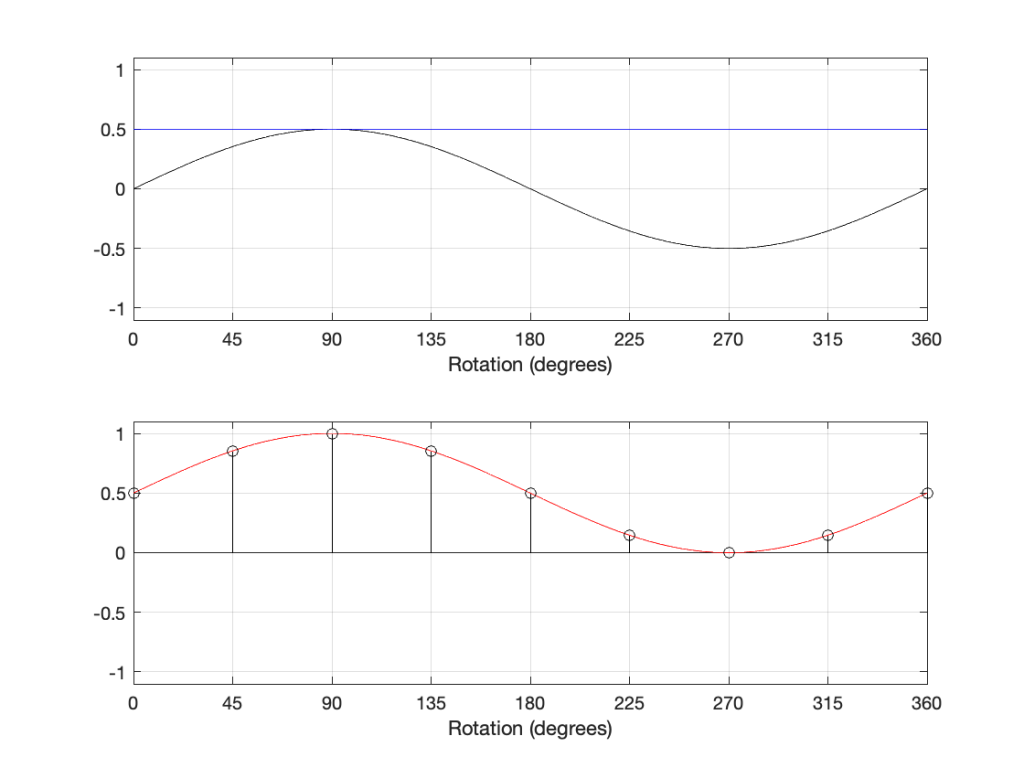
In the plot above, the top plot has a DC component (the blue line) that is added to the sine component (the black curve) resulting in a sine wave with a DC offset (the red curve).
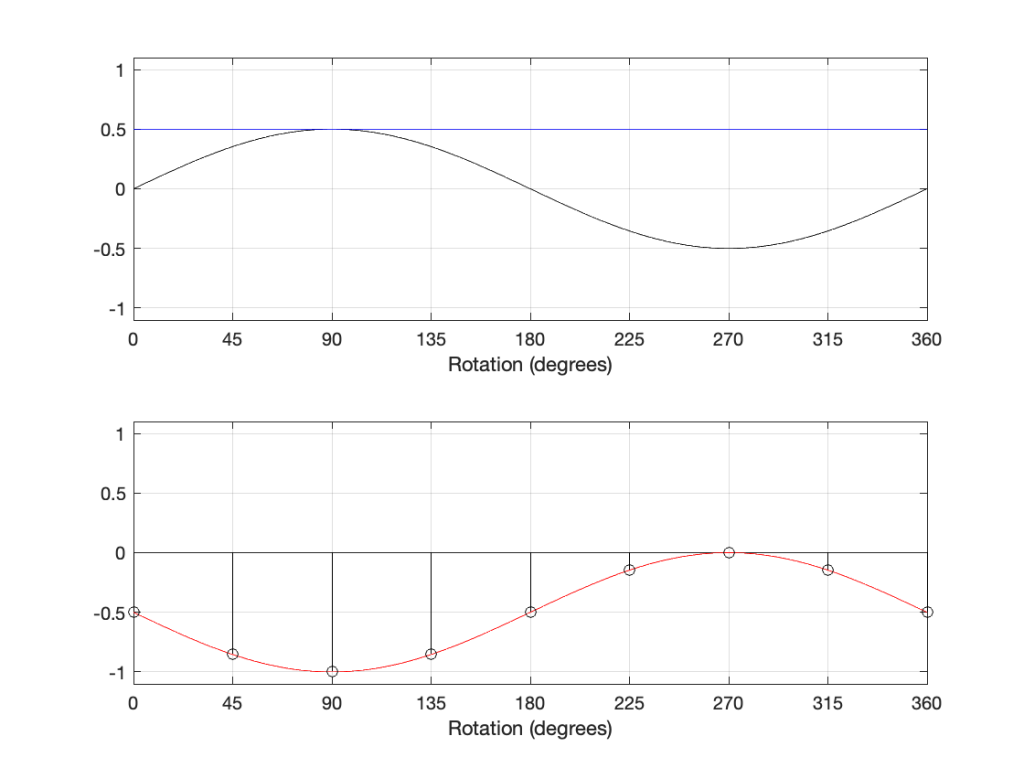
If we invert the polarity of this signal, then the result is as shown in Figure 11.
However, if we delay the components by 180º, the result is different, as shown in Figure 12:
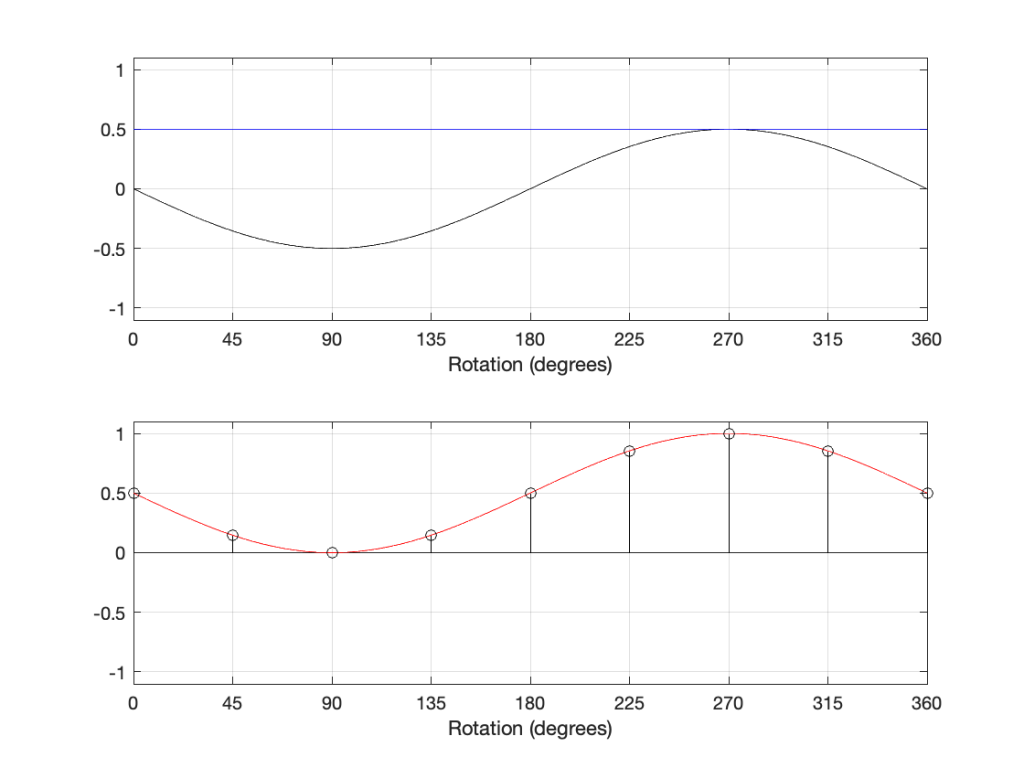
The hint from the 1946 article was the addition of a DC offset to the signal. If we think of that as a sine wave with a frequency of 0 Hz, then it can be “phase-shifted” by 180º which results in the same value instead of inverting polarity.
However, to be fair, most of the time, shifting the phase by 180º gives the same result as inverting the polarity. However, I still don’t like it when people say “flip the phase”…
Variations on the Goldberg Variations
As part of a listening session today, I put together a playlist to compare piano recordings. I decided that an interesting way to do this was to use the same piece of music, recorded by different artists on different instruments in different rooms by different engineers using different microphone and techniques. The only constant was the notes on the page in front of the performer.
A link to the playlist is here: LINK TO TIDAL
Playing through this, it’s interesting to pay attention to things like:
- Overall level of the recording
- Notice how much (typically) quieter the Dolby Atmos-encoded recording is than the 2.0 PCM encoded ones. However, there’s a large variation amongst the 2.0 recordings.
- Monophonic vs. stereo recordings
- Perceived width of the piano
- Perceived width of the room
- How enveloping the room is (this might be different from the perceived width, but these two attributes can be co-related, possibly even correlated)
- Perceived distance to the piano.
- On some of the recordings, the piano appears to be close. The attack of each note is quite fast, and there is not much reveberation.
- On some of the recordings, the piano appears to be distant – more reveberant, with a soft, slow attack on each note.
- On other recordings, it may appear that the piano is both near (because of the fast attack on each hammer-to-string strike) and far (because of the reverberation). (Probably achieved by using a combination of microphones at different distances – or using digital reverb…)
- The length of the reverberation time
- Whether the piano is presented as one instrument or a collection of strings (e.g. can you hear different directions to (or locations of) individual notes?)
- If the piano is presented as a wide source with separation between bass and treble, is the presentation from the pianist’s perspective (bass on the left, treble on the right) or the audience’s perspective (bass on the left, treble on the right… sort of…)
32 is a lot of bits…
Once upon a time, I did a blog posting about why, when we test digital audio systems, we typically use a 997 Hz sine wave instead of a 1000 Hz tone.
The short version of this is the following:
Let’s say that I digitally create a (not-dithered) 1000 Hz sine wave at 0 dB FS in a 16-bit system running at 48 kHz. This means that every second, there are exactly 1000 cycles of the wave, and since there are 48,000 samples per second, this, in turn means that there is one cycle every 48 samples, so sample #49 is identical to sample #1.
So, we are only testing 48 of the possible 2^16 ( = 65,536) quantisation values, right?
Wrong. It’s worse than you think.
If we zoom in a little more, we can see that Sample #1 = 0 (because it’s a sine wave). Sample #25 is also equal to 0 (because 48,000 / 1,000 is a nice number that is divisible by 2).
Unfortunately, 48,000 / 1,000 is a nice number that is also divisible by 4. So what? This means that when the sine wave goes up from 0 to maximum, it hits exactly the same quantisation values as it does on the way from maximum back down to 0. For example, in the figure below, the values of the two samples shown in red are identical. This is true for all symmetrical points in the positive side and the negative side of the wave.
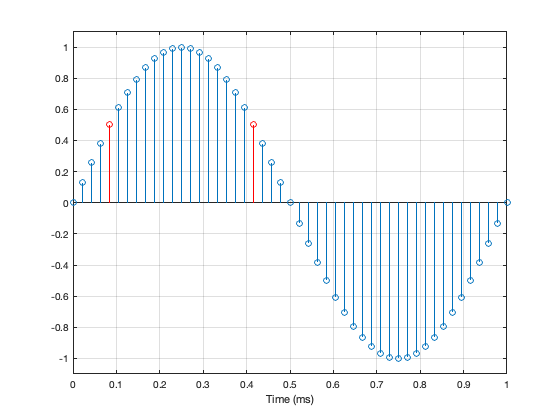
Jumping ahead, this means that, if we make a “perfect” 1 kHz sine wave at 48 kHz (regardless of how many bits in the system) we only test a total of 25 quantisation steps. 0, 12 positive steps, and 12 negative ones.
Not much of a test – we only hit 25 out of a possible 65,546 values in a 16-bit system (or 25 out of 16,777,216 possible values in a 24-bit system).
What if I wanted to make a signal that tested ALL possible quantisation values in an LPCM system? One way to do this is to simply make a linear ramp that goes from the lowest possible value up to the highest possible value, step by step, sample by sample. (of course, there are other ways, but it doesn’t matter… we’re just trying to hit every possible quantisation value…)
How long would it take to play that test signal?
First we convert the number of bits to the number of quantisation steps. This is done using the equation 2^bits. So, you get the following results
| Number of Bits | Number of Quantisation Steps |
| 16 | 65,536 |
| 24 | 16,777,216 |
| 32 | 4,294,967,296 |
If the value of each sample has a different quantisation value, and we play the file at the sampling rate then we can calculate the time it will take by dividing the number of quantisation steps by the sampling rate. This results in the following:
| Sampling Rate (kHz) | 16 Bits | 24 Bits | 32 Bits |
| 44.1 | 1.5 seconds | 6.4 minutes | 27.1 hours |
| 48 | 1.4 seconds | 5.8 minutes | 24.9 hours |
| 88.2 | 0.7 seconds | 3.2 minutes | 13.5 hours |
| 96 | 0.7 seconds | 2.9 minutes | 12.4 hours |
| 176.4 | 0.4 seconds | 1.6 minutes | 6.8 hours |
| 192 | 0.3 seconds | 1.5 minutes | 6.2 hours |
| 352.8 | 0.2 seconds | 47.6 seconds | 3.4 hours |
| 384 | 0.2 seconds | 43.7 seconds | 3.1 hours |
| 705.6 | 0.1 seconds | 23.8 seconds | 1.7 hours |
| 768 | 0.1 seconds | 21.8 seconds | 1.6 hours |
So, the moral of the story is, if you’re testing the validity of a quantiser in a 32-bit fixed-point system, and you’re not able to do it off-line (meaning that you’re locked to a clock running at the correct sampling rate) you’d either (1) hope that it’s also a crazy-high sampling rate or (2) that you’re getting paid by the hour.
Why I am thinking about this?
I often get asked for my opinion about audio players; these days, network streamers especially, since they’re in style.
Let’s say, for example, that someone asked me to recommend a network streamer for use with their system. In order to recommend this, I need to measure it to make sure it behaves.
One of the tests I’m going to run is to ensure that every sample value on a file is accurately output from the device. Let’s also make it simple and say that the device has a digital output, and I only need to test 3 LPCM audio file formats (WAV, AIFF and FLAC – since those can be relied to give a bit-for-bit match from file to output). (We’ll also pretend that the digital output can support a 32-bit audio word…)
So, to run this test, I’m going to
- create test files that I described above (checking every quantisation value at all three bit depths and all 10 sampling rates)
- play them
- record them
- and then compare whether I have a bit-for-bit match from input (the original file) to the output
If you add up all the values in the table above for the 10 sampling rates and the three bit depths, then you get to a total of 4.2 DAYS of play time (playing audio constantly 24 hours a day) per file format.
So, say I wanted to test three file formats for all of the sampling rates and bit depths, then I’m looking at playing & recording 12.6 days of audio – and then I can start the analysis.
REALLY‽
Of course this is silly… I’m not going to test a 32-bit, 44.1 kHz file… In fact, if I don’t bother with the 32-bit values at all, then my time per file format drops from 4.2 days down to 23.7 minutes of play time, which is a lot more feasible, but less interesting if I’m getting paid by the hour.
However, it was fun to calculate – and it just goes to show how big a number 2^32 is…
What is a “virtual” loudspeaker? Part 3
#91.3 in a series of articles about the technology behind Bang & Olufsen
In Part 1 of this series, I talked about how a binaural audio signal can (hypothetically, with HRTFs that match your personal ones) be used to simulate the sound of a source (like a loudspeaker, for example) in space. However, to work, you have to make sure that the left and right ears get completely isolated signals (using earphones, for example).
In Part 2, I showed how, with enough processing power, a large amount of luck (using HRTFs that match your personal ones PLUS the promise that you’re in exactly the correct location), and a room that has no walls, floor or ceiling, you can get a pair of loudspeakers to behave like a pair of headphones using crosstalk cancellation.
There’s not much left to do to create a virtual loudspeaker. All we need to do is to:
- Take the signal that should be sent to a right surround loudspeaker (for example) and filter it using the HRTFs that correspond to a sound source in the location that this loudspeaker would be in. REMEMBER that this signal has to get to your two ears since you would have used your two ears to hear an actual loudspeaker in that location.
- Send those two signals through a crosstalk cancellation processing system that causes your two loudspeakers to behave more like a pair of headphones.
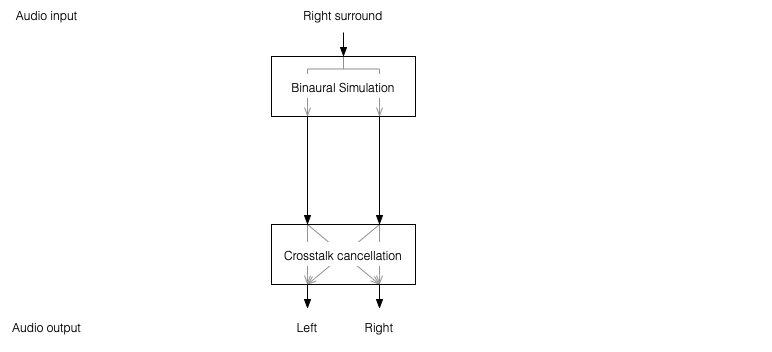
One nice thing about this system is that the crosstalk cancellation is only there to ensure that the actual loudspeakers behave more like headphones. So, if you want to create more virtual channels, you don’t need to duplicate the crosstalk cancellation processor. You only need to create the binaurally-processed versions of each input signal and mix those together before sending the total result to the crosstalk cancellation processor, as shown below.
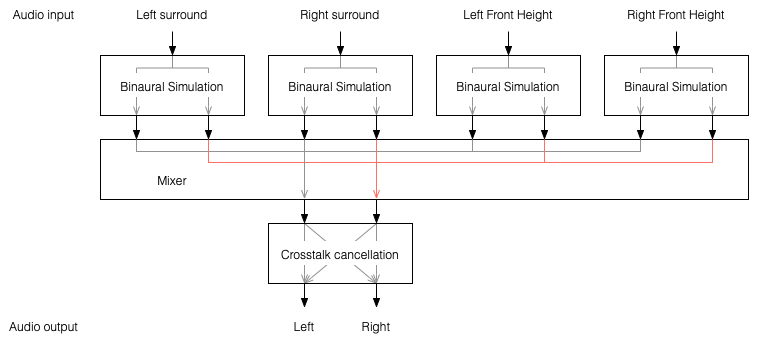
This is good because it saves on processing power.
So, there are some important things to realise after having read this series:
- All “virtual” loudspeakers’ signals are actually produced by the left and right loudspeakers in the system. In the case of the Beosound Theatre, these are the Left and Right Front-firing outputs.
- Any single virtual loudspeaker (for example, the Left Surround) requires BOTH output channels to produce sound.
- If the delays (aka Speaker Distance) and gains (aka Speaker Levels) of the REAL outputs are incorrect at the listening position, then the crosstalk cancellation will not work and the virtual loudspeaker simulation system won’t work. How badly is doesn’t work depends on how wrong the delays and gains are.
- The virtual loudspeaker effect will be experienced differently by different persons because it’s depending on how closely your actual personal HRTFs match those predicted in the processor. So, don’t get into fights with your friends on the sofa about where you hear the helicopter…
- The listening room’s acoustical behaviour will also have an effect on the crosstalk cancellation. For example, strong early reflections will “infect” the signals at the listening position and may/will cause the cancellation to not work as well. So, the results will vary not only with changes in rooms but also speaker locations.
Finally, it’s worth nothing that, in the specific case of the Beosound Theatre, by setting the Speaker Distances and Speaker Levels for the Left and Right Front-firing outputs for your listening position, then you have automatically calibrated the virtual outputs. This is because the Speaker Distances and Speaker Levels are compensations for the ACTUAL outputs of the system, which are the ones producing the signal that simulate the virtual loudspeakers. This is the reason why the four virtual loudspeakers do not have individual Speaker Distances and Speaker Levels. If they did, they would have to be identical to the Left and Right Front-firing outputs’ values.
What is a “virtual” loudspeaker? Part 2
#91.2 in a series of articles about the technology behind Bang & Olufsen
In Part 1, I talked at how a binaural recording is made, and I also mentioned that the spatial effects may or may not work well for you for a number of different reasons.
Let’s go back to the free field with a single “perfect” microphone to measure what’s happening, but this time, we’ll send sound out of two identical “perfect” loudspeakers. The distances from the loudspeakers to the microphone are identical. The only difference in this hypothetical world is that the two loudspeakers are in different positions (measuring as a rotational angle) as shown in Figure 1.
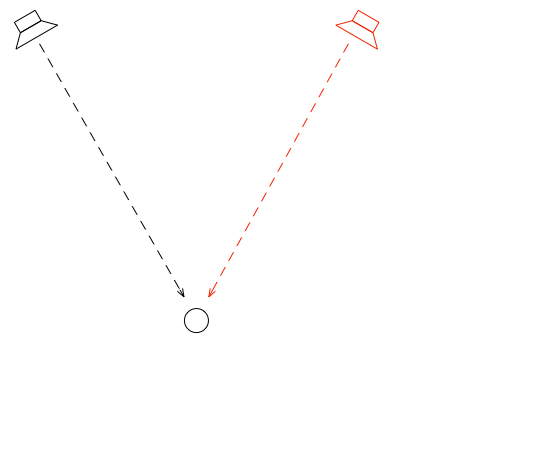
In this example, because everything is perfect, and the space is a free field, then output of the microphone will be the sum of the outputs of the two loudspeakers. (In the same way that if your dog and your cat are both asking for dinner simultaneously, you’ll hear dog+cat and have to decide which is more annoying and therefore gets fed first…)
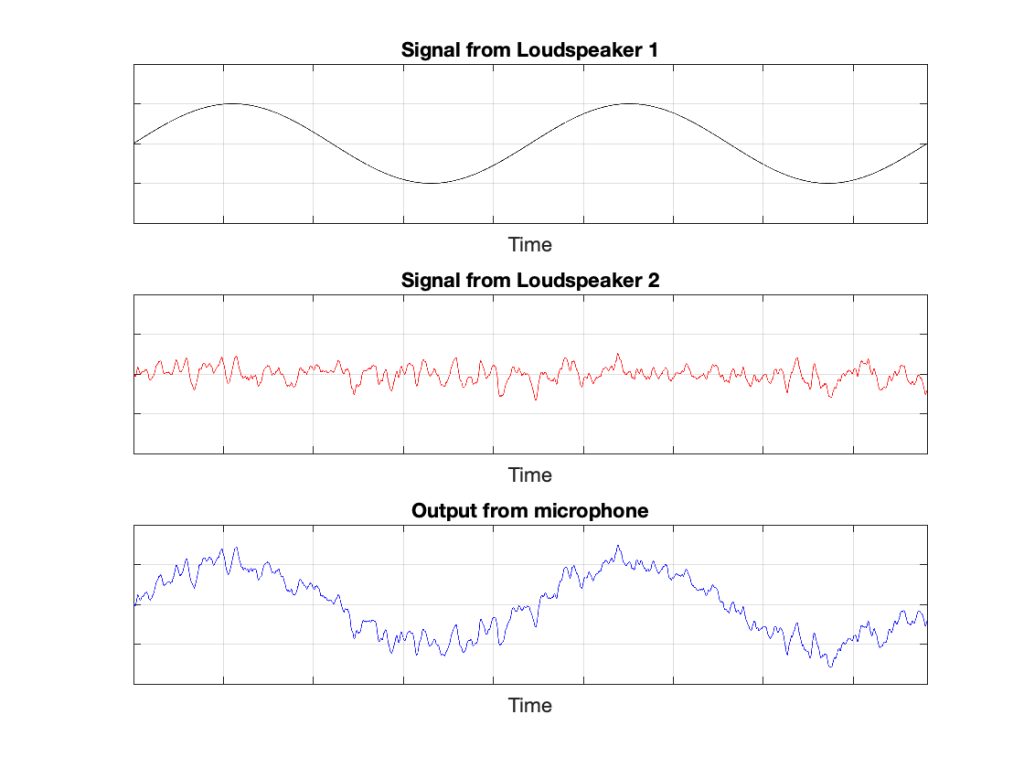
IF the system is perfect as I described above, then we can play some tricks that could be useful. For example, since the output of the microphone is the sum of the outputs of the two loudspeakers, what happens if the output of one loudspeaker is identical to the other loudspeaker, but reversed in polarity?
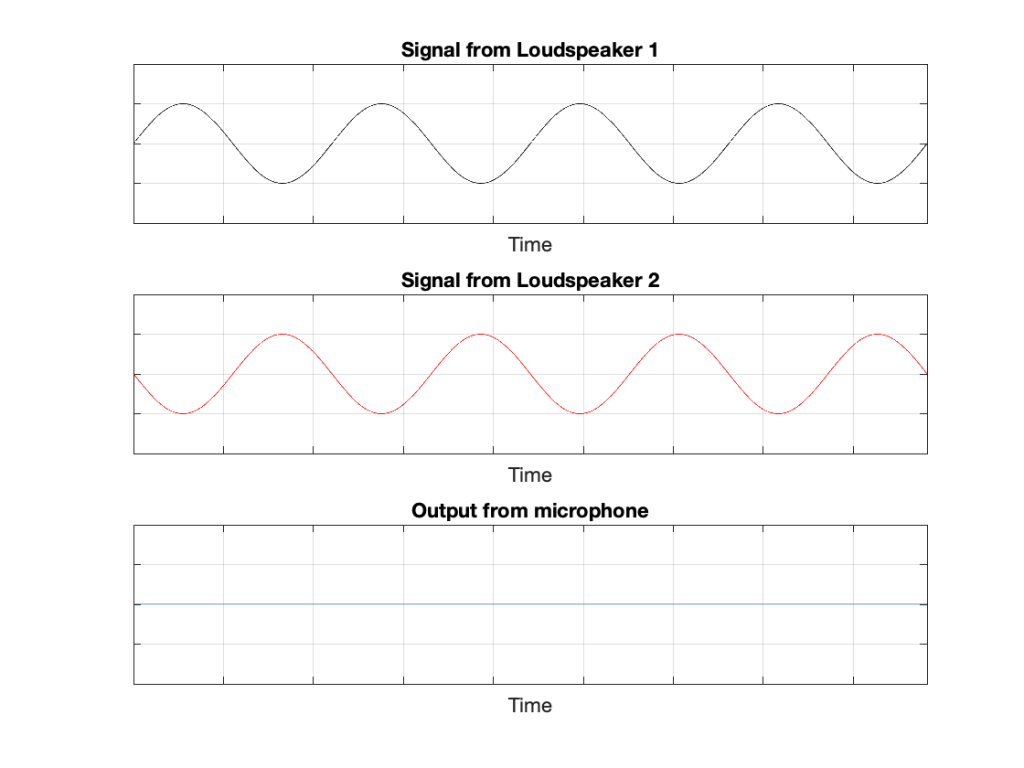
In this example, we’re manipulating the signals so that, when they add together, you nothing at the output. This is because, at any moment in time, the value of Loudspeaker 2’s output is the value of Loudspeaker 1’s output * -1. So, in other words, we’re just subtracting the signal from itself at the microphone and we get something called “perfect cancellation” because the two signals cancel each other at all times.
Of course, if anything changes, then this perfect cancellation won’t work. For example, if one of the loudspeakers moves a little farther away than the other, then the system is broken, as shown below.
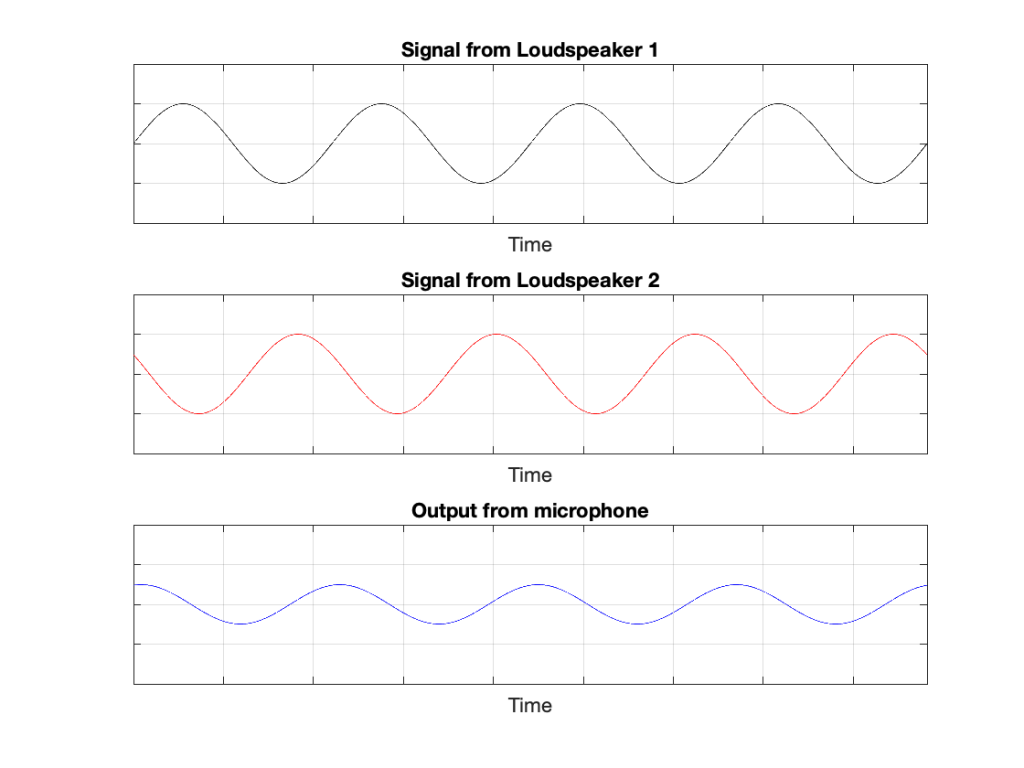
Again, everything that I’ve said above only works when everything is perfect, and the loudspeakers and the microphone are in a free field; so there are no reflections coming in and ruining everything.
We can now combine these two concepts:
- using binaural signals to simulate a sound source in a location (although this would normally be done using playback over earphones to keep it simple) and
- using signals from loudspeakers to cancel each other at some location in space as a
to create a system for making virtual loudspeakers.
Let’s suspend our adherence to reality and continue with this hypothetical world where everything works as we want… We’ll replace the microphone with a person and consider what happens. To start, let’s just think about the output of the left loudspeaker.
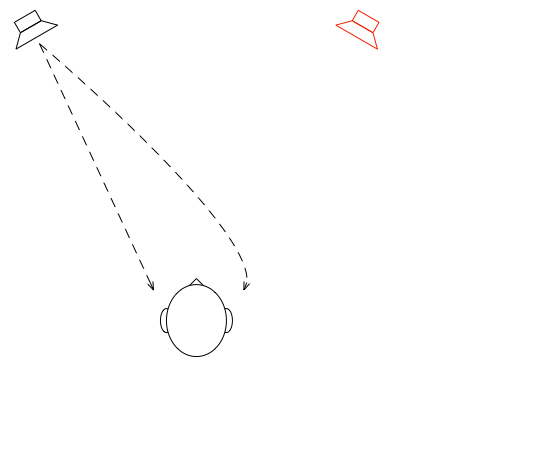
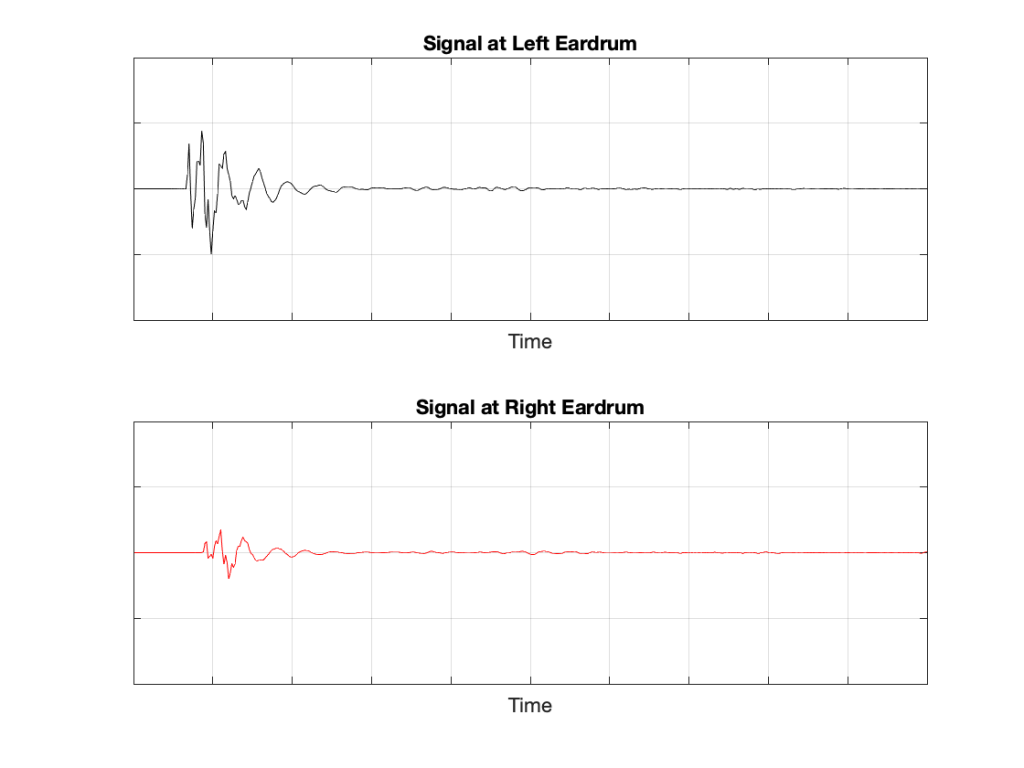
If we plot the impulse responses at the two ears (the “click” sound from the loudspeaker after it’s been modified by the HRTFs for that loudspeaker location), they’ll look like this:
What if were were able to send a signal out of the right loudspeaker so that it cancels the signal from the left loudspeaker at the location of the right eardrum?
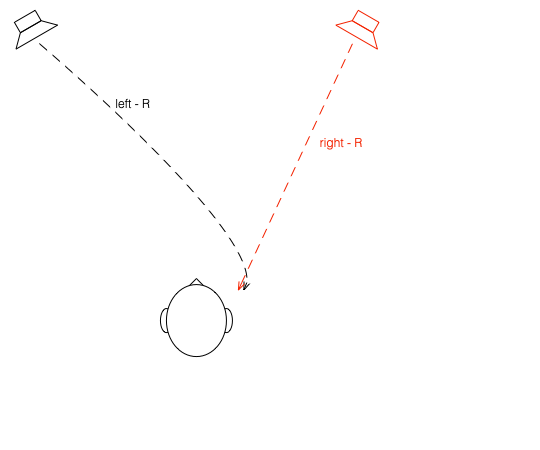
Unfortunately, this is not quite as easy as it sounds, since the HRTF of the right loudspeaker at the right ear is also in the picture, so we have to be a bit clever about this.
So, in order for this to work we:
- Send a signal out of the left loudspeaker.
We know that this will get to the right eardrum after it’s been messed up by the HRTF. This is what we want to cancel… - …so we take that same signal, and
- filter it with the inverse of the HRTF of the right loudspeaker
(to undo the effects of the HRTF of the right loudspeaker’s signal at the right ear) - filter that with the HRTF of the left loudspeaker at the right ear
(to match the filtering that’s done by your head and pinna) - multiply by -1
(so that it will cancel when everything comes together at your right eardrum) - and send it out the right loudspeaker.
- filter it with the inverse of the HRTF of the right loudspeaker
Hypothetically, that signal (from the right loudspeaker) will reach your right eardrum at the same time as the unprocessed signal from the left loudspeaker and the two will cancel each other, just like the simple example shown in Figure 3. This effect is called crosstalk cancellation, because we use the signal from one loudspeaker to cancel the sound from the other loudspeaker that crosses to the wrong side of your head.
This then means that we have started to build a system where the output of the left loudspeaker is heard ONLY in your left ear. Of course, it’s not perfect because that cancellation signal that I sent out of the right loudspeaker gets to the left ear a little later, so we have to cancel the cancellation signal using the left loudspeaker, and back and forth forever.
If, at the same time, we’re doing the same thing for the other channel, then we’ve built a system where you have the left loudspeaker’s signal in the left ear and the right loudspeaker’s signal in the right ear; just like a pair of headphones!
However, if you get any of these elements wrong, the system will start to under-perform. For example, if the HRTFs that I use to predict your HRTFs are incorrect, then it won’t work as well. Or, if things aren’t time-aligned correctly (because you moved) then the cancellation won’t work.
What is a “virtual” loudspeaker? Part 1
#91.1 in a series of articles about the technology behind Bang & Olufsen
Without connecting external loudspeakers, Bang & Olufsen’s Beosound Theatre has a total of 11 independent outputs, each of which can be assigned any Speaker Role (or input channel). Four of these are called “virtual” loudspeakers – but what does this mean? There’s a brief explanation of this concept in the Technical Sound Guide for the Theatre (you’ll find the link at the bottom of this page), which I’ve duplicated in a previous posting. However, let’s dig into this concept a little more deeply.
To begin, let’s put a “perfect” loudspeaker in a free field. This means that it’s in a space that has no surfaces to reflect the sound – so it’s an acoustic field where the sound wave is free to travel outwards forever without hitting anything (or at least appear as this is the case). We’ll also put a “perfect” microphone in the same space.
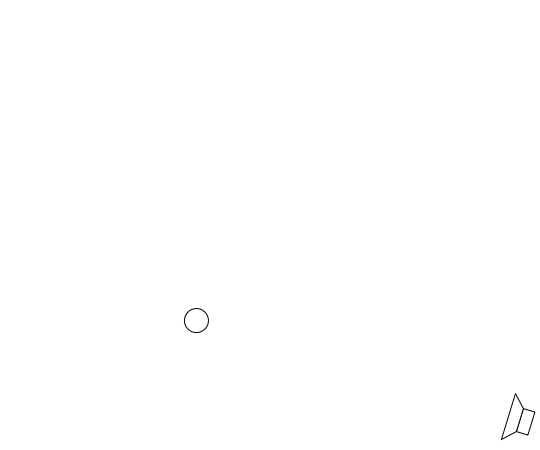
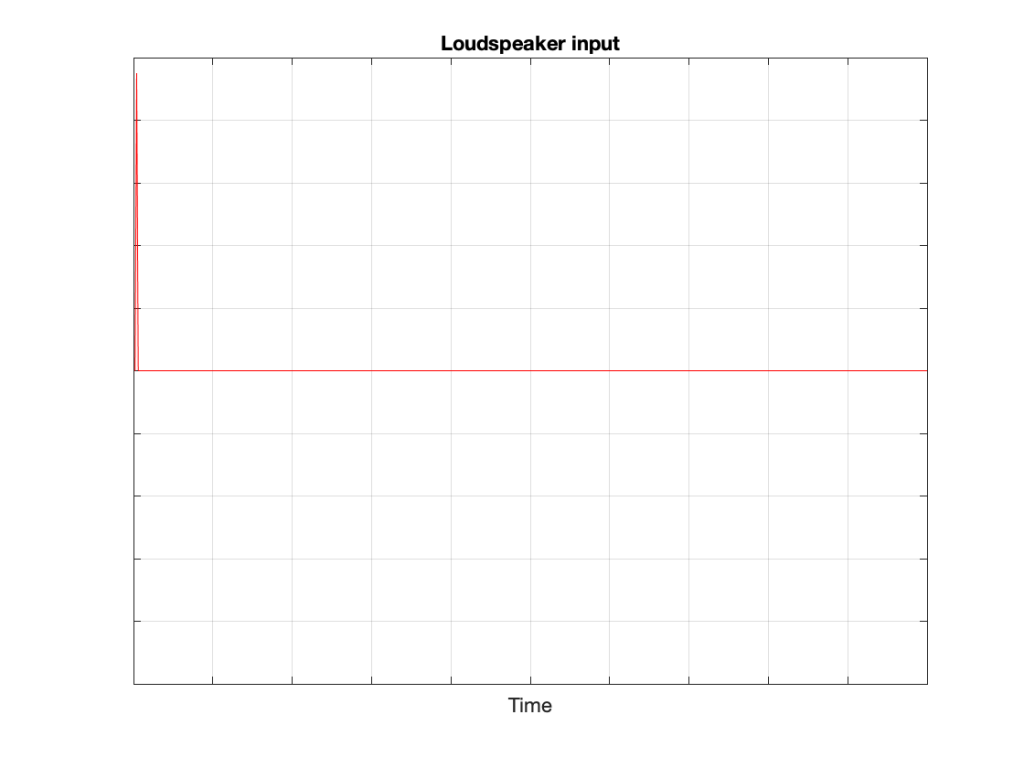
We then send an impulse; a very short, very loud “click” to the loudspeaker. (Actually a perfect impulse is infinitely short and infinitely loud, but this is not only inadvisable but impossible, and probably illegal.)
That sound radiates outwards through the free field and reaches the microphone which converts the acoustic signal back to an electrical one so we can look at it.
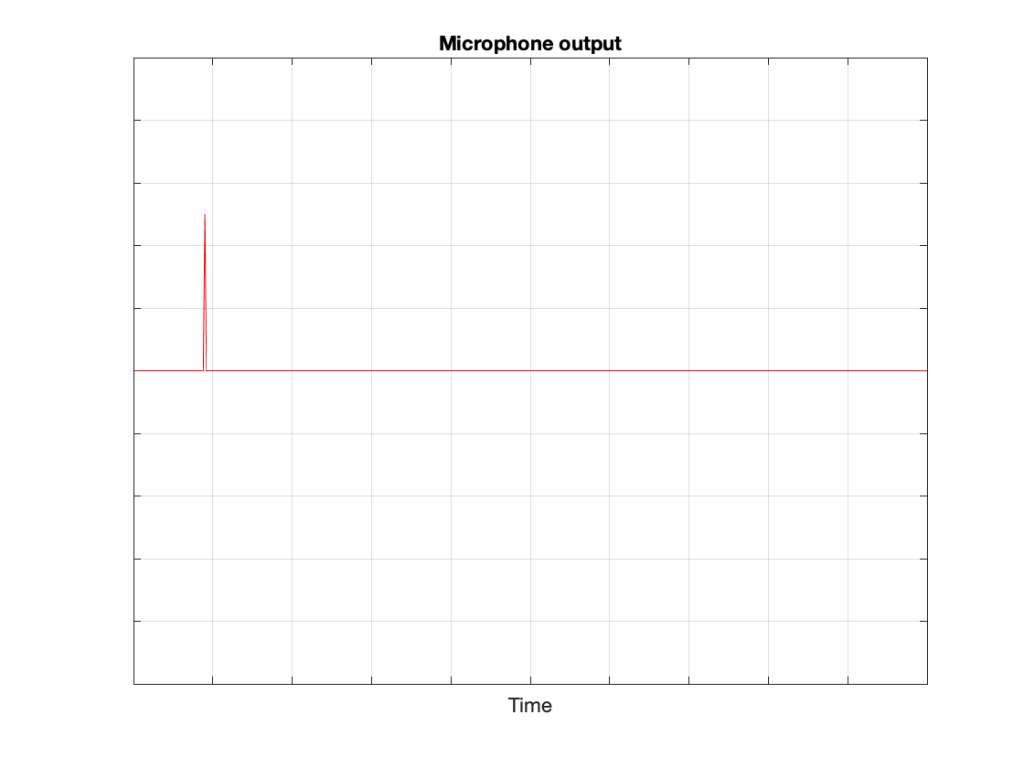
There are three things to notice when you compare Figure 3 to Figure 2:
- The signal’s level is lower. This is because the microphone is some distance from the loudspeaker.
- The signal is later. This is because the microphone is some distance from the loudspeaker and sound waves travel pretty slowly.
- The general shape of the signals are identical. This is because I said that the loudspeaker and the microphone were both “perfect” and we’re in a space that is completely free of reflections.
What happens if we take away the microphone and put you in the same place instead?

If we now send the same click to the loudspeaker and look at the “outputs” of your two eardrums (the signals that are sent to your brain), these will look something like this:
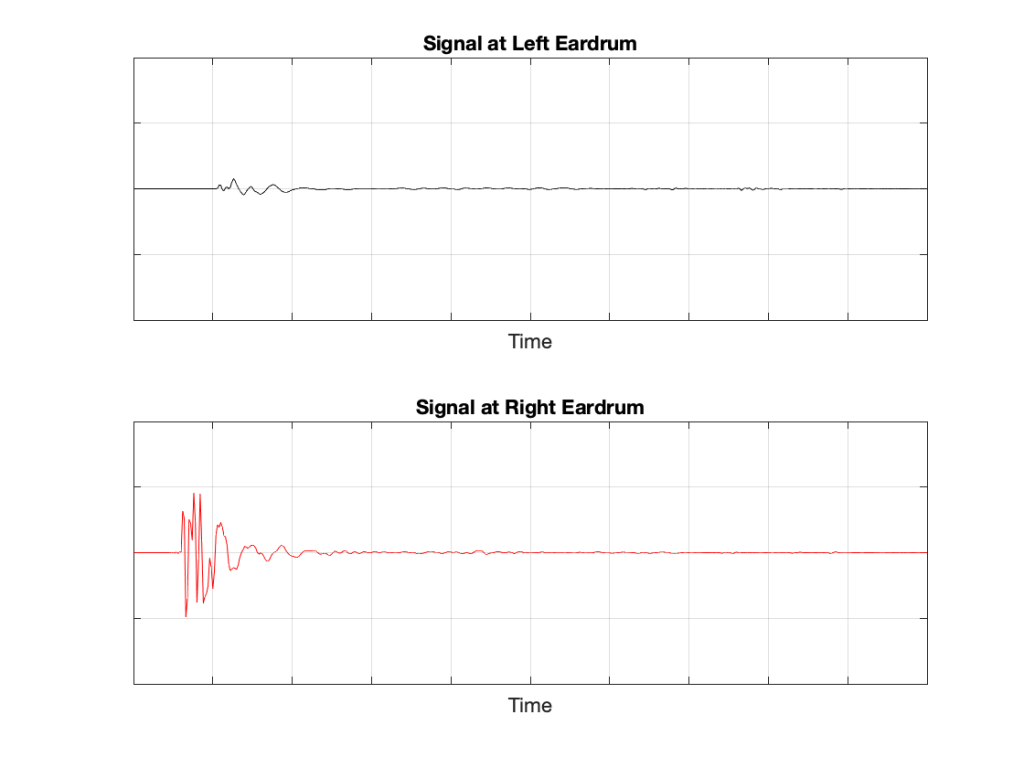
These two signals are obviously very different from the one that the microphone “hears” which should not be a surprise: ears aren’t microphones. However, there are some specific things of which we should take note:
- The output of the left eardrum is lower than that of the right eardrum. This is largely because of an effect called “head shadowing” which is exactly what it sounds like. The sound is quieter in your left ear because your head is in the way.
- The signal at the right eardrum is earlier than at the left eardrum. This is because the left eardrum is not only farther away, but the sound has to go around your head to get there.
- The signal at the right eardrum is earlier than the output of the microphone output (in Figure 3) because it’s closer to the loudspeaker. (I put the microphone at the location of the centre of the simulated head.) Similarly the left ear output is later because it’s farther away.
- The signal at the right eardrum is full of spikes. This is mostly caused by reflections off the pinna (the flappy thing on the side of your head that you call your “ear”) that arrive at slightly different times, and all add together to make a mess.
- The signal at the left eardrum is “smoother”. This is because the head itself acts as a filter reducing the levels of the high frequency content, which tends to make things less “spiky”.
- Both signals last longer in time. This is the effect of the ear canal (the “hole” in the side of your head that you should NOT stick a pencil in) resonating like a little organ pipe.
The difference between the signals in Figures 2 and 4 is a measurement of the effect that your head (including your shoulders, ears/pinnae) has on the transfer of the sound from the loudspeaker to your eardrums. Consequently, we geeks call it a “head-related transfer function” or HRTF. I’ve plotted this HRTF as a measurement of an impulse in time – but I could have converted it to a frequency response instead (which would include the changes in magnitude and phase for different frequencies).
Here’s the cool thing: If I put a pair of headphones on you and played those two signals in Figure 5 to your two ears, you might be able to convince yourself that you hear the click coming from the same place as where that loudspeaker is located.
Although this sounds magical, don’t get too excited right away. Unfortunately, as with most things in life, reality tends to get in the way for a number of reasons:
- Your head and ears aren’t the same shape as anyone else’s. Your brain has lived with your head and your ears for a long time, and it’s learned to correlate your HRTFs with the locations of sound sources. If I suddenly feed you a signal that uses my HRTFs, then this trick may or may not work, depending on how similar we are. This is just like borrowing someone else’s glasses. If you have roughly the same prescription, then you can see. However, if the prescriptions are very different, you’ll get a headache very quickly.
- In reality, you’re always moving. So, even if the sound source is not moving, the specific details of the HRTFs are always changing (because the relative positions and angles to your ears are changing) but my system doesn’t know about this – so I’m simulating a system where the loudspeaker moves around you as you rotate your head. Since this never happens in real life, it tends to break the simulation.
- The stuff I showed above doesn’t include reflections, which is how you determine distance to sources. If I wanted to include reflections, each reflection would have to have its own HRTF processing, depending on its angle relative to your head.
However, hypothetically, this can work, and lots of people have tried. The easiest way to do this is to not bother measuring anything. You just take a “dummy head” -a thing that is the same size as an average human head (maybe with an average torso) and average pinnae* – but with microphones where the eardrums are – and you plunk it down in a seat in a concert hall and record the outputs of the two “ears”. You then listen to this over earphones (we don’t use headphones because we want to remove your pinnae from the equation) and you get a “you are there” experience (assuming that the dummy head’s dimensions and shape are about the same as yours). This is what’s known as a binaural recording because it’s a recording that’s done with two ears (instead of two or more “simple” microphones).
If you want to experience this for yourself, plug a pair of headphones into your computer and do a search for the “Virtual Barber Shop” video. However, if you find that it doesn’t work for you, don’t be upset. It just means that you’re different: just like everyone else.* Typically, recordings like this have a strange effect of things sounding very close in the front, and farther away as sources go to the sides. (Personally, I typically don’t hear anything in the front. All of the sources sound like they’re sitting on the back of my neck and shoulders. This might be because I have a fat head (yes, yes… I know…) and small pinnae (yes, yes…. I know…) – or it might indicate some inherent paranoia of which I am not conscious.)
* Of course, depressingly typically, it goes without saying that the sizes and shapes of commercially-available dummy heads are based on averages of measurements of men only. Neither women nor children are interested in binaural recordings or have any relevance to such things, apparently…
Filters and Ringing: Part 10
There’s one last thing that I alluded to in a previous part of this series that now needs discussing before I wrap up the topic. Up to now, we’ve looked at how a filter behaves, both in time and magnitude vs. frequency. What we haven’t really dealt with is the question “why are you using a filter in the first place?”
Originally, equalisers were called that because they were used to equalise the high frequency levels that were lost on long-distance telephone transmissions. The kilometres of wire acted as a low-pass filter, and so a circuit had to be used to make the levels of the frequency bands equal again.
Nowadays we use filters and equalisers for all sorts of things – you can use them to add bass or treble because you like it. A loudspeaker developer can use them to correct linear response problems caused by the construction or visual design of the device. They can be used to compensate for the acoustical behaviour of a listening room. Or they can be used to compensate for things like hearing loss. These are just a few examples, but you’ll notice that three of the four of them are used as compensation – just like the original telephone equalisers.
Let’s focus on this application. You have an issue, and you want to fix it with a filter.
IF the problem that you’re trying to fix has a minimum phase characteristic, then a minimum phase filter (implemented either as an analogue circuit or in a DSP) can be used to “fix” the problem not only in the frequency domain – but also in the time domain. IF, however, you use a linear phase filter to fix a minimum phase problem, you might be able to take care of things on a magnitude vs. frequency analysis, but you will NOT fix the problem in the time domain.
This is why you need to know the time-domain behaviour of the problem to choose the correct filter to fix it.
For example, if you’re building a room compensation algorithm, you probably start by doing a measurement of the loudspeaker in a “reference” room / location / environment. This is your target.
You then take the loudspeaker to a different room and measure it again, and you can see the difference between the two.
In order to “undo” this difference with a filter (assuming that this is possible) one strategy is to start by analysing the difference in the two measurements by decomposing it into minimum phase and non-minimum phase components. You can then choose different filters for different tasks. A minimum phase filter can be used to compensate a resonance at a single frequency caused by a room mode. However, the cancellation at a frequency caused by a reflection is not minimum phase, so you can’t just use a filter to boost at that frequency. An octave-smoothed or 1/3-octave smoothed measurement done with pink noise might look like you fixed the problem – but you’ve probably screwed up the time domain.
Another, less intuitive example is when you’re building a loudspeaker, and you want to use a filter to fix a resonance that you can hear. It’s quite possible that the resonance (ringing in the time domain) is actually associated with a dip in the magnitude response (as we saw earlier). This means that, although intuition says “I can hear the resonant frequency sticking out, so I’ll put a dip there with a filter” – in order to correct it properly, you might need to boost it instead. The reason you can hear it is that it’s ringing in the time domain – not because it’s louder. So, a dip makes the problem less audible, but actually worse. In this case, you’re actually just attenuating the symptom, not fixing the problem – like taking an Asprin because you have a broken leg. Your leg is still broken, you just can’t feel it.
Filters and Ringing: Part 7
I’m going to start this part by doing something I very, very rarely do: to quote Wikipedia.
“In control theory and signal processing, a linear, time-invariant system is said to be minimum-phase if the system and its inverse are causal and stable.”
However, in my defence, one of the references attached to that statement is Julius O. Smith III, so that makes it okay.
Let’s unwrap that sentence and see if we know enough to know what it’s telling us.
We don’t care about control theory. So let’s ignore that part. We’re only interested in signal processing, where our signal is audio; so we move on.
We already know what a ‘linear, time-invariant” system (like our filters) is, and we now know that we can say that that system is ‘minimum-phase’ if:
- the system (our peak filter in the previous part, for example)
- and its inverse (our dip filter in the previous part, for example)
- are causal
- and stable
Let’s deal with the ‘stable’ part first. We know that our two filters are stable because we saw that their poles are inside the unit circle in the Z-Plane representation. (We also know it because they both have ringing that decays instead of increases over time.)
We also know that their zeros are also inside the unit circle, since the zeros of each filter are in the same place as the poles of the other filter, which we already said, are inside the unit circle.
So, what does ‘causal’ mean? It’s really just a fancy word that means that the output of our filter is determined by either the past or the present, or some combination of the two. In real life, all filters and systems are causal, since they can’t do something based on what will happen in the future.
However, if you are not working in real time, you can easily create systems and filters that are non-causal and have outputs that are created by events in the future. One simple example of this is to record your voice, reverse the track, add some reverb, and then reverse it back again. Now you have reverb that ramps up to a sound before it starts. This is non-causal.
Do I care?
Not yet. But keep the two conditions in mind:
- Both the filter and its inverse must be ‘causal’. The output of a minimum phase filter can only be the result of the present or the past, never the future.
- Both the filter and its inverse must be stable. We like stable…
Filters and Ringing: Part 6
In this part, I’m going to deviate just a little from something I said at the beginning of this series. To be honest, if I hadn’t admitted this, you probably wouldn’t notice – but I would prefer to keep things clean… The deviation is that, for this part, I’m making a slight change to how Q is defined. This is not serious enough to get into the details of exactly how the definition is different .
Using the slightly-different definition of Q, let’s make a peaking filter with a centre frequency of 1 kHz, a boost of 12 dB and a Q of 2. This will have the response shown below in Figure 1.

Using the same modified definition of Q, let’s also look at the response of a dip filter with the same parameter values, but a gain of -12 dB instead.
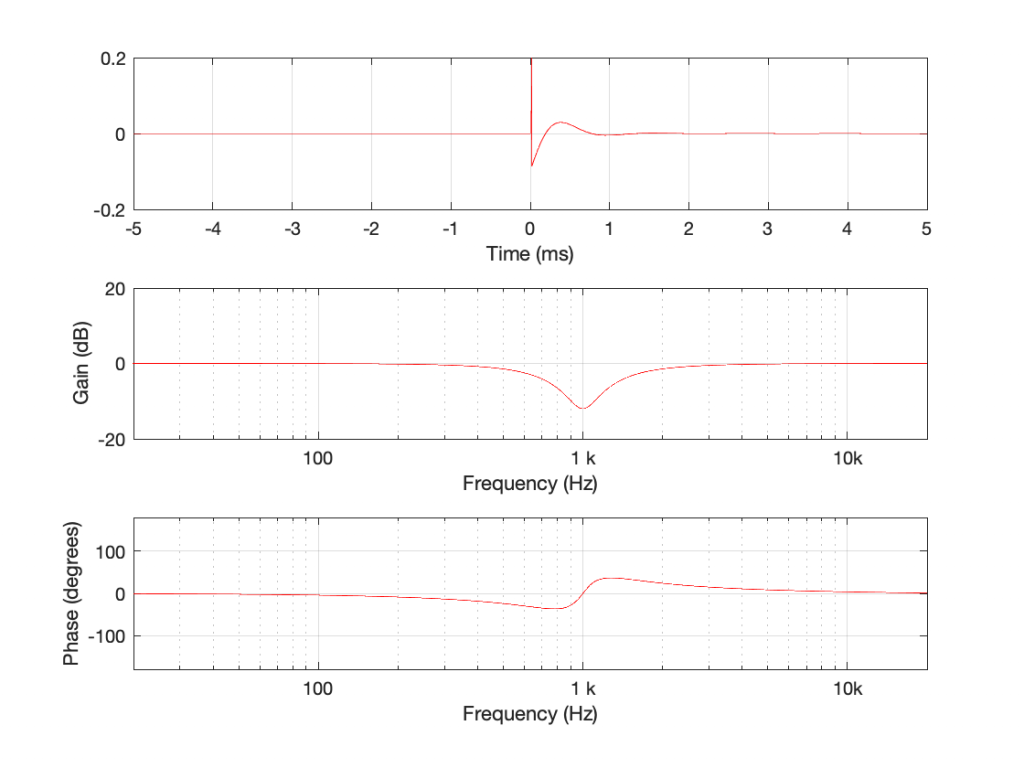
If you look at the magnitude responses of these two filters, you’ll see that it looks like they are mirror images of each other. In fact, they are.
If you look at the phase responses of these two filters, you’ll also see that it looks like they are mirror images of each other. In fact, they are.
If you look at their impulse responses, you’ll see that it would be difficult to see that they are related at all… But never mind this.
If I connect the output of the first filter to the input of the second filter, and measure the total throughput of the system, it will look like this:
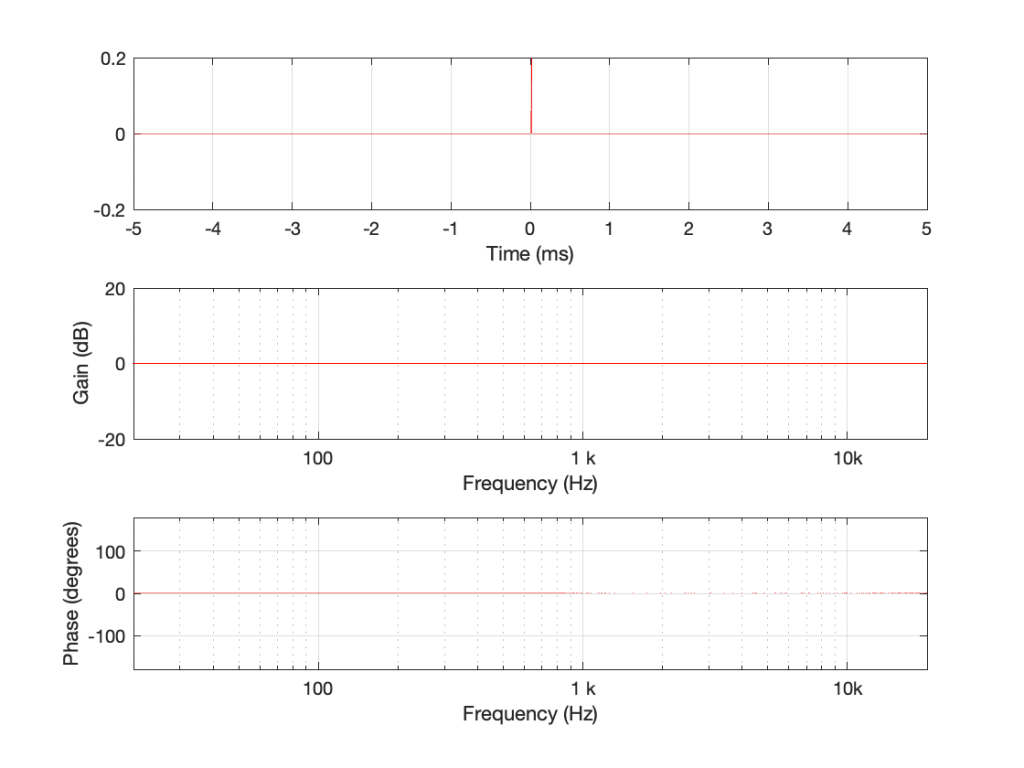
Just in case you’re suspicious, I didn’t fake this. I actually connected the boost to the dip and sent an impulse through the whole thing and you’re looking at the result. No tricks! (Note that I could have reversed their order with the same total result.)
What you can see here is that the responses of the dip and the boost negate each other. Whatever one does, the other does exactly the opposite.
Generally speaking, we audio geeks use some special words to describe not-very special cases like this.
Often, you’ll hear us talking about a linear system which is a fancy way of saying ‘the effects of this system can be undone’. In this example, the dip filter can ‘undo’ the effect of the boost (and vice versa) therefore both must be linear filters.
Just as often, you’ll hear us talking about time-invariant systems, which just means that they don’t change over time. Because I implemented those two filters using equations done on my computer, if I run the math again tomorrow, I’ll get exactly the same answer. If I test them using an impulse that is quieter or louder, I also get exactly the same responses. (If I had implemented them using resistors and capacitors and transistors or vacuum tubes, I might not get the same answer tomorrow or with a different signal level because of temperature changes, for example. Although now I’m really splitting hairs, just to make a point.)
The reason I said “just as often” is because, normally we use the two terms together as a package deal. So, we ask whether a system (like something as simple as a filter or as complicated as a reverb unit or an upmixing algorithm) is Linear Time-Invariant or LTI. This is an important question because it packs a lot of information in it.
For example, if a reverb unit is LTI, then I can measure it today with an impulse, and I know that it will behave the same tomorrow with lute music or a snare drum. It does the same thing all day, every day, regardless of the input signal or its level. One measurement, and I can go away and analyse it for the rest of the week.
If it’s not LTI, then its characteristics will change for some reason that I don’t necessarily know. Maybe the internal delays are modulating in time, so its response in 10 seconds will be different than it is now. Maybe it has a compressor or a noise gate built in, so it changes its behaviour according to the level of the signal.
If we get back to our (rather simple) peak / dip filter example. We know they’re LTI (because I said so – and you have to trust me). We also know that the dip filter is the opposite of the boost. The question is “how, exactly, did I make this happen?”
The general answer to this question has already been answered – the magnitude and the phase responses are mirror images of each other. Therefore, for any given frequency, one filter boosts by the same amount that the other cuts, and one filter advances in phase by the same amount that the other delays in phase.
The more geeky answer to this question requires that we look at the Z-Plane, which I’ve talked about throughly in another series of postings starting with this one. I’ll repeat myself a little by saying that a Z-Plane representation shows a different way of looking at the ‘ingredients’ in a filter. It contains ‘poles’ that are placed at frequencies that are infinitely boosted, and ‘zeroes’ that are placed at frequencies that are infinitely cut. By carefully placing poles and zeros relative to each other in the Z-Plane, you can decide how the filter will behave for other frequencies between 0 Hz and the Nyquist frequency.
When you design (or analyse) filters this way, there are a couple of basic rules:
The ‘safe zone’ in the Z-Plane is defined by a circle. If you start placing poles outside it, then the filter can become unstable. If a filter is unstable, this means that its ringing can get louder over time instead of decaying.
If you place a pole in exactly the same place as a zero, they cancel each other out, and the total result is as if neither were there.
So, let’s look at our two filters above in their Z-Plane representations.
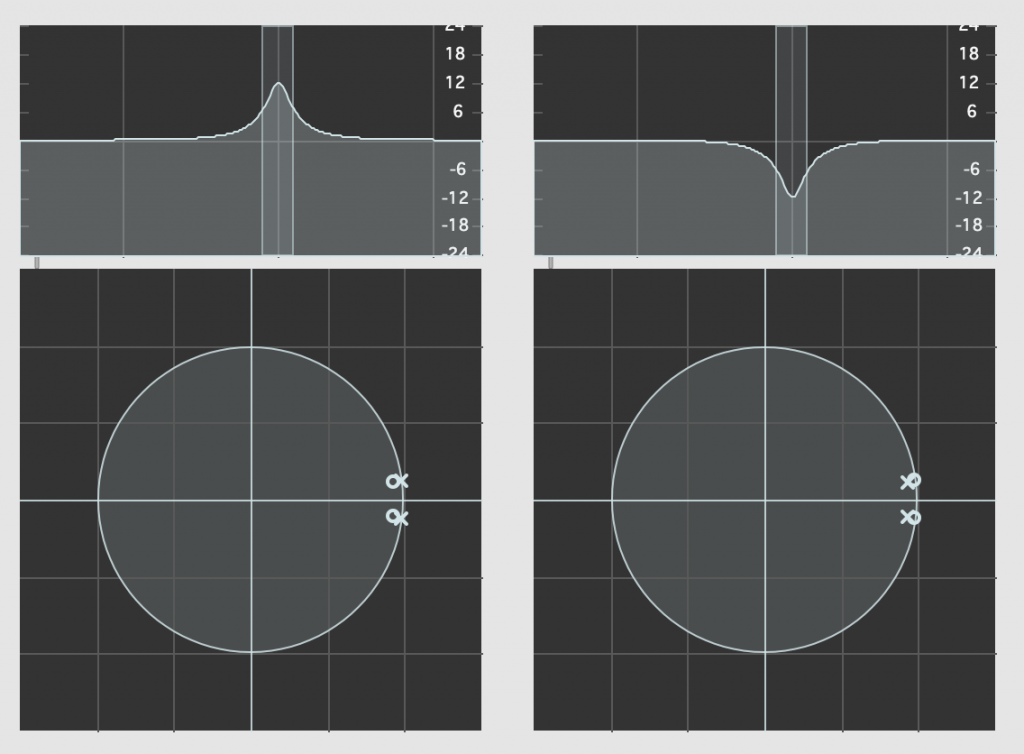
Admittedly, the resolution of the display in the software that I’m using to show this isn’t great, but if you compare the Z-Plane plots on the left and right, you can see that the zeros (marked with ‘o’) and the poles (‘x’) swap places. Just to make things a little clearer, I moved the centre frequency to 10 kHz and kept the gain and Q values the same. These are shown in Figure 5.

What’s the point of showing you this? The Magnitude and Phase response plots (which, combined, comprise the filters’ Frequency Responses) are ‘just’ descriptions of the behaviour of the filter. They tell you what happens to a signal that goes through them.
The Z-Plane representations show you how the filters are actually implemented.
It’s like the difference between reading a description of how a cake tastes and reading the recipe.
What you can see in the Z-Plane is not only that the responses of the filters negate each other: they’re built to ensure that this is the case. The poles and zeros of one filter cancel the zeros and poles of the other, and vice versa.
There’s one other extra piece of information that you already know. The fact that the poles for any of these filters are inside the circle helps to tell us that they’re stable and therefore LTI. It also tells us something else that we’ll talk about in the next part.