Back in the “old days”, people used to take a look at a three-letter code on CD packaging that indicated the domain used for the Recording, Mastering, and Distribution media. Usually, you saw things like “DDD” (meaning “Digital, Digital, Digital”) or “ADD” (for an Analogue recording that was mastered and distributed in the Digital domain).
Nowadays, there’s plenty of discussion about “high-resolution” audio – but one of things that nobody has seemed to agree on is exactly what is “high” and what is “normal” resolution (although I, personally, would also include George Massenburg’s call for a “Vile-Resolution” classification as well).
Well, finally, important people have gotten together to agree on how high is enough to be called “high” – and how to tell consumers about it. The details can be found here: Link.
Some details from that page are below
The descriptors for the Master Quality Recording categories are as follows:
MQ-P From a PCM master source 48 kHz/20 bit or higher; (typically 96/24 or 192/24 content)
MQ-A From an analog master source
MQ-C From a CD master source (44.1 kHz/16 bit content)
MQ-D From a DSD/DSF master source (typically 2.8 or 5.6 MHz content)
Let’s start with some depressing news: You can’t trust your ears. Sorry, but none of us can.
There are lots of reasons for this, and the statement is actually far more wide-reaching than any of us would like to admit. However, in this article, we’re going to look at one small aspect of the statement, and what we might be able to do to get around the problem.
We’ll begin with a thought experiment (although, for some of you, this may be an experiment that you have actually done). Imagine that you go into the quietest room that you’ve ever been in, and you are given a button to press and a pair of headphones to put on. Then you sit and wait for a while until you calm down and your ears settle in to the silence… While that’s happening you read the instructions of the task with which you are presented:
Whenever you hear a tone in the headphones in either one of your ears, please press the button.
Simple! Hear a beep, press the button. What could be more difficult to do than that?
Then, the test begins: you hear a beep in your left ear and you press the button. You hear another, quieter beep and you press the button again. You hear an even quieter beep and you press the button. You hear nothing, and you don’t press the button. You hear a beep and you press the button. Then you hear a beep at a lower frequency and so on and so on. This goes on and on at different levels, at different frequencies, in your two ears, until someone comes in the room and says “thank you, that will be all”.
While this test seems like it would be pretty easy to do, it’s a little unnerving. This is because the room that you’re sitting in is so quiet and the beeps are also so quiet that, sometimes you think you hear a beep – but you’re not sure, because things like the sound of your heartbeat, and your breathing, and the “swooshing” of blood in your body, and that faint ringing in your ears, and the noise you made by shifting in your chair are all, relatively speaking VERY loud compared to the beeps that you’re trying to detect.
Anyways, when you’re done, you’ll might be presented with a graph that shows something called your “threshold of hearing”. This is a map of how loud a particular frequency has to be in order for you to hear it. The first thing that you’ll notice is that you are less sensitive to some frequencies than others. Specifically, a very low frequency or a very high frequency has to be much louder for you to hear it than if you’re listening to a mid-range frequency. (There are evolutionary reasons for this that we’ll discuss at the end.) Take a look at the bottom curve on Figure 1, below:
Fig 1: The threshold of hearing (bottom curve) and the Equal Loudness contours for 70 phons (red curve) and 90 phons (top curve) according to ISO226.
The bottom curve on this plot shows a typical result for a threshold of hearing test for a person with average hearing and no serious impairments or temporary issues (like wax build-up in the ear canal). What you can see there is that, for a 1 kHz tone, your threshold of hearing is 0 dB SPL (in fact, this is how 0 dB SPL is defined…) As you go lower in frequency from there, you will have to turn up the actual signal level just in order for you to hear it. So, for example, you would need to have approximately 60 dB SPL at 30 Hz in order to be able to detect that something is coming out of your headphones or loudspeakers. Similarly, you would need something like 10 dB SPL at 10 kHz in order to hear it. However, at 3.5 kHz, you can hear tones that are quieter than 0 dB SPL! It stands to reason, then, that a 30 Hz tone at 60 dB SPL and a 1 kHz tone at 0 dB SPL and a 3.5 kHz tone at about -10 dB SPL and a 10 kHz tone at about 10 dB SPL would all appear to have the same loudness level (since they are all just audible).
Let’s now re-do the test, but we’ll change the instructions slightly. I’ll give you a volume knob instead of a button and I’ll play two tones at different frequencies. The volume knob only changes the level of one of the two tones, and your task is to make the two tones the same apparent level. If you do this over and over for different frequencies, and you plot the results, you might wind up with something like the red or the top curves in Fig 1. These are called “Equal Loudness Contours” (some people call them “Fletcher-Munson Curves because the first two researchers to talk about them were Fletcher and Munson) because they show how loud different frequencies have to be in order for you to think that they have the same loudness. So, (looking at the red curve) a 40 Hz tone at 100 dB SPL sounds like it’s the same loudness as a 1 kHz tone at 70 dB SPL or a 7.5 kHz tone at 80 dB SPL. The loudness level that you think you’re hearing is measured in “phons” – and the phon value of the curve is its value in dB SPL at 1 kHz. For example, the red curve crosses the 1 kHz line at 70 dB SPL, so it’s the “70 phon” curve. Any tone that has an actual level in dB SPL that corresponds to a point on that red line will have an apparent loudness of 70 phons. The top curve is for the 90 phons.
Figure 2 shows the Equal Loudness Contours from 0 phons (the Threshold of Hearing) to 90 phons in steps of 10 phons.
Fig 2: The Equal Loudness contours for 0 phons (bottom curve) to 90 phons (top curve) in 10 phon increments, according to ISO226.
There are two important things to notice about these curves. The first is that they are not “flat”. In other words, your ears do not have a flat frequency response. In fact, if you were measured the same way we measure microphones or loudspeakers, you’d have a frequency response specification that looked something like “20 Hz – 15 kHz ±30 dB” or so… This isn’t something to worry about, because we all have the same problem. So, this means that the orchestra conductor asked the bass section to play louder because he’s bad at hearing low frequencies, and the recording engineer balancing the recording adjusted the bass-to-midrange-to-treble relative levels using his bad hearing, and, assuming that the recording system and your playback system are reasonably flat-ish, then hopefully, your hearing is identically bad to the conductor and recording engineer, so you hear what they want you to.
However, I said that there are two things to notice – that was just the first thing. The second thing is that the curves are different at different levels. For example, if you look at the 0 phon curve (the bottom one) you’ll see that it raises a lot more in the low frequency region than, say, the 90 phon curve (the top one) relative to their mid-range values. This means that, the quieter the signal, the worse your ability to hear bass (and treble). For example, let’s take the curves and assume that the 70 phon line is our reference – so we’ll make that one flat, and adjust all of the others accordingly and plot them so we can see their difference. That’s shown in Figure 3.
Fig 3: The Equal Loudness contours for 0 phons (bottom curve) to 90 phons (top curve) in 10 phon increments, according to ISO226. These have all been normalised to the 70 phon curve and subsequently inverted.
What does Figure 3 show us, exactly? Well, one way to think of it is to go back to our “recording engineer vs. you” example. Let’s say that the recording engineer that did the recording set the volume knob in the recording studio so that (s)he was hearing the orchestra with a loudness at the 70 phon line. On other words, if the orchestra was playing a 1 kHz sine tone, then the level of the signal was 70 dB SPL at the listening position – and all other frequencies were balanced by the conductor and the engineer to appear to sound the same level as that. Then you take the recording home and set the volume so that you’re hearing things at the 30 phon level (because you’re having a dinner party and you want to hear the conversation more than you want to hear Beethoven or Justin Bieber, depending on your taste or lack thereof). Look at the curve that intersects the -40 dB line at 1 kHz (the 4th one from the bottom) in Figure 3. This shows you your sensitivity difference relative to the recording engineer’s in this example. The curve slopes downwards – meaning that you can’t hear bass as well – so, your recording playing in the background will appear to have a lot less bass and a little less treble than what the recording engineer heard – just because you turned down the volume. (Of course, this may be a good thing, since you’re having dinner and you probably don’t want to be distracted from the conversation by thumpy bass and sparkly high frequencies.)
Part 2: Compensation
In order to counter-act this “misbehaviour” in your hearing, we have to change the balance of the frequency bands in the opposite direction to what your ears are doing. So if we just take the curves in Figure 3 and flip each of them upside down, you have a “perfect” correction curve showing that, when you turn down the volume by, say 40 dB (hint: look at the value at 1 kHz) then you’ll need to turn up the low end by lots to compensate and make the overall balance sound the same.
Fig 4: The Equal Loudness contours for 0 phons (bottom curve) to 90 phons (top curve) in 10 phon increments, according to ISO226. These have all been normalised to the 70 phon curve.
Of course, these curves shown in Figure 4 are normalised to one specific curve – in this case, the 70 phon curve. So, if your recording engineer was monitoring at another level (say, 80 phons) then your “perfect” correction curves will be wrong.
And, since there’s no telling (at least with music recordings) what level the recording and mastering engineers used to make the recording that you’re listening to right now (or the one you’ll hear after this one), then there’s no way of predicting what curve you should use to do the correction for your volume setting.
All we can really say is that, generally, if you turn down the volume, you’ll have to turn up the bass and treble to compensate. The more you turn down the volume, the more you’ll have to compensate. However, the EXACT amount by which you should compensate is unknown, since you don’t know anything about the playback (or monitoring) levels when the recording was done. (This isn’t the same for movies, since re-recording engineers are supposed to work at a fixed monitoring level which should be the same as all the cinemas in the world… in theory…)
This compensation is called “loudness” – although in some cases it would be better termed “auto-loudness”. In the old days, a “loudness” switch was one that, when engaged, increased the bass and treble levels for quiet listening. (Of course, what most people did was hit the “loudness”switch and left it on forever.) Nowadays, however, this is usually automatically applied and has different amounts of boost for different volume settings (hence the “auto-” in “auto-loudness”). For example, if you look at Figure 5 you’ll see the various amounts of boost applied to the signal at different volume settings of the BeoPlay V1 / BeoVision 11 / BeoSystem 4 / BeoVision Avant when the default settings have not been changed. The lower the volume setting, the higher the boost.
Fig 5: The equalisation applied by the “Loudness” function at different volume settings in the BeoPlay V1, BeoVision 11, BeoSystem 3 and BeoVision Avant. Note that these are the default settings and are customisable by the user.
Of course, in a perfect world, the system would know exactly what the monitoring levels was when they did the recording, and the auto-loudness equalisation would change dynamically from recording to recording. However, until there is meta-data included in the recording itself that can tell the system information like that, then there will be no way of knowing how much to add (or subtract).
Historical Note
I mentioned above that the extra sensitivity we have in the 3 kHz region is there due to evolution. In fact, it’s a natural boost applied to the signal hitting your eardrum as a result of the resonance of the ear canal. We have this boost (I guess, more accurately, we have this ear canal) because, if you snap a twig or step on some dry leaves, the noise that you hear is roughly in that frequency region. So, once-upon-a-time, when our ancestors were something else’s lunch, the ones with the ear canals and the resulting mid-frequency boost were more sensitive to the noise of a sabre-toothed tiger trying to sneak up behind them, stepping on a leaf, and had a little extra head start when they were running away. (It’s like the T-shirt that you can buy when you’re visiting Banff, Alberta says: “I don’t need to run faster than the bear. I just need to run faster than you.”)
As an interesting side note to this: the end result of this is that our language has evolved to use this sensitive area. The consonants in our speech – the “s” and”t” sounds, for example, sit right in that sensitive region to make ourselves easiest to understand.
Warning note
You might come across some youtube video or a downloadable file that let’s you “check your hearing” using a swept sine wave. Don’t bother wasting your time with this. Unless the headphones that you’re using (and everything else in the playback chain) are VERY carefully calibrated, then you can’t trust anything about such a demonstration. So don’t bother.
Warning note #2 – Post script…
I just saw on another website here that someone named John Duncan made the following comment about what I wrote in this article. “Having read it a couple of times now, tbh it feels like it is saying something important, I’m just not quite sure what. Is it that a reference volume is the most important thing in assessing hifi?” The answer to this is “Exactly!” If you compare two sound systems (say, two different loudspeakers, or two different DAC’s or two different amplifiers and so on… The moral of the stuff I talk about above is that, not only in such a comparison do you have to make sure that you only change one thing in the system (for example, don’t compare two DAC’s using a different pair of loudspeakers connected to each one) you absolutely must ensure that the two things you’re comparing are EXACTLY the same listening level. A different of 1 dB will have an effect on your “frequency response” and make the two things sound like they have different timbral balances – even when they don’t.
For example, when I’m tuning a new loudspeaker at work, I always work at the same fixed listening level. (for me, this is two channels of -20 dB FS full-band uncorrelated pink noise produces 70 dB SPL, C-weighted at the listening position). Before I start tuning, I set the level to match this so that I don’t get deceived by my own ears. If I tuned loudspeakers quieter than this, I would push up the bass to compensate. If I tuned louder, then I would reduce the bass. This gives me some consistency in my work. Of course, I check to see how the loudspeakers sound at other listening levels, but, when I’m tuning, it’s always at the same level.
I’ve been collecting some so-called “high-resolution” audio files over the past year or two (not including my good ol’ SACD’s and DVD-Audio’s that I bought back around the turn of the century… Or my old 1/4″, half-track, 30 ips tapes that I have left over from the past century. (Please do not add a comment at the bottom about vinyl… I’m not in the mood for a fight today.) Now, let’s get things straight at the outset. “High Resolution” means many things to many people. Some people say that it means “sampling rates above 44.1 kHz”. Other people say that it means “sampling rates at 88.2 kHz or higher”. Some people will say that it means 24 bits instead of 16, and sampling rate arguments are for weenies. Other people say that if it’s more than one bit, it ain’t worth playing. And so on and so on. For the purposes of this posting, let’s say that “high resolution” is a blanket marketing term that is used by people these days when they’re selling an audio file that you can download that is has a bit rate that is higher than 44.1 kHz / 16 bits or 1378.125 kbps. (You can calculate this yourself as follows: 44100 samples per second * 16 bits per sample * 2 channels / 1024 bits in a kilobit = 1378.125) I’ll also go on record (ha ha…) as saying that I would rather listen to a good recording of a good tune played by good musicians recorded at 44.1 kHz / 16 bit (or even worse!) than a bad recording (whatever that means) of a boring tune performed poorly by musicians that are encumbered neither by talent nor the interest to rehearse (or any recording that used an auto-tuner). All of that being said, I will also say that I am skeptical when someone says that something is something when they could get away with it being nothing. So, I like to check once-and-a-while to see if I’m getting what I was sold. So, I thought I might take some of my legally-acquired LPCM “high-resolution audio” files and do a quick analysis of their spectral content, just to see what’s there. In order to do this, I wrote a little MATLAB script that
loads one channel of my audio file
takes a block of 2^18 samples multiplied by a Blackman-Harris function and does an 2^18-point FFT on it
moves ahead 2^18 samples and repeats the previous step over and over until it gets to the end of the recording (no overlapping… but this isn’t really important for what I’m doing here…)
looks through all of the FFT results and take the maximum value of all FFT results for each FFT bin (think of it as a peak monitor with an infinite hold function on each frequency bin)
I plot the final result
So, the graphs below are the result of that process for some different tunes that I selected from my collection.
Track #1
Track 1 (an 88.2/24 file) is plotted first. Not much to tell here. You can see that, starting at about 1 kHz or so, the amplitude of the signals starts falling off. This is not surprising. If it did not do that, then we would use white noise instead of pink noise to give us a rough representation of the spectrum of music. You may notice that the levels seem quite low – the maximum level on the plot being about -40 dB FS but keep in mind that this is (partly) because, at no point in the tune, was there a sine wave that had a higher level than that. It does not mean that the peak level in the tune was -40 dB FS.
Track 1: Full spectrum
The second plot of the same tune just shows the details in the top 2 octaves of the recording. Since this is a 88.2 kHz file, then this means we’re looking at the spectrum from 11025 Hz to 44100 Hz. I’ve plotted this spectrum on a linear frequency scale so that it’s easier to see some of the details in the top end. This isn’t so important for this tune, but it will come in handy below…
Track 1: Top 2 octaves
Track #2
The full-bandwidth plot for Track #2 (another 94/24 file) is shown below.
Track 2: Full bandwidth
This one is interesting if you take a look up at the very high end of the plot – shown in detail in the figure below.
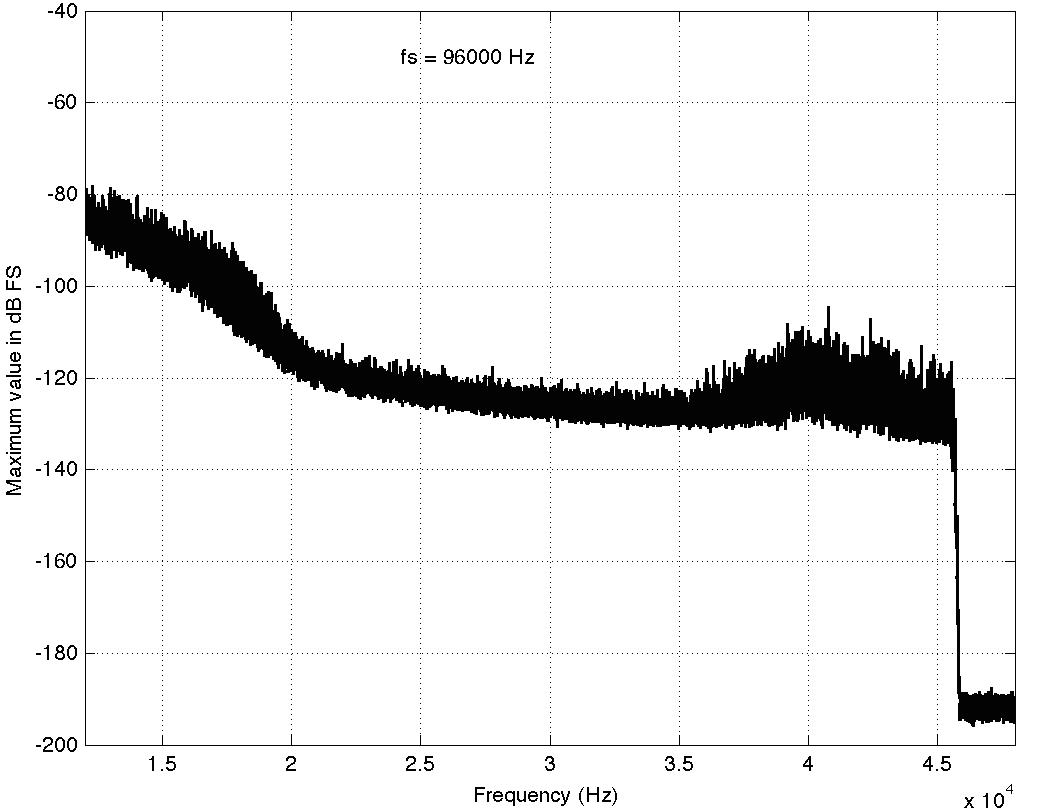
Track 2: Top 2 octaves
Here, you can see a couple of things. Firstly, you can see that there is a rise in the noise from about 35 kHz up to about 45 kHz. This is possibly (maybe even probably) the result of some kind of noise shaping applied to the signal, which is not necessarily a bad thing, unless you have equipment that has intermodulation distortion issues in the high end that would cause energy around that region to fold back down. However, since that stuff is at least 80 dB below maximum, I certainly won’t lose any sleep over it. Secondly, you can see that there is a very steep low pass filter (probably an anti-aliasing filter) that causes the signal to drop off above about 45 kHz. Note that the boost in the energy just before the steep roll-off might be the result of a peak in the low pass filter’s response – but I doubt it. It’s more a “maybe” than a “probably”. You may also have some questions about why the noise floor above about 46 kHz seems to flatten out at about -190 dB FS. This is probably not due to content in the recording itself. This is likely “spectral leakage” from the windowing that comes along with making an FFT. I’ll talk a little about this at the end of this article.
Track #3
The third track on my hit list (another 94/24 file) is interesting…
Track 3: Full bandwidth
Take a look at the spike there around 20 kHz… What the heck are they doing there!? Let’s take a look at the zoom (shown below) to see if it makes more sense.
Track 3: Top 2 octaves
Okay, so zooming in more didn’t help – all we know is that there is something in this recording that is singing along at about 20 kHz at least for part of the recording (remember I’m plotting the highest value found for each FFT bin…). If you’re wondering what it might be, I asked a bunch of smart friends, and the best explanation we can come up with is that it’s noise from a switched-mode power supply that is somehow bleeding into the recording. HOW it’s bleeding into the recording is a potentially interesting question for recording engineers. One possibility is that one of the musicians was charging up a phone in the room where the microphones were – and the mic’s just picked up the noise. Another possibility is that the power supply noise is bleeding electrically into the recording chain – maybe it’s a computer power supply or the sound card and the manufacturer hasn’t thought about isolating this high frequency noise from the audio path. Or, maybe it’s something else.
Track #4
This last track is also sold as a 48 kHz, 24 bit recording. The total spectrum is shown below.
Track 4: Full bandwidth
This one is particularly interesting if we zoom in on the top end…
Track 4: Top 2 octaves
This one has an interesting change in slope as we near the top end. As you go up, you can see the knee of a low-pass filter around 20 kHz, and a second on around 23 kHz. This could be explained a couple of different ways, but one possible explanation is that it was originally a 44.1 kHz recording that was sample-rate converted to 48 kHz and sold as a higher-resolution file. The lower low-pass could be the anti-aliasing filter of the original 44.1 kHz recording. When the tune was converted to 48 kHz (assuming that it was…) there was some error (either noise or distortion) generated by the conversion process. This also had to be low-pass filtered by a second anti-aliasing filter for the new sampling rate. Of course, that’s just a guess – it might be the result of something totally different.
So what?
So what did I learn? Well, as you can see in the four examples above, just because a track is sold under the banner of “high-resolution”, it doesn’t necessarily mean that it’s better than a “normal resolution”recording. This could be because the higher resolution doesn’t actually give you more content or because it gives you content that you don’t necessarily want. Then again, it might mean that you get a nice, clean, recording that has the resolution you paid for, as in the first track. It seems that there is a bit of a gamble involved here, unfortunately. I guess that the phrase “don’t judge a book by its cover” could be updated to be “don’t judge a recording by its resolution” but it doesn’t really roll off the tongue quite so nicely, does it?
P.S.
Please do not bother asking what these four tracks are or where I bought them. I’m not telling. I’m not doing any of this to “out” anyone – I’m just saying “buyer beware”.
P.P.S
Please do not use this article as proof that high resolution recordings are a load of hooey that aren’t worth the money. That’s not what I’m trying to prove here. I’m just trying to prove that things are not always as they are advertised – but sometimes they are. Whether or not high res audio files are worth the money when they ARE the real McCoy is up to you.
Appendix
I mentioned some things above about “spectral leakage” and FFT windowing and a Blackman Harris function. Let’s do a quick run-through of what this stuff means without getting into too many details. When you do an FFT (a Fast Fourier Transform – but more correctly called a DFT or Discrete Fourier Transform in our case – but now I’m getting picky), you’re doing some math to convert a signal (like an audio recording) in the time domain into the frequency domain. For example, in the time domain, a sine wave will look like a wave, since it goes up and down in time. In the frequency domain, a sine wave will look like a single spike, because it contains only one frequency and no others. So, in a perfect world, an FFT would tell us what frequencies are contained in an audio recording. Luckily, it actually does this pretty well, but it has limitations. An FFT applied to an audio signal has a fixed number of outputs, each one corresponding to a certain frequency. The longer the FFT that you do, the more resolution you have on the frequencies (in other words, the “frequency bins” or “frequency centres” are closer together). If the signal that you were analysing only contained frequencies that were exactly the same as the frequency bins that the FFT was reporting on, then it would tell you exactly what was in the signal – limited only by the resolution of your calculator. However, if the signal contains frequencies that are different from the FFT’s frequency bins, then the energy in the signal “leaks” into the adjacent bins. This makes it look like there is a signal with a different frequency than actually exists – but it’s just a side effect of the FFT process – it’s not really there. The amount that the energy leaks into other frequency bins can be minimised by shaping the audio signal in time with a “windowing function”. There are many of these functions with different names and equations. I happened to use the Blackman Harris function because it gives a good rejection of spectral artefacts that are far from the frequency centre, and because it produces relatively similar artefact levels regardless of whether your signal is on or off the frequency bin of the FFT. For more info on this, read this.
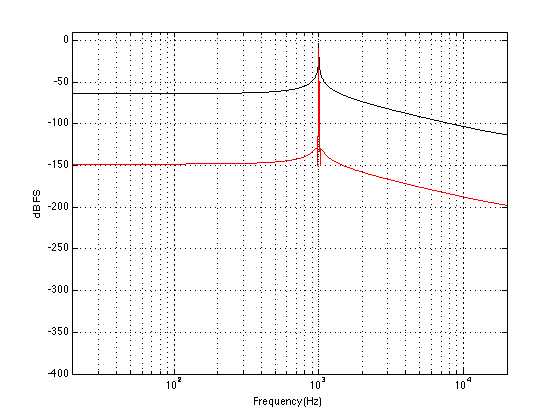
Spectral leakage of Blackman-Harris windowing function. 1000 Hz at 0 dB FS, Fs=2^16, FFT Window length = 2^16 samples. The black plot shows the magnitude response calculated using an FFT and a rectangular windowing function. The red curve is with a Blackman Harris function. Note that the spectral leakage caused by the Blackman Harris function “bleeds” energy into all other bins, resulting in apparently much higher values than in the case of the rectangular windowing function.
This is a detail showing the peak of the response of for the 1000 Hz tone analysis. Note that the apparent level of the tone windowed using the Blackman Harris function is about 9 dB lower than when it’s windowed with a rectangular function.
Spectral leakage of Blackman-Harris windowing function. 1000.5 Hz at 0 dB FS, Fs=2^16, FFT Window length = 2^16 samples. The black plot shows the magnitude response calculated using an FFT and a rectangular windowing function. The red curve is with a Blackman Harris function. Now, since the frequency of the signal does not fall exactly on an FFT bin, the Blackman Harris – windowed signal appears “cleaner” than the one windowed using a rectangular function.
This is a detail showing the peak of the response of for the 1000.5 Hz tone analysis.
This week, instead of talking about what is inside the loudspeakers, let’s talk about what I listen for when sound is coming out of them. Specifically, let’s talk about one spatial aspect of the mix – where instruments and voices are located in two-dimensional space. (This will be a short posting this week, because it includes homework…)
Step 1: Go out and buy a copy of Jennifer Warnes’s album called “Famous Blue Raincoat: The Songs of Leonard Cohen” and play track 2 – “Bird on a Wire”.
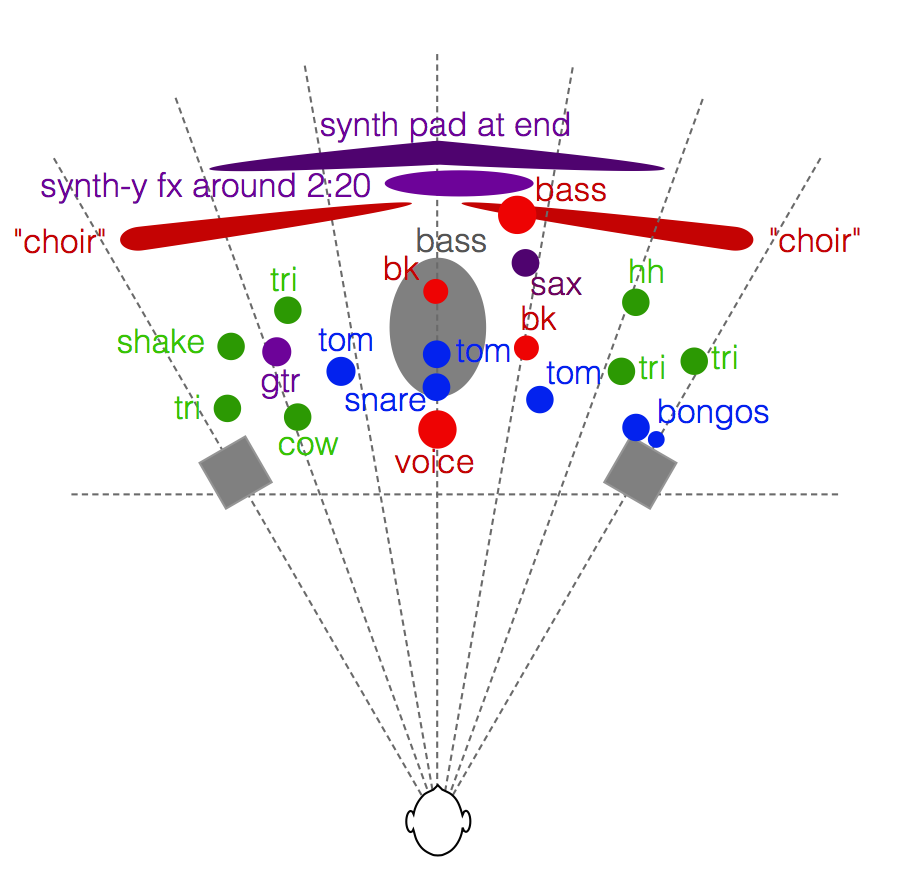
Step 2: Close your eyes and really concentrate on where the various voices and instruments are located in space relative to your loudspeakers. If you hear what I hear, you’ll hear something like what I’ve tried to represent on the map shown in the figure below.
A map of the locations of many of the instruments in Jennifer Warnes’s recording of “Bird on a Wire”.
I’ve used some colour coding, just to help keep things straight:
Voices are in Red
Drums are in blue
Metallic instruments (including cymbals) are in green
Bass is gray
Synth and Saxophone are in purple
Note that Jennifer sings her own backup vocals, so the “voice”, and the two “bk” (for backup – not Burger King) positions are all her. It also sounds like she’s singing in the “choir” on the left – but it’s hard for me to hear exactly where she is.
Whenever I’m listening to a pair of loudspeakers (or a car audio system, or the behaviour of an upmix algorithm) to determine the spatial properties, I use this map (which I normally keep in my head – not on paper…) to determine how things are behaving. The two big questions I’m trying to answer when considering a map like this revolve around the loudspeakers’ ability to deliver the (1) accuracy and (2) the precision I’m looking for. (Although many marketing claims will use these words interchangeably, they do not mean the same thing.)
The question of accuracy is one of whether the instruments are located in the correct places, both in terms of left and right, but also in terms of distance. For example, the tune starts with a hit on the centre tom-tom, followed immediately by the bigger tom-tom on the left of the mix. If I have to point at that second, deeper-pitched tom-tom – which direction am I pointing in? Is it far enough left-of-centre, but not hard over in the left loudspeaker? (This will be determined by how well the loudspeakers’ signals are matched at the listening position, as well as the location of the listening position.) Secondly, how far away does it sound, relative to other sound sources in the mix? (This will be influenced primarily by the mix itself.) Finally, how far away does it sound from the listening position in the room? (This will be influenced not only by the mix, but by the directivity of the loudspeakers and the strength of sidewall reflections in the listening room. I talked about that in another blog posting once-upon-a-time.)
The question of precision can be thought of as a question of the size of the image. Is it a pin-point in space (both left/right and in distance)? Or is a cloud – a fuzzy location with indistinct edges? Typically, this characteristic is determined by the mix (for example, whether the panning was done using amplitude or delay differences between the two audio channels), but also by the loudspeaker matching across the frequency range and their directivity. For example, one of the experiments that we did here at B&O some years ago showed that a difference as small as 3 degrees in the phase response matching of a pair of loudspeakers could cause a centrally-located phantom image to lose precision and start to become fuzzy.
Some things I’ve left out of this map:
The locations of the individual voices in the “choir”
Extra cowbells at around 2:20
L/R panned cabasa (or shaker?) at about 2:59
Reveberation
Some additional notes:
The triangles on the right side happen around 2:12 in the tune. The ones on the left come in much earlier in the track.
The “synth-y fx around 2:20” might be a guitar with a weird modulation on it. I don’t want to get into an argument about exactly what instrument this is.
I’ve only identified the location of the bass in the choir. There are other singers, of course…
You might note that I used the term “two-dimensional space” in the beginning of this posting. In my head, the two dimensions are (1) angle to the source and (2) distance to the source. I don’t think in X-Y cartesian terms, but Polar terms.
An important thing to mention before I wrap up is that this aspect of a loudspeaker’s performance (accuracy and precision of phantom imaging) is only one quality of many. Of course, if you’re not sitting in the sweet spot, none of this can be heard, so it doesn’t matter. Also, if your loudspeakers are not positioned “correctly” (±30 degrees of centre and equidistant from the listening position) then none of this can be heard, so it doesn’t matter. And so on and so on. The point I’m trying to make here is that phantom image representation is only one of the many things to listen for, not only in a recording but also when evaluating loudspeakers.
If you’re needing to check the channel allocation of a multichannel audio file player, this file (multichannel_wav_channel_id_5_1 – remember, right-click to download…) might come in handy.
It’s a three-second long, 6-channel .wav file, 44.1 kHz, 16 bit, with the channel allocation as follows: